
Security incidents rarely begin with a dramatic attack.
Sometimes, they start with an SSL certificate that quietly expires. A domain registration is forgotten. An AWS access key remains active long after it should have been removed. A cloud storage bucket becomes publicly accessible. A pull request containing a security issue sits unnoticed for weeks.
Each individual problem may look small.
The consequences are not.
For modern engineering and security teams, manually checking these risks is difficult to scale. Infrastructure changes constantly, cloud environments grow, developers create new repositories, domains approach expiration, and security configurations can drift over time.
This is where security automation becomes valuable.
Instead of relying on someone to remember every security check, teams can build automated security workflows that continuously inspect systems, detect risks, and notify the right people before a small issue becomes a customer-facing incident.
In this article, we’ll explore 10 practical security workflows that can help engineering, DevOps, SecOps, and platform teams reduce operational risk and protect the reputation of their organization.
Why Security Automation Matters
Security teams already have enough work.
They need to investigate alerts, respond to incidents, review infrastructure, monitor vulnerabilities, manage access, and collaborate with development and operations teams.
Adding dozens of repetitive checks to that workload creates another problem: human attention becomes the bottleneck.
Automation can take care of repetitive verification tasks while engineers focus on decisions that actually require human judgment.
A good security workflow typically follows a simple pattern:
Trigger → Collect Data → Analyze → Decide → Notify → Take Action
For example:
SSL certificate approaching expiration → check certificate → calculate remaining days → determine whether it crosses the warning threshold → notify the responsible team.
The same pattern can be applied to cloud credentials, GitHub pull requests, exposed assets, domains, security headers, and many other security controls.
1. SSL Certificate Expiry Monitor
An expired SSL certificate can make a perfectly healthy website appear broken.
Visitors may receive browser security warnings, APIs can stop communicating correctly, and customers may lose confidence in the service.
The problem is that SSL certificates have expiration dates, and organizations may have hundreds of domains, subdomains, and services to manage.
How the workflow works
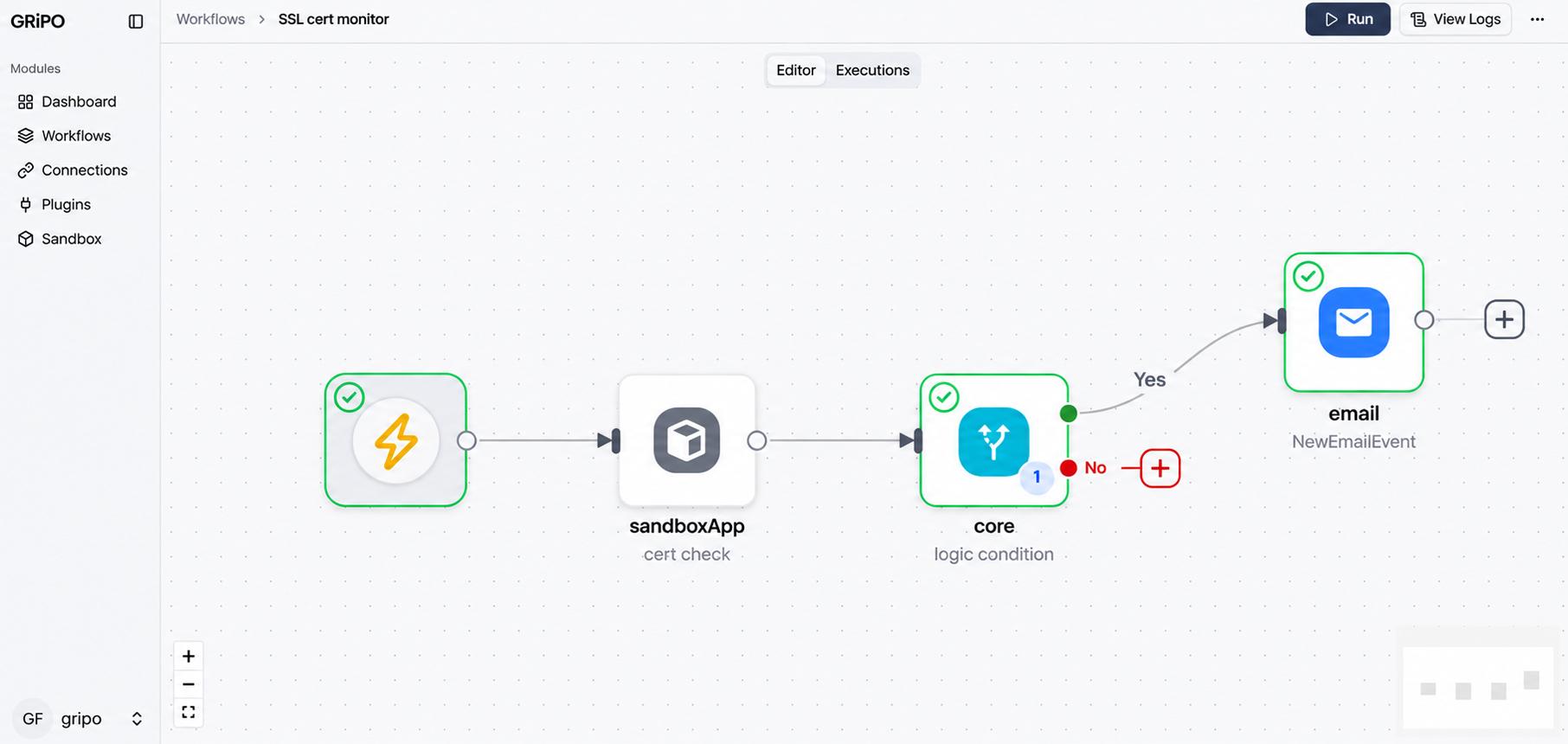
An automated SSL monitoring workflow can:
- Receive a domain or website URL.
- Connect to the server.
- Inspect the SSL/TLS certificate.
- Read the certificate expiration date.
- Calculate the remaining validity period.
- Compare it against a predefined threshold.
- Send an alert when renewal is required.
For example:
Certificate expires in 30 days or fewer → send security alert
This is much safer than discovering the problem when customers start reporting browser warnings.
Why automate it?
The objective isn’t simply to monitor certificates.
It is to make certificate expiration someone else’s problem before it becomes your customer’s problem.
WorkFlow: https://gripo.io/use-cases/workflow-tls-certificate-monitor
2. Domain & WHOIS Expiry Guardian
Your website may be running perfectly while your domain registration is approaching expiration.
That’s a dangerous situation.
Domains are often registered for one or more years, which makes their expiration dates easy to overlook especially when an organization manages domains across multiple registrars and TLDs.
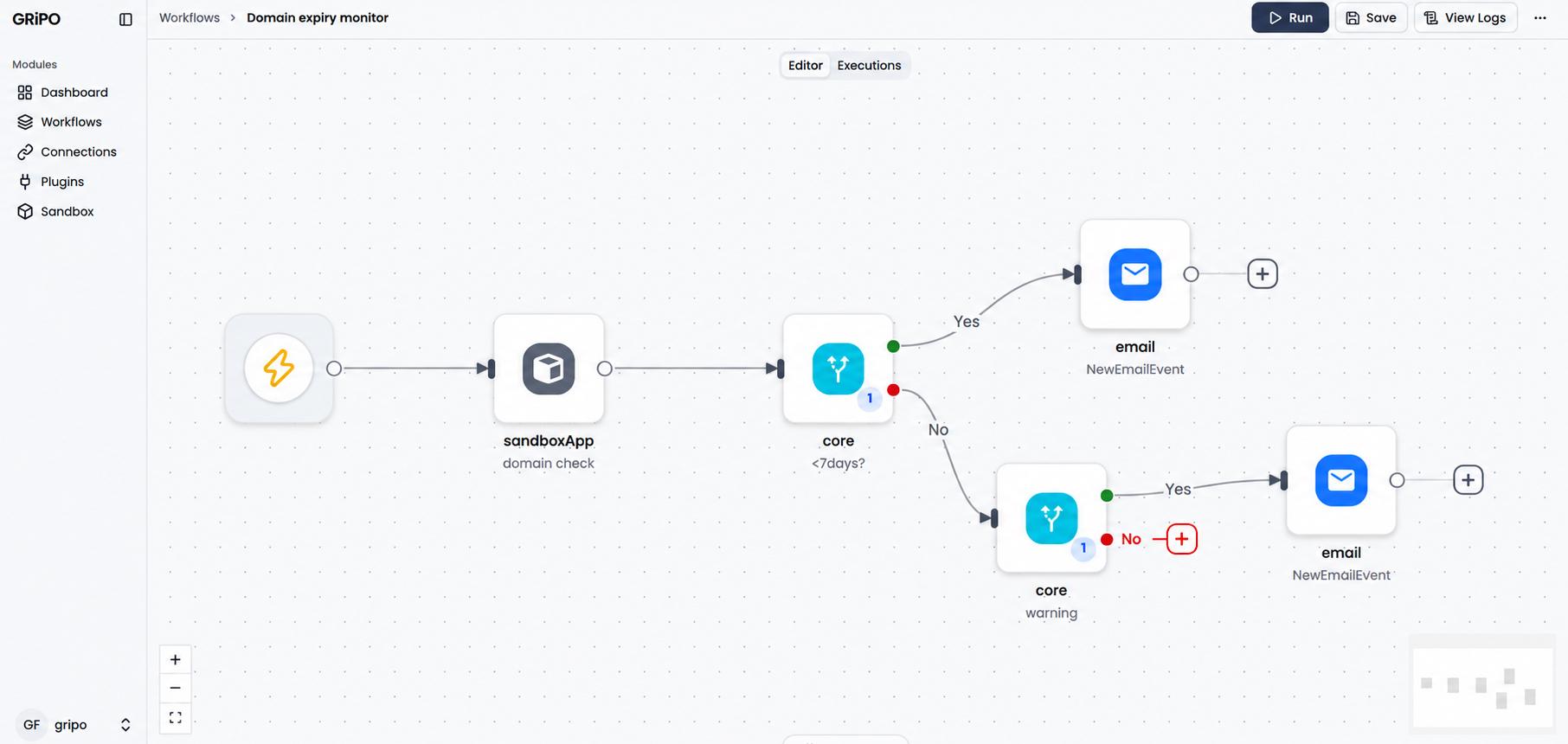
An automated domain expiry workflow can periodically check:
- Domain name
- Registration status
- Expiration date
- Registrar information
- Remaining days
- WHOIS information where available
The workflow can then notify the appropriate person when a domain reaches a warning threshold.
Example
A company owns:
- example.com
- example.net
- example.io
- example.org
- multiple regional domains
Instead of maintaining a spreadsheet and manually checking every registration, automation can continuously monitor the expiration dates.
A simple rule might be:
Domain expires within 30 days → send a warning alert
Domain expires within 7 days → send a critical renewal alert
A forgotten domain renewal can become more than a technical problem. It can affect websites, email services, authentication systems, marketing campaigns, and customer trust.
WorkFlow: https://gripo.io/use-cases/workflow-automated-domain-expiry-monitor
3. Automated PR Security Scanner GitHub
Security should not begin after code reaches production.
Pull requests provide an important opportunity to identify security issues before they become part of a deployed application.
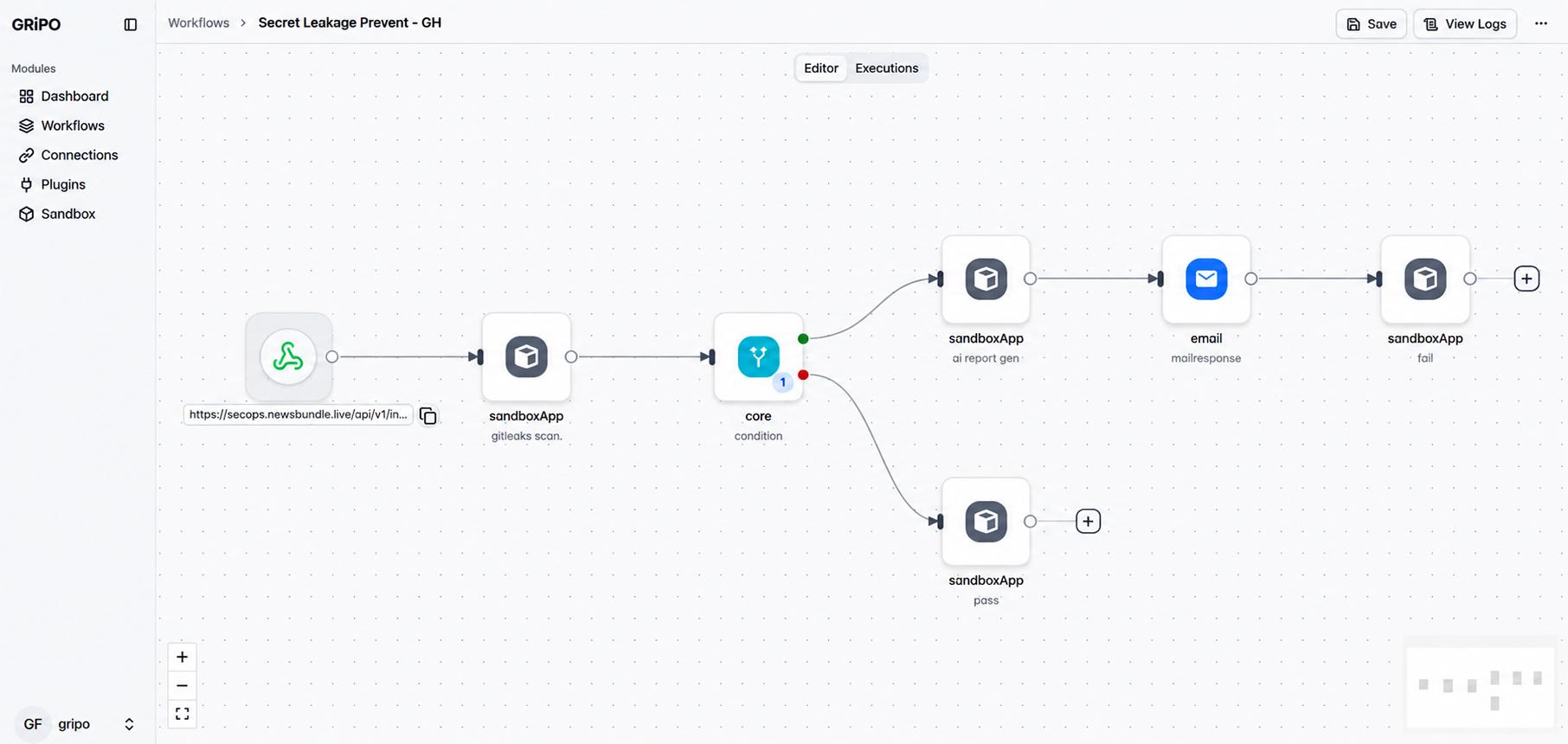
An automated PR security workflow can be triggered whenever a developer opens or updates a pull request.
The workflow can:
- Detect the pull request.
- Retrieve the relevant code or changed files.
- Run security scanning tools.
- Analyze the results.
- Identify potentially dangerous patterns.
- Report findings to the development team.
Depending on the tooling, the workflow can look for issues such as:
- Hardcoded credentials
- Vulnerable dependencies
- Dangerous configuration changes
- Insecure coding patterns
- Exposed secrets
- Suspicious permissions
The goal isn’t to replace security engineers.
It is to make security checks happen closer to the moment code changes are introduced.
WorkFlow: https://gripo.io/use-cases/automated-pr-secret-scanner
4. Internet-Exposed Asset Monitor Shodan
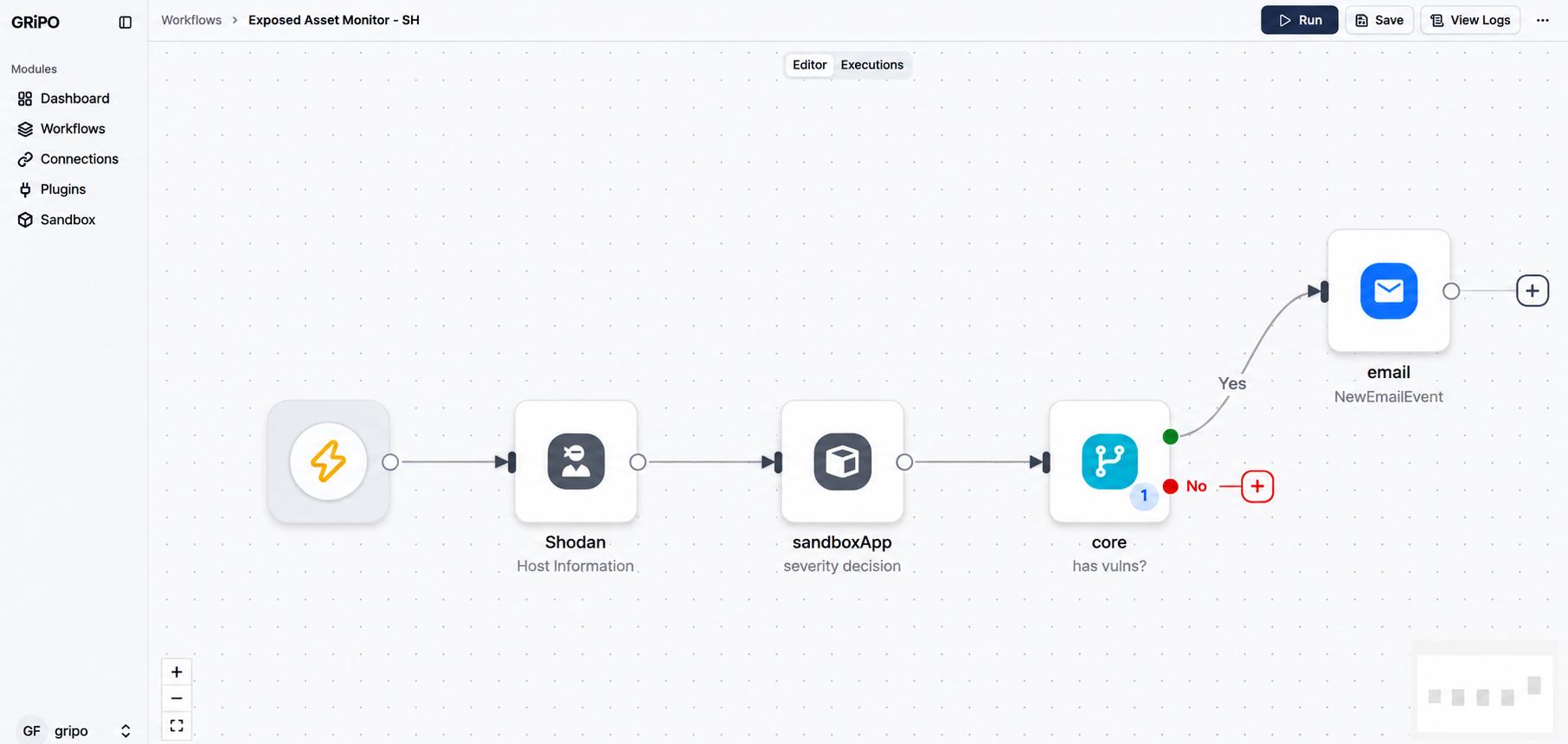
You cannot protect infrastructure you don’t know exists.
As organizations grow, new servers, services, cloud resources, ports, and applications appear on the public internet.
Some may be intentionally exposed.
Others may be exposed accidentally.
Services such as Shodan can provide visibility into internet-facing infrastructure. An automated workflow can periodically inspect relevant information and alert teams when unexpected exposure is detected.
For example:
Target IP detected → query Shodan → analyze exposed ports and vulnerabilities → evaluate security risk → alert security team
This can help security teams identify changes that may otherwise remain unnoticed.
Why this matters
An internet-exposed service isn’t automatically a vulnerability.
But an unexpected internet-exposed service deserves attention.
Automation helps turn unknown exposure into something that can be reviewed quickly.
WorkFlow: https://gripo.io/use-cases/workflow-automated-internet-exposed-asset-security-monitor
5. Security Headers Monitor
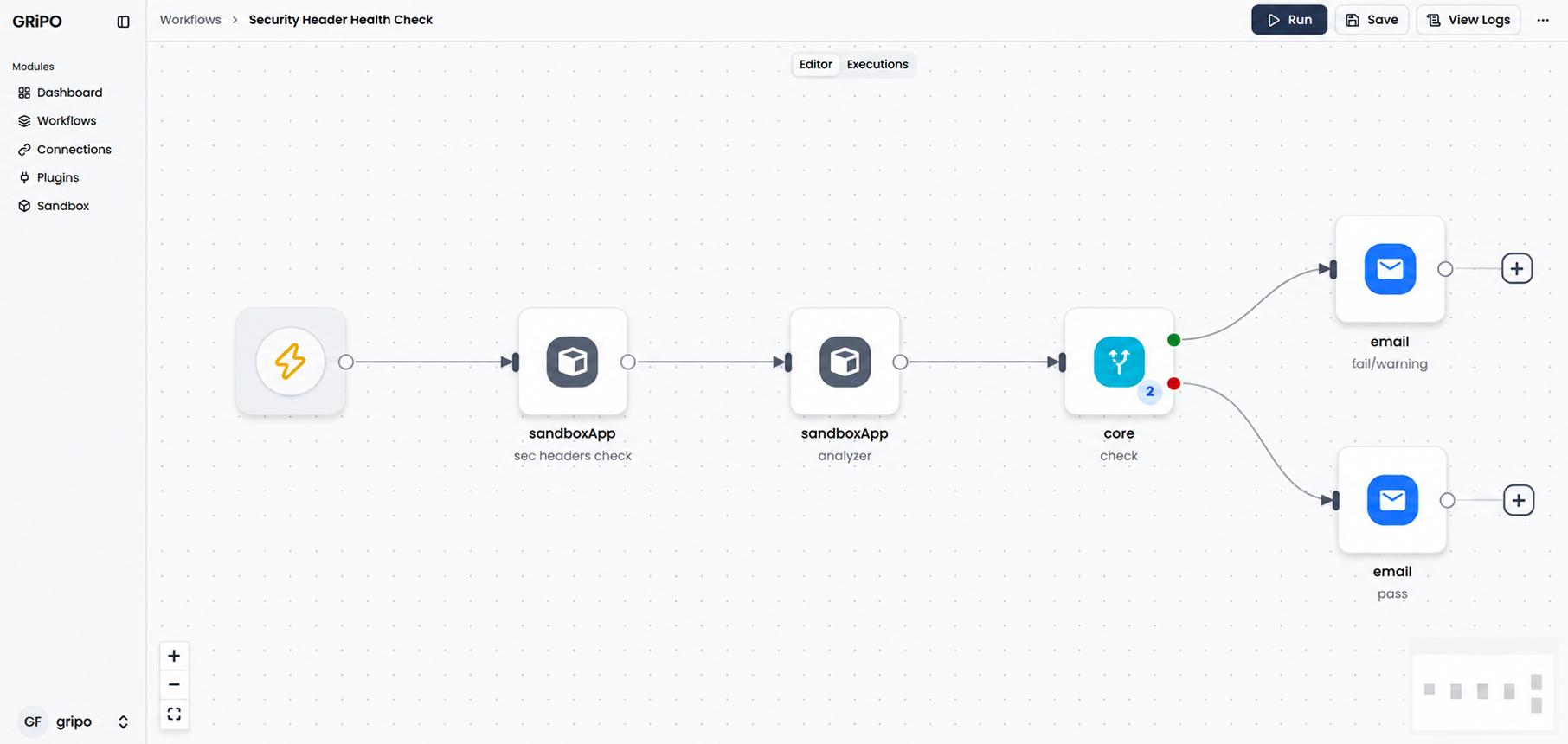
Security headers are an important part of modern web security.
Headers such as:
- Content-Security-Policy
- Strict-Transport-Security
- X-Content-Type-Options
- Referrer-Policy
- Permissions-Policy
can influence how browsers handle and protect web applications.
The challenge is that security configurations can change.
A deployment may unintentionally remove a header. A reverse proxy configuration may change. A new application may be deployed without the expected security controls.
A security headers workflow can periodically inspect a website and verify whether required headers are present and configured according to organizational requirements.
Example workflow
Website URL → HTTP request → inspect response headers → compare against policy → generate result → notify
This turns a manual security check into a repeatable control.
WorkFlow: https://gripo.io/use-cases/workflow-automated-http-security-header-scanner
6. TLS Configuration Health Check
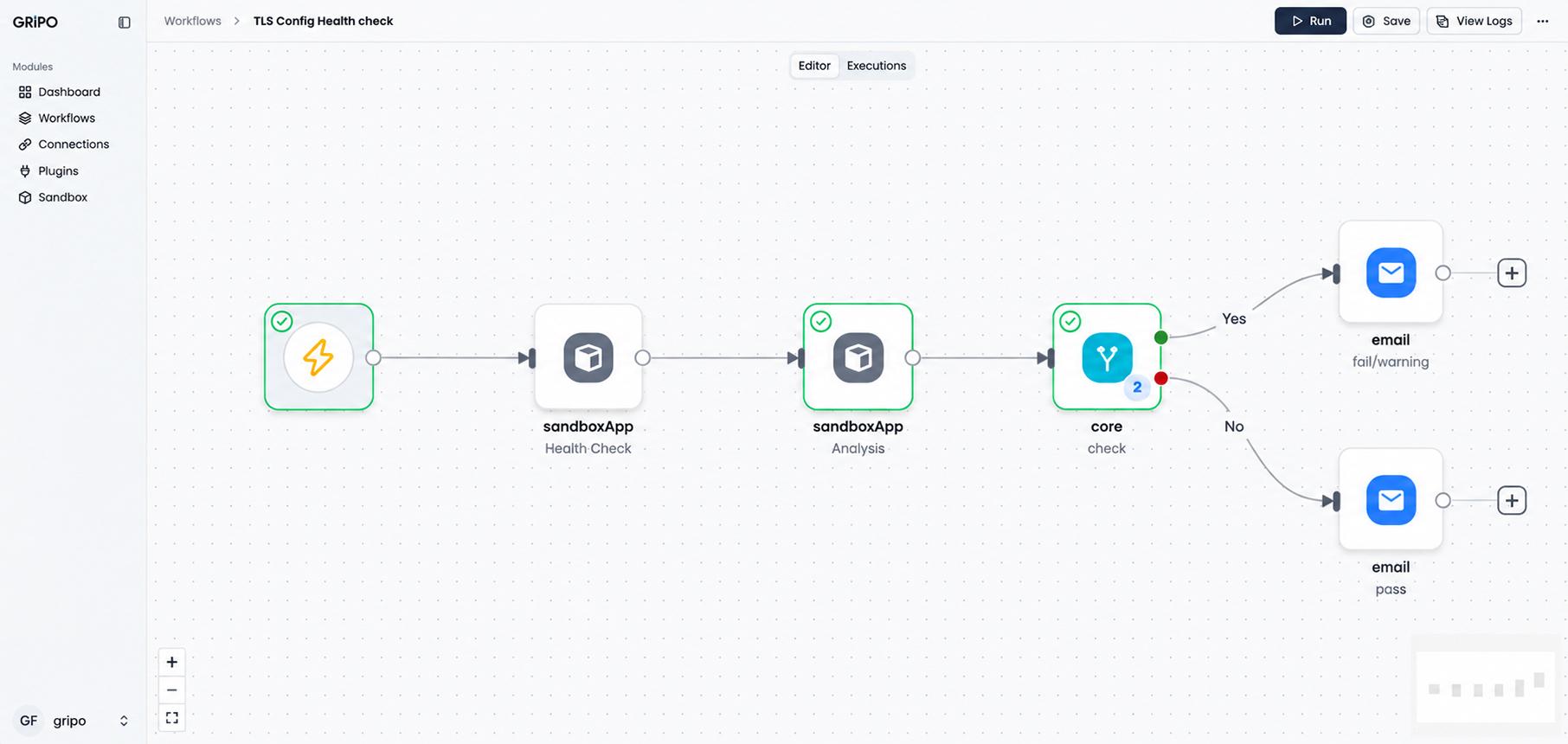
Having a valid certificate does not necessarily mean that your TLS configuration is healthy.
A service may have a valid certificate while still using outdated or undesirable cryptographic configurations.
A TLS health-check workflow can inspect a service and evaluate relevant configuration characteristics, such as:
- Certificate validity
- Supported TLS versions
- Cipher configuration
- Certificate chain
- Protocol configuration
- Expiration status
The workflow can then produce a simple result:
PASS → Configuration is secure
WARNING → Needs attention
FAIL → Immediate remediation required
This is particularly useful when organizations operate many public-facing services.
Instead of manually checking every endpoint, teams can automate periodic validation.
WorkFlow: https://gripo.io/use-cases/workflow-tls-configuration-health-check
7. Stale PR Monitor GitHub
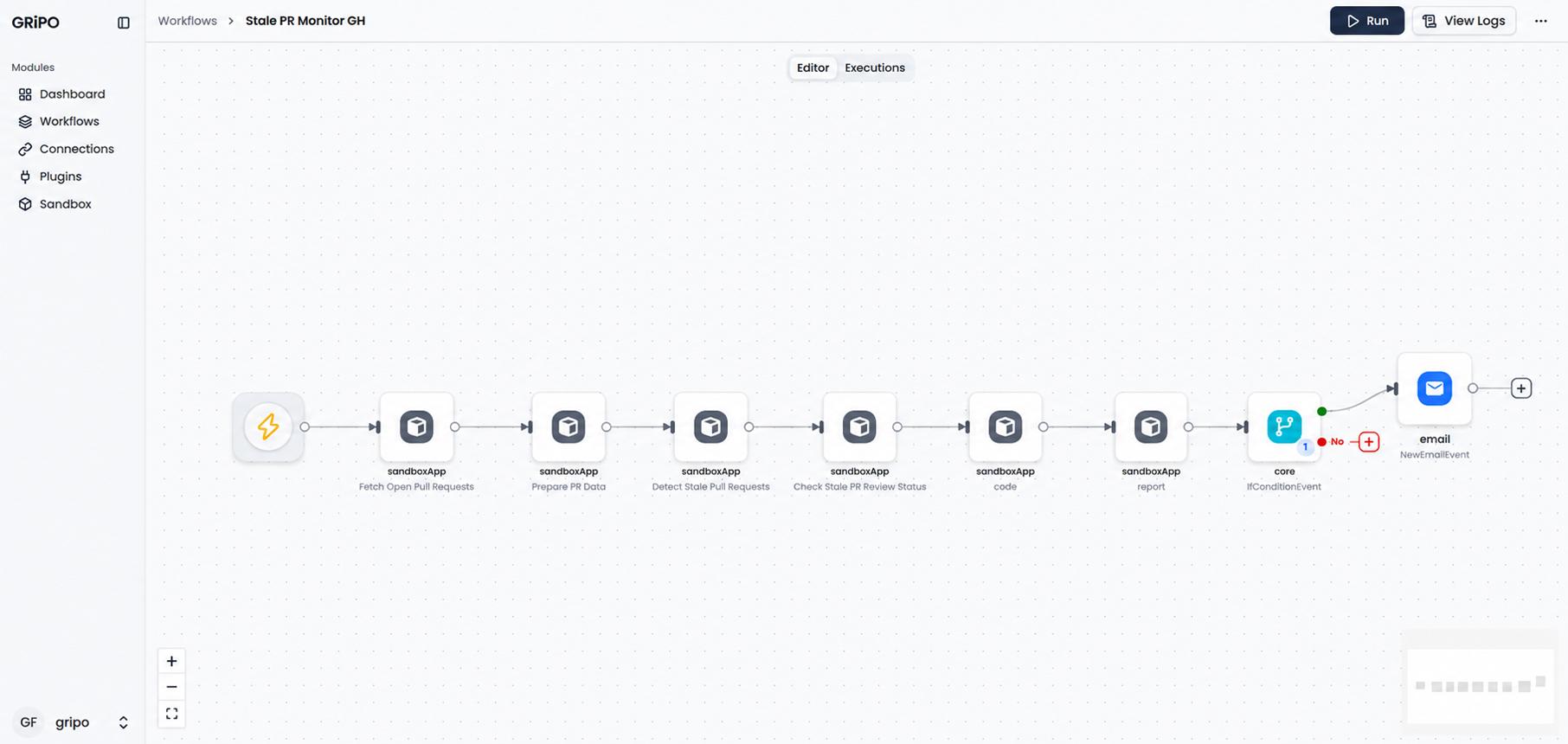
Not every security problem comes from malicious activity.
Sometimes the problem is simply that nobody finished the work.
A pull request may remain open for days or weeks because the developer is busy, reviewers haven’t responded, or the change has been forgotten.
This becomes especially important for security-related pull requests.
A stale PR workflow can periodically check GitHub repositories and identify pull requests that have not received meaningful activity within a defined period.
For example:
PR inactive for 14 days → notify repository owner
The workflow can provide information such as:
- Repository
- Pull request number
- Author
- Last activity
- Number of inactive days
- Assigned reviewers
This gives engineering teams a simple way to reduce the number of forgotten changes.
Automation doesn’t force a PR to be merged.
It simply makes sure important work doesn’t disappear into the backlog.
WorkFlow: https://gripo.io/use-cases/github-stale-pull-request-security-monitor
8. Email Phishing Detector VirusTotal
Phishing remains one of the most common ways attackers attempt to compromise organizations.
Employees may receive emails containing suspicious URLs, domains, or attachments. Manually investigating every suspicious indicator can consume valuable security-team time.
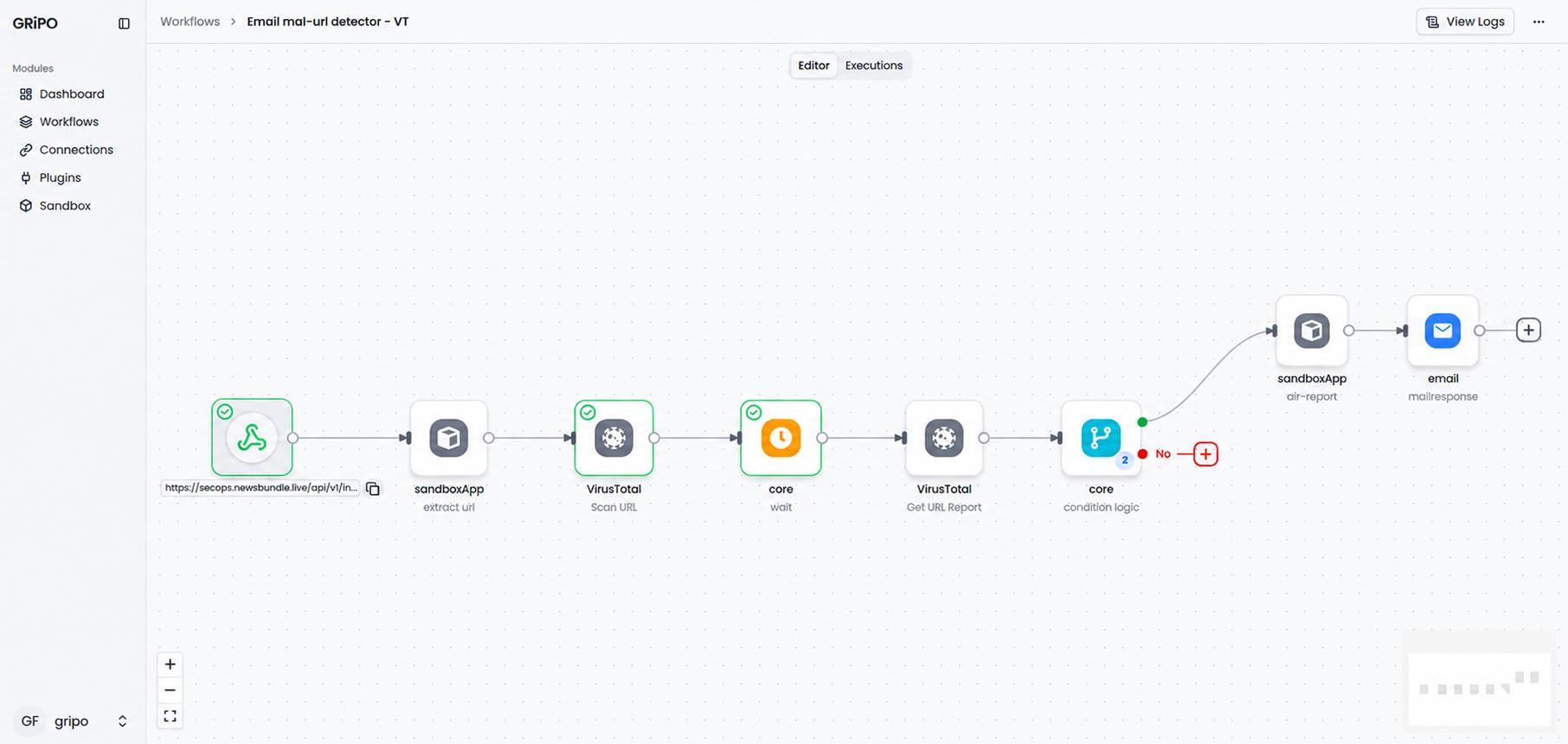
An automated phishing-analysis workflow can take an indicator from an email-security process and submit relevant information for analysis using security intelligence services such as VirusTotal.
A workflow could look like:
Suspicious URL → extract URL → submit for analysis → retrieve results → evaluate detection → notify security team
For example:
Malicious URL detected → generate high-priority alert
Suspicious URL detected → generate warning alert
This kind of automation can help security teams move faster when investigating suspicious messages.
It should complement, not replace, existing email security controls and human investigation.
WorkFlow: https://gripo.io/use-cases/malicious-url-email-security-monitor
9. Stale Access Keys Audit AWS
Cloud credentials are powerful.
An AWS access key that remains active after it is no longer needed can increase an organization’s attack surface.
The challenge is that credentials are often created for applications, developers, automation systems, testing environments, and temporary projects.
Over time, some credentials may become unused.
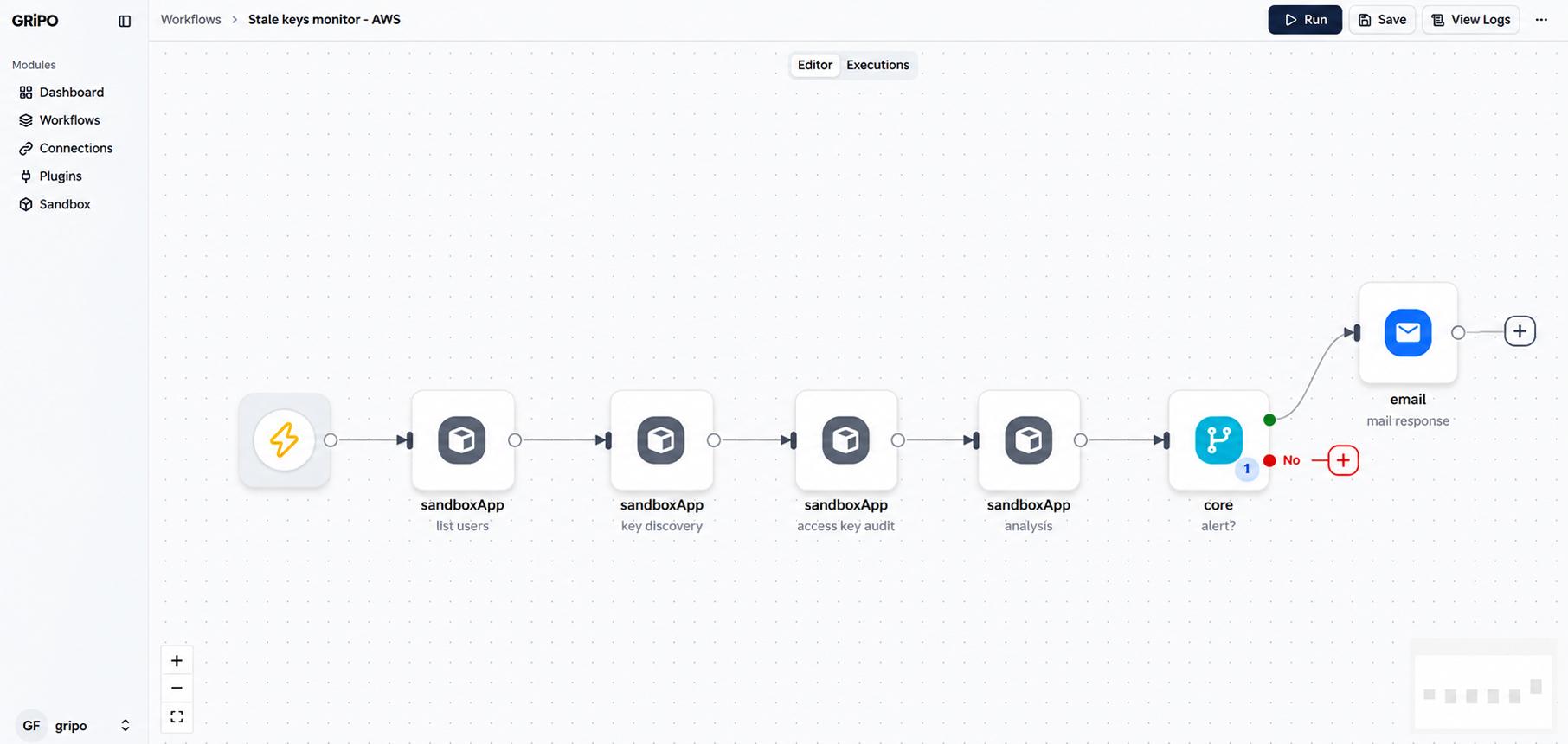
An automated AWS access-key audit can periodically identify keys that have not been used for a defined period.
For example:
Access key is active and older than 90 days → identify owner → send high-priority alert → request review
The workflow can help teams maintain better visibility into:
- Access key age
- Last-used information
- Associated IAM identity
- Key status
- Required remediation
Importantly, automation should not blindly delete credentials.
A safer approach is:
Detect → Review → Approve → Remediate
This reduces the risk of breaking legitimate workloads while still reducing unnecessary credential exposure.
WorkFlow: https://gripo.io/use-cases/stale-aws-iam-access-key-audit
10. Public S3 Bucket Exposure Check AWS
Cloud storage makes it easy to store large amounts of data.
It can also make it easy to expose data accidentally.
An S3 bucket that is unintentionally accessible to the public can create a serious security and compliance problem depending on what it contains.
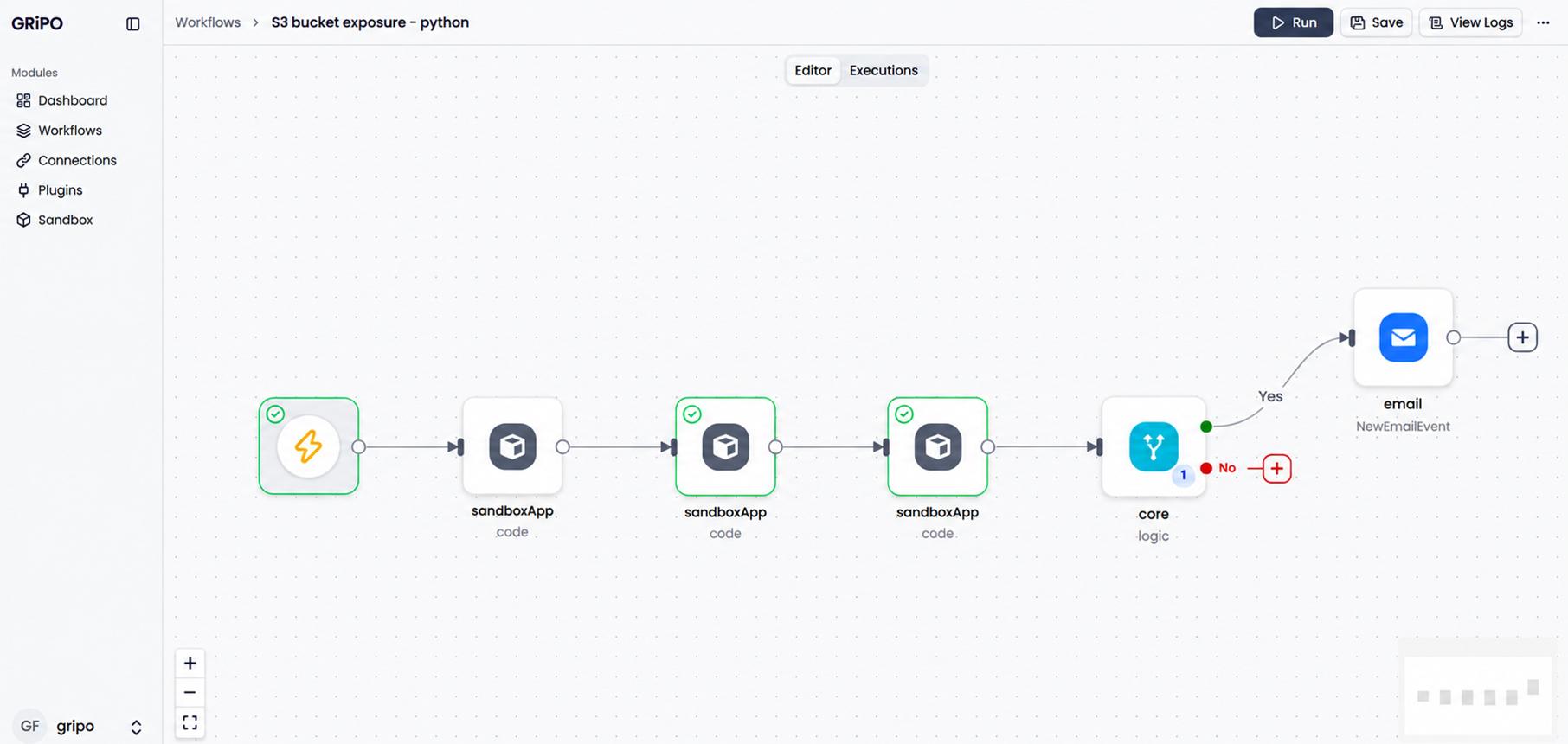
A public S3 exposure workflow can periodically inspect buckets and evaluate their access configuration.
The workflow might:
- Retrieve the list of relevant S3 buckets.
- Inspect bucket permissions and public-access configuration.
- Identify potentially public buckets.
- Determine whether the exposure is expected.
- Notify the security or cloud team.
- Create a remediation task when necessary.
For example:
Public access detected → identify bucket owner → classify exposure → alert security team
Again, automation should avoid making assumptions about whether exposure is legitimate.
Some organizations intentionally publish static assets through cloud storage.
The purpose of the workflow is to detect and surface unexpected exposure for review.
WorkFlow: https://gripo.io/use-cases/workflow-public-s3-bucket-exposure-check
How These 10 Workflows Work Together
These workflows may appear unrelated at first.
One checks SSL certificates.
Another checks AWS credentials.
Another monitors GitHub pull requests.
Another looks for internet-exposed infrastructure.
But they all solve the same fundamental problem:
Detect security risks before they become incidents.
You can think of them as different layers of an automated security control system.
| Area | Workflow | What It Protects |
| Website | SSL Certificate Monitor | Availability & trust |
| Domain | WHOIS Expiry Guardian | Domain continuity |
| Code | PR Security Scanner | Application security |
| Infrastructure | Shodan Asset Monitor | Attack surface |
| Web | Security Headers Monitor | Browser security |
| Transport | TLS Health Check | Secure communication |
| Development | Stale PR Monitor | Security workflow hygiene |
| Phishing Detector | User & account security | |
| Cloud | AWS Access Key Audit | Credential security |
| Storage | S3 Exposure Check | Data security |
The important point is that security automation is not one tool or one workflow.
It is a collection of automated controls that continuously reduce operational risk.
Where AI Agents Can Improve Security Automation
Traditional automation is excellent when the rules are predictable.
But security operations often involve context.
For example:
A public S3 bucket was detected.
The next question isn’t necessarily:
“Close the bucket.”
The real questions might be:
- Is this bucket supposed to be public?
- What data does it contain?
- Who owns it?
- Was the configuration changed recently?
- Is the exposure related to a recent deployment?
- Should the security team investigate?
This is where AI agents can add another layer of intelligence.
An AI agent can collect information from multiple systems, analyze the available context, summarize the situation, and recommend the next action.
A workflow could look like:
Security Event → Collect Context → AI Agent Analysis → Risk Assessment → Human Approval → Remediation
For enterprise environments, this distinction is important.
The goal isn’t to give an AI agent unlimited access to production infrastructure.
The goal is to give the agent controlled access to the tools and data it actually needs.
Automate Security Checks With GRiPO
This is where GRiPO can fit into the security automation workflow.
GRiPO enables teams to build automated workflows that connect services, execute scripts and commands in isolated environments, and use AI agents for more intelligent operational tasks.
For example, a security workflow can:
Trigger → Fetch security data → Execute a security check in a sandbox → Analyze the result → Apply rules or AI reasoning → Notify the responsible team
The sandbox is particularly useful when workflows need to execute code, scripts, CLI tools, or infrastructure commands.
Instead of running every operation directly on a developer’s machine or a shared server, teams can use an isolated execution environment for the workflow.
This can be useful for security automation involving:
- Python security scripts
- AWS CLI
- GitHub CLI
- Kubernetes commands
- Terraform operations
- API calls
- Security scanning tools
- AI coding agents
The result is a workflow-based approach to security operations where repetitive checks can run automatically and sensitive execution can happen inside controlled environments.
The Bigger Goal: Prevent Small Problems From Becoming Big Incidents
Security teams don’t need more dashboards simply for the sake of having more dashboards.
They need systems that help them identify important problems early.
An expired certificate.
An abandoned pull request.
An unused access key.
An exposed S3 bucket.
An unexpected internet-facing service.
A suspicious URL.
Individually, these may look like small operational tasks.
But when they are ignored, they can contribute to outages, data exposure, security incidents, compliance issues, and reputational damage.
That is why security automation matters.
The best security workflow is often the one that quietly runs in the background, checks the right condition, and alerts the right person before anyone notices there was a problem.
Final Thoughts
Modern security cannot depend entirely on manual monitoring.
Infrastructure changes too quickly, cloud environments are too large, and engineering teams have too many systems to check individually.
Security automation provides a practical way to continuously verify important security controls without turning every check into a manual task.
The 10 workflows covered here are a starting point:
- SSL Certificate Expiry Monitor
- Domain & WHOIS Expiry Guardian
- Automated PR Security Scanner
- Internet-Exposed Asset Monitor
- Security Headers Monitor
- TLS Configuration Health Check
- Stale PR Monitor
- Email Phishing Detector
- Stale AWS Access Keys Audit
- Public S3 Bucket Exposure Check
Together, they demonstrate an important principle:
Don’t wait for a security problem to become visible to your customers. Automate the checks that can detect it first.
With workflow automation, sandboxes, integrations, and AI agents, security teams can move from reactive monitoring toward continuous, proactive security operations.