
Problem Introduction
Phishing and malicious emails represent a significant entry vector for enterprise security breaches. Attackers frequently embed harmful links within seemingly legitimate messages to redirect users to credential-harvesting pages, malware downloads, or phishing sites. Because malicious URLs often use redirects or deceptive domain structures, manual inspection by end users is unreliable and time-consuming. Traditional manual submission to threat-intelligence tools slows down incident response and leads to unanalyzed threats sitting in user inboxes.
How GRiPO Helps You in This Situation
GRiPOFlow bridges user inboxes and automated threat intelligence by providing a one-click security analysis mechanism. Via a custom Google Apps Script Gmail contextual add-on, users can trigger an instant investigation directly from an open email. GRiPOFlow automatically ingests the email payload, extracts embedded URLs, queries VirusTotal for threat intelligence, evaluates detection metrics, and dispatches structured security alerts without requiring manual analyst intervention.
GRiPO Solution
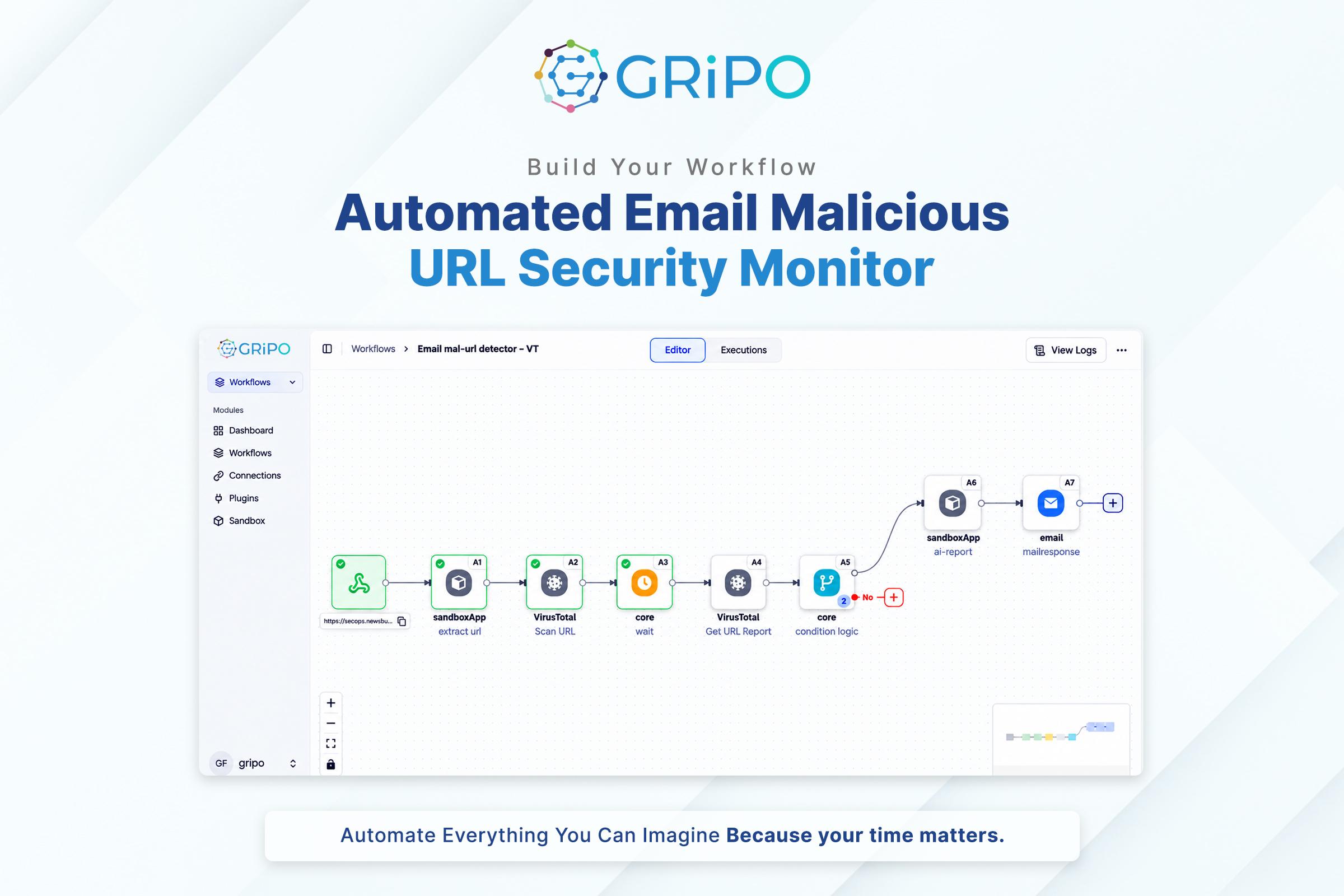
The solution combines a lightweight Gmail add-on with an event-driven GRiPOFlow backend. When a user clicks “Scan Email with GripoFlow” in Gmail, the add-on sends the email payload to a GRiPOFlow webhook. The workflow extracts the link via Node A1, submits it to VirusTotal via Node A2, pauses for 30 seconds via Node A3, fetches the complete report via Node A4, and evaluates threat statistics in Node A5. If malicious or suspicious indicators exceed zero, Nodes A6 and A7 format and dispatch a detailed email alert.
| Threat Evaluation Metric | Condition | Verdict | Workflow Action |
| Malicious Detections | malicious > 0 | MALICIOUS | Generates full threat report; dispatches High-Priority Alert Email. |
| Suspicious Detections | suspicious > 0 (and malicious == 0) | SUSPICIOUS | Generates threat report; dispatches Warning Alert Email. |
| Clean / Undetected | malicious == 0 and suspicious == 0 | CLEAN | Terminates workflow without sending an alert. |
Automated Email Malicious URL Security Monitor
Operating as an event-driven security monitor, the workflow initiates instantly upon webhook invocation. It extracts hidden redirect chains, final destinations, web categories, and engine detection ratios from VirusTotal. This turns Gmail into a security investigation interface, delivering immediate alerts for malicious links while eliminating manual sandbox submissions.