
Problem Introduction
Websites rely on HTTP response security headers to enforce HTTPS, restrict content sources, prevent clickjacking, and control browser behavior. Missing or weak headers leave gaps. Checking each header by hand against a target URL, and deciding which results need reporting, is repetitive.
How GRiPO Helps You in This Situation
The challenge isn’t having different tools, it’s getting them to work together. When the output of one system has to feed another for analysis, action, or AI insights, teams end up moving data manually, maintaining custom scripts, or building complex ETL pipelines. GRiPO Flow connects these tools into a single workflow where data, insights, AI analysis, and actions flow between systems automatically.
GRiPO Solution
jev is a System One model designed to make fast, structured decisions. Instead of generating text, it returns a defined decision that can be used directly for routing. GRiPO supports jev as a plugin. In this workflow:
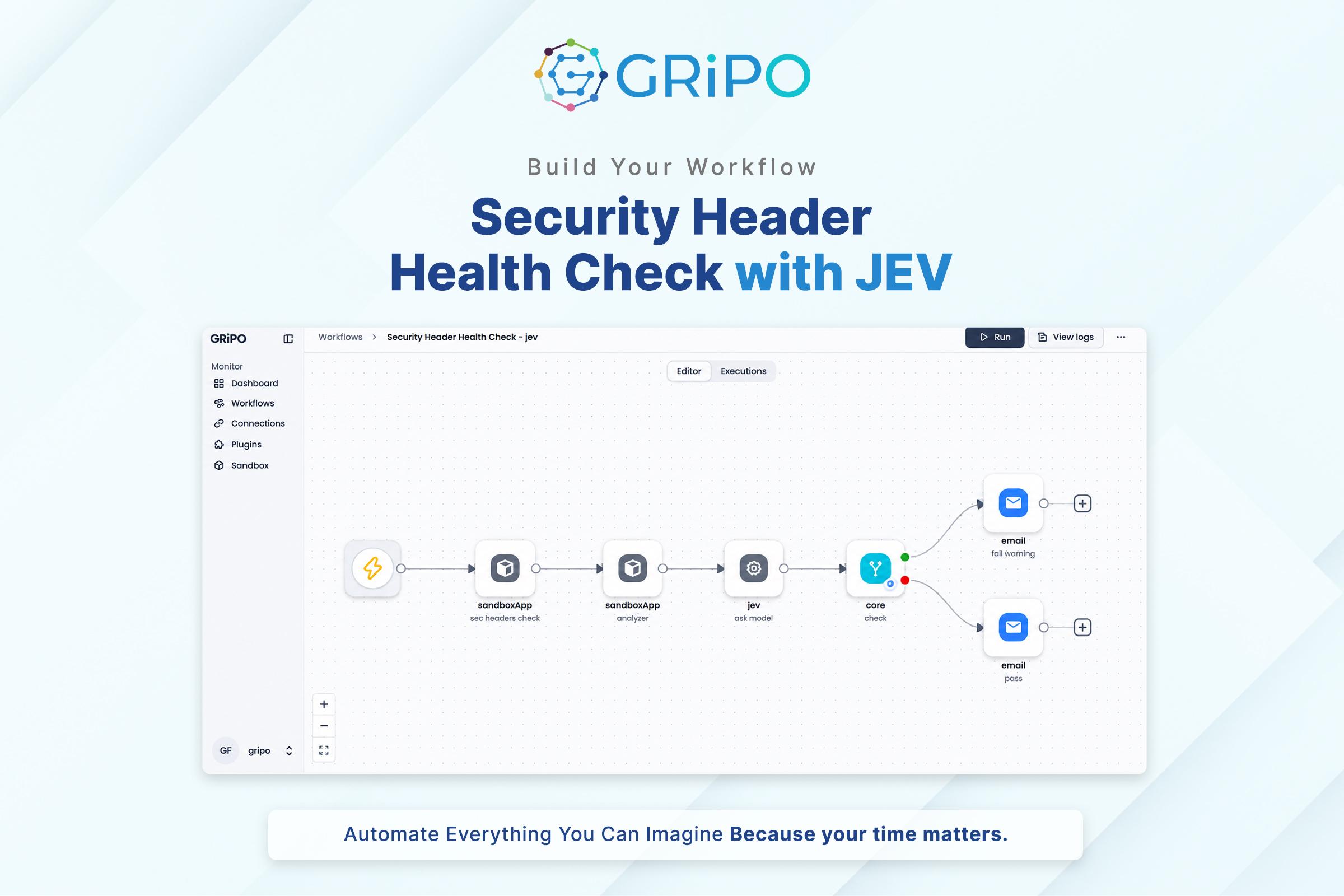
- On-Demand Trigger: takes a target URL as input.
- sec headers check: a Python sandbox script requests the URL (15-second timeout) and collects the HTTP status code, final URL, response headers, and scan time. If the request fails, it returns the error.
- analyzer: a Python script checks six headers and marks each PASS, WARNING, or FAIL:
- HSTS: FAIL if missing, WARNING if max-age is under one year.
- CSP: FAIL if missing, WARNING if it contains unsafe-inline, unsafe-eval, or a wildcard.
- X-Frame-Options: FAIL if missing (WARNING if CSP has frame-ancestors), WARNING if not DENY or SAMEORIGIN.
- X-Content-Type-Options: FAIL if missing, WARNING if not nosniff.
- Referrer-Policy: WARNING if missing or unsafe-url.
- Permissions-Policy: WARNING if missing.
- Overall status is FAIL if any check fails, otherwise WARNING if any warns, otherwise PASS. It also outputs counts and recommendations.
- ask noul: jev receives the analyzer output and answers: “Given these missing security headers, should this be reported? Consider this is a first-time scan.”
- If Condition: if jev’s score is above 0.7, the workflow takes the Yes branch. Otherwise it takes the No branch.
- fail/warning email (Yes): the subject carries the overall status. The body includes target, status, HTTP status, findings, pass/warning/fail counts, recommendations, and an action-required note.
- pass email (No): subject “Security Header Health Check — PASS”, with target, findings, counts, and recommendations.
Automated Security Header Health Check
The workflow runs on demand against a target URL. It fetches the response headers, scores six security headers, and has jev decide whether the result should be reported (score above 0.7). It then sends either a fail/warning email or a pass email with findings, counts, and recommendations.