
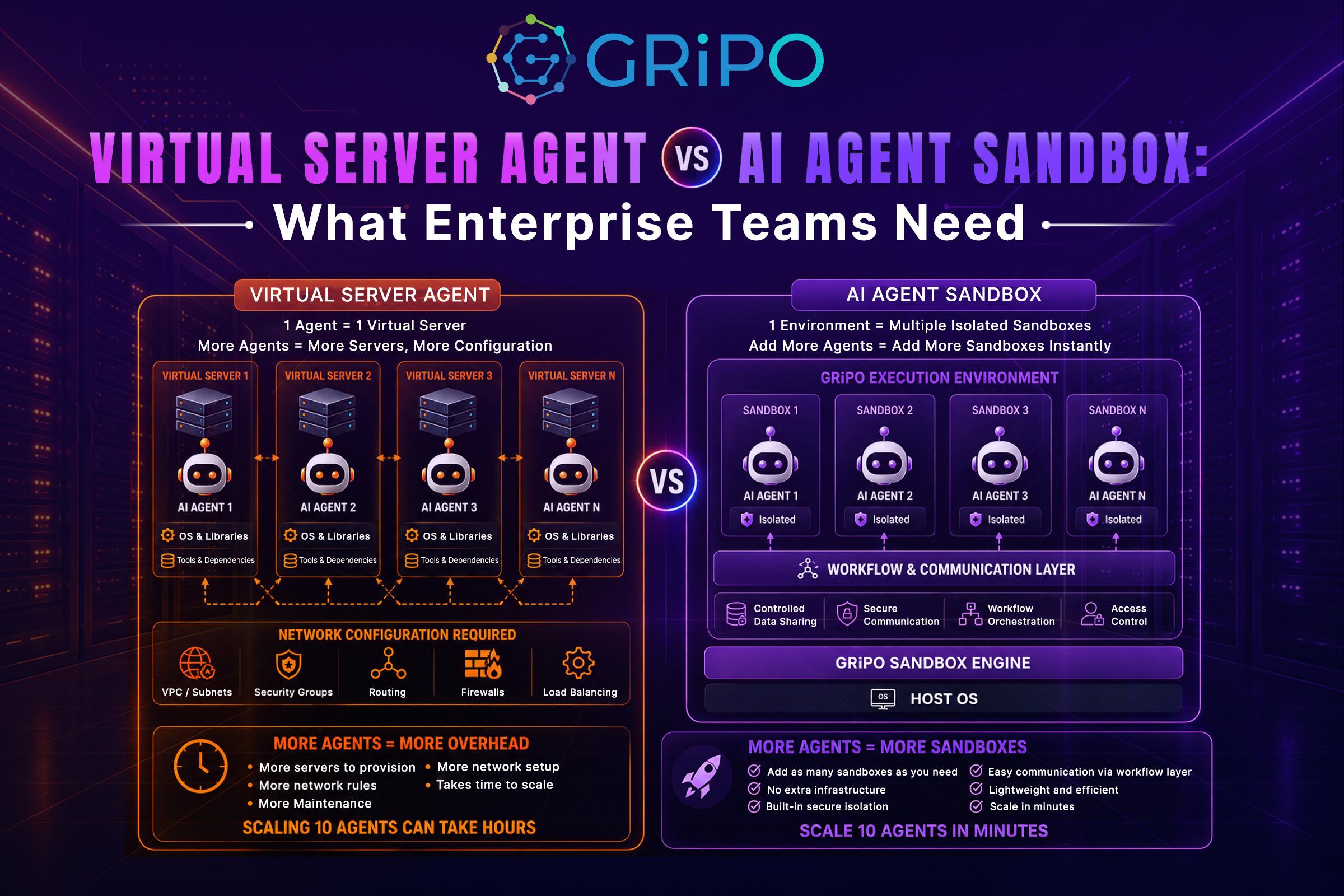
AI agents are moving from simple assistants to systems that can actually perform engineering work.
An agent can inspect a repository, modify files, execute tests, install dependencies, call APIs, query cloud services, and sometimes make changes to infrastructure. That changes the infrastructure problem.
The question is no longer just:
Which AI model should we use?
For engineering teams, a more important question is:
Where should the AI agent execute its work, and what should it be allowed to access?
A common approach is to give an agent access to a virtual server. The server provides CPU, memory, storage, an operating system, networking, and whatever tools the agent needs.
Another approach is an AI agent sandbox: a controlled, isolated execution environment created specifically for an agent task.
These approaches can look similar from the outside. Both can provide a Linux environment, install packages, execute commands, and run code.
Architecturally, however, they solve different problems.
A virtual server primarily provides compute infrastructure.
An AI agent sandbox provides a controlled execution boundary around an autonomous agent.
That distinction becomes critical when the agent can execute untrusted code, process sensitive repositories, access credentials, or interact with production systems.
What Is a Virtual Server Agent?
The term virtual server agent generally describes an AI agent operating inside or through a virtual server environment.
The underlying infrastructure might be a virtual machine hosted on AWS, Azure, Google Cloud, OVHcloud, or another provider.
For example:
A typical virtual server agent architecture consists of a developer assigning work to an AI agent, which then operates through a virtual server. The server provides the operating system, development tools, source code, credentials, network access, cloud CLIs, Docker, Terraform, and other resources required to complete the task. This gives the agent a persistent environment with significant control over the underlying infrastructure.
The virtual server gives the agent a persistent machine where it can perform work.
This model can be useful when an agent needs:
- Long-running processes
- Persistent storage
- Custom operating-system configuration
- Specialized software
- Stable network connectivity
- GPU or other dedicated resources
- Stateful development environments
- Full control over the underlying environment
For example, a platform engineering team might provision a dedicated VM for an AI agent that continuously analyzes infrastructure repositories.
The VM could contain:
- Terraform
- AWS CLI
- kubectl
- Helm
- Python
- Git
- Security scanners
- Internal tooling
The agent then operates within that environment.
The architecture is straightforward.
The security challenge is controlling how much authority that environment gives the agent.
What Is an AI Agent Sandbox?
An AI agent sandbox is an isolated execution environment designed to let an AI agent perform actions without giving it unrestricted access to the surrounding system.
The sandbox can provide:
- An isolated filesystem
- Restricted network access
- Limited credentials
- Temporary compute
- Controlled package installation
- Resource limits
- Process isolation
- Execution policies
- Logging and auditing
- Workspace-level access
A simplified architecture looks like this:
An AI agent sandbox places a controlled execution boundary between the agent and enterprise systems. A policy or gateway determines what the agent can access, while the sandbox provides an isolated workspace containing only the required source code, dependencies, tools, temporary files, and approved network access. This architecture limits the agent’s ability to interact with resources outside its assigned task.
The key difference is architectural intent.
The sandbox is not merely a place to run Linux.
It is designed to establish a boundary between what the agent can do and everything else in the environment.
Modern agent systems increasingly treat sandbox execution as a fundamental part of agent infrastructure. OpenAI’s 2026 Agents SDK documentation, for example, describes sandbox execution as a way for agents to inspect files, run commands, edit code, and perform long-running tasks in controlled environments.
Virtual Server Agent vs AI Agent Sandbox
The simplest way to understand the difference is to compare their primary purpose.
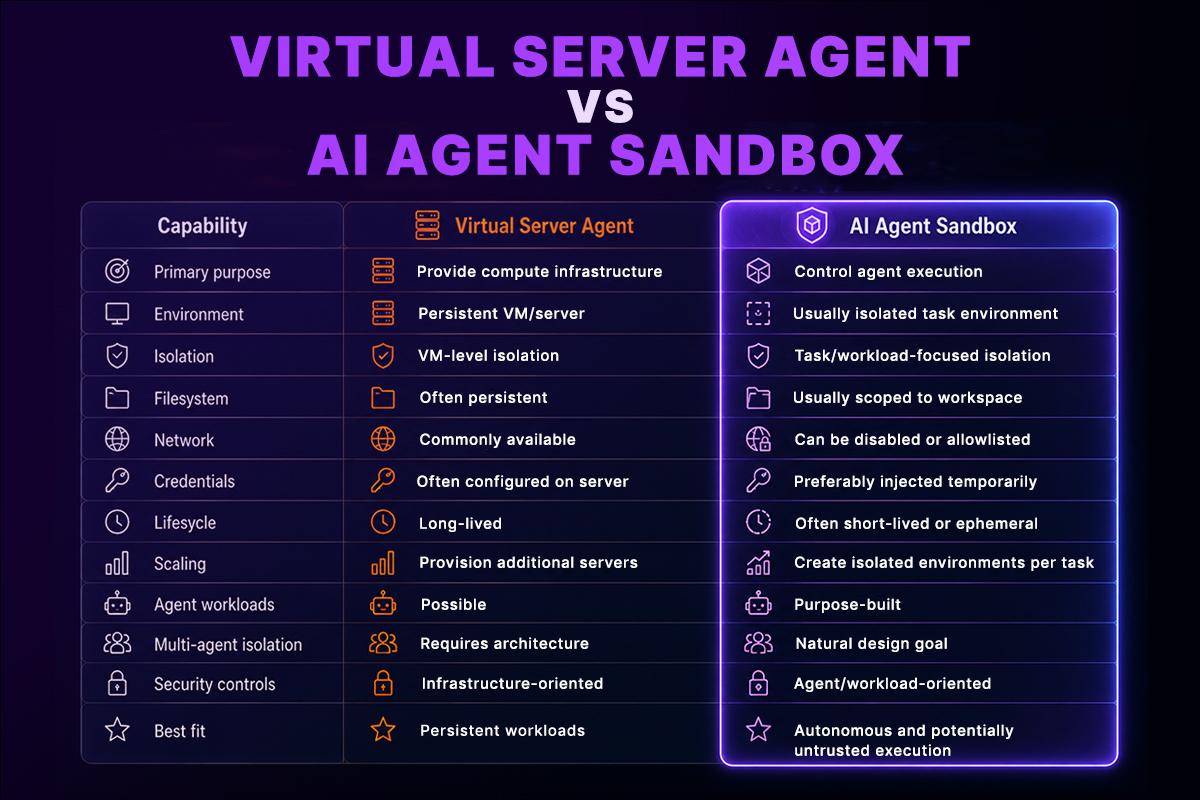
The distinction isn’t that one is “secure” and the other is “insecure.”
A properly configured virtual machine can be highly secure.
The issue is that security doesn’t automatically appear because a VM exists.
You still need to design permissions, identity, networking, secrets management, monitoring, patching, lifecycle management, and isolation.
Why AI Agents Need a Different Security Model
Traditional applications generally execute deterministic instructions.
AI agents don’t behave exactly like traditional applications.
An agent can receive a task, inspect its environment, decide which tool to call, interpret the result, and continue with another action.
That creates a larger security surface.
NIST has highlighted that AI agents introduce security challenges because they combine model-generated decisions with access to data, tools, and external systems.
Consider a coding agent running inside a server containing:
/home/agent/project
/home/agent/.aws
/home/agent/.ssh
/home/agent/.env
/opt/internal-tools
/var/log
Even if the agent was initially asked:
“Fix the failing unit tests.”
The agent may discover additional files, execute shell commands, inspect environment variables, install packages, or access network resources depending on the permissions available to it.
This is why least privilege matters.
NIST defines least privilege as restricting access to the minimum resources and authorizations required to perform the assigned task.
For an AI agent, that principle should apply to:
- Files
- Processes
- Network destinations
- Cloud APIs
- Databases
- Secrets
- Kubernetes resources
- Git repositories
- External services
The Problem With Giving an AI Agent a Full Server
A virtual server can become dangerous when it’s treated as an unrestricted workspace.
Imagine giving an AI coding agent a server with:
AWS_ACCESS_KEY_ID
AWS_SECRET_ACCESS_KEY
SSH private keys
Production kubeconfig
Terraform state
Database credentials
Internal API tokens
The agent may not intentionally misuse these credentials.
That’s not the only threat.
An agent can encounter malicious instructions inside:
- README files
- GitHub issues
- Pull requests
- Dependencies
- Documentation
- Web pages
- Source code comments
- Build output
This is part of the broader prompt-injection problem.
NIST research identifies direct and indirect prompt injection as relevant risks for agent systems, particularly when agents interact with untrusted information.
The problem becomes more serious when the agent has unrestricted network access.
A compromised or manipulated agent might be tricked into sending information to an external service.
This is why modern coding-agent security designs increasingly use restricted network access and isolated workspaces. OpenAI’s Codex security documentation, for example, describes isolated environments with network access disabled by default and workspace restrictions designed to reduce risks such as prompt injection and data exfiltration.
Why an AI Agent Sandbox Is Different
A sandbox starts from a different assumption:
The agent’s execution environment should be constrained by default.
Instead of asking:
“How do we give the agent enough access to this server?”
the architecture asks:
“What is the minimum environment this agent needs to complete this task?”
That leads to a much more controlled workflow.
For example:
A sandbox-based workflow begins when a task creates an isolated environment with the required repository, temporary credentials, tools, network policies, and resource limits. The AI agent performs its work inside that environment, after which the workflow collects the results and can destroy the sandbox. This ephemeral approach reduces persistent state and limits the long-term impact of autonomous agent activity.
The environment can disappear after the task.
This reduces the amount of persistent state an autonomous agent can accumulate.
It also makes isolation easier to reason about.
Virtual Server vs Sandbox: Security Considerations
Security should be evaluated across several layers rather than by asking whether something is a VM or container.
1. Filesystem Isolation
A virtual server normally has its own filesystem, but the agent may still have broad access to everything inside that server.
A sandbox can expose only the workspace required for a specific task.
For example:
Allowed:
/workspace/repository
Blocked:
/etc
/home/other-users
~/.ssh
production credentials
That reduces accidental exposure.
2. Network Isolation
Network access deserves particular attention.
An agent that can execute commands and access the entire internet has significantly more freedom than one that can only communicate with approved services.
A strong architecture can use:
Network access should be limited to the services required for the agent’s task. For example, a coding agent may be allowed to access a Git provider, package registry, and approved internal APIs while being blocked from production databases and arbitrary internet destinations. This reduces the potential for unauthorized communication or data exfiltration.
This is especially useful for coding agents that need Git access or package downloads but don’t need unrestricted outbound connectivity.
3. Credential Isolation
Don’t put long-lived production credentials into an agent’s home directory.
Instead, consider short-lived credentials or narrowly scoped identities.
For example:
Instead of storing permanent credentials inside the agent’s environment, the workflow can request a short-lived identity or token from an identity service. The temporary credential should provide only the permissions required for a specific API or task and should expire when the work is complete. This limits the impact of credential exposure.
The token can expire when the task finishes.
This is particularly important when agents interact with AWS, Kubernetes, databases, SaaS platforms, or internal APIs.
4. Process Isolation
The execution environment should limit what processes the agent can start and what privileges those processes receive.
Containerization can help, but containers aren’t automatically equivalent to a strong security sandbox.
Kubernetes itself notes that there is no universal API definition for a “sandboxed Pod” and that sandboxed workloads can use runtimes such as gVisor or Kata Containers.
gVisor, for example, provides a sandboxed runtime that can be integrated with Kubernetes.
The correct isolation mechanism depends on the threat model and workload.
AI Agent Sandbox vs Docker
Docker and an AI agent sandbox aren’t necessarily competing technologies.
Docker can be part of the sandbox architecture.
For example:
A GRiPO workflow can connect a trigger to a visual workflow builder, AI agent, and isolated code sandbox. Inside the sandbox, the agent can work with repositories, Python, Terraform, kubectl, and custom CLI tools. After execution, the workflow can connect the result to integrations such as Slack, Jira, AWS, or PagerDuty and route the outcome for approval or further action.
Docker primarily provides container packaging and process isolation.
An agent sandbox typically addresses the broader execution problem:
- What files can the agent access?
- Which tools can it use?
- Which APIs can it call?
- Can it access the internet?
- What credentials are available?
- How long does the environment exist?
- What happens when the task finishes?
- What actions need human approval?
- How are agent actions logged?
So the question isn’t necessarily Docker or sandbox.
It can be Docker inside a controlled sandbox architecture.
When Should Enterprise Teams Use a Virtual Server Agent?
A virtual server can be a good choice when the workload requires a persistent environment.
Consider it when:
Long-running state matters
If the agent needs to maintain a large environment for weeks or months, rebuilding an ephemeral sandbox for every operation may not be practical.
Specialized infrastructure is required
Some workloads require:
- GPU resources
- Specialized drivers
- Custom kernels
- Large persistent disks
- Stateful databases
- Long-running services
A dedicated virtual server may make sense.
The environment is tightly controlled
If the agent operates in a highly restricted internal environment with carefully managed permissions, a VM can be an effective execution layer.
When Should You Use an AI Agent Sandbox?
A sandbox is particularly useful when the agent performs autonomous or potentially untrusted work.
Examples include:
AI coding agents
An agent can clone a repository, modify code, install dependencies, run tests, and generate a pull request without receiving unrestricted access to a developer workstation.
Automated security analysis
A security agent may need to execute scanners or inspect suspicious code.
Running that workload inside an isolated environment reduces the potential impact of unsafe execution.
CI/CD automation
An AI agent can analyze failed builds, reproduce problems, modify configuration, and validate a fix inside a temporary environment.
Infrastructure troubleshooting
An agent can inspect Terraform, Kubernetes manifests, logs, and monitoring data while remaining separated from production write access.
Multi-agent workflows
If several agents operate simultaneously, each task can receive its own isolated workspace.
In a multi-agent workflow, each AI agent can operate inside its own isolated sandbox. Agent A, Agent B, and Agent C can therefore work simultaneously without sharing the same execution environment. This reduces cross-agent interference and makes it easier to apply separate resource, filesystem, network, and permission boundaries to each task.
This prevents one agent’s workspace from becoming another agent’s execution environment.
How GRiPO Fits Into This Architecture
For enterprise teams, the challenge isn’t just creating a container. The difficult part is connecting secure execution to the rest of the automation system. That’s where GRiPO approaches the problem as an automation platform rather than simply a compute service.
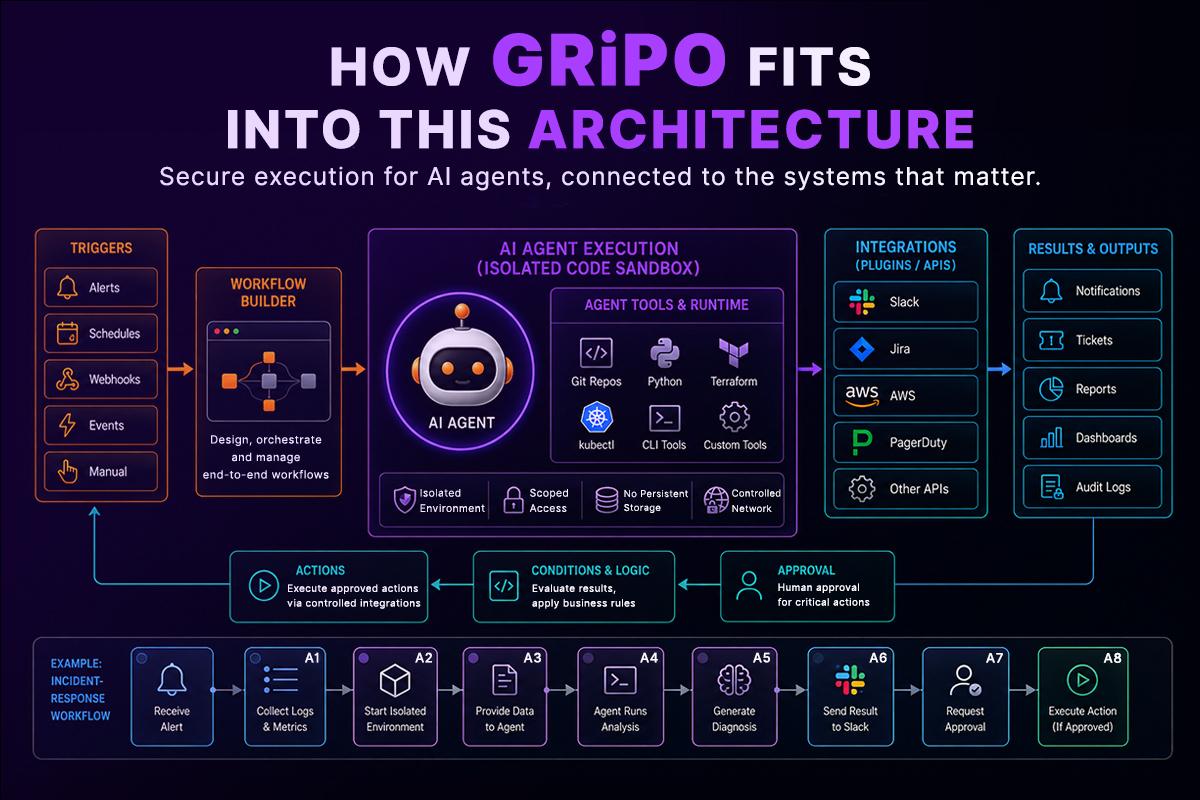
A typical GRiPO workflow can start with a trigger and move through the Workflow Builder to an AI agent running inside an isolated code sandbox. Within the sandbox, the agent can work with repositories, Python, Terraform, kubectl, and custom CLI tools. Once the task is completed, the workflow can connect the results to external services through plugins or APIs such as Slack, Jira, AWS, and PagerDuty, with the final outcome routed for approval or further action.
The important architectural idea is separation. The AI agent can perform computation inside an isolated execution environment while the workflow controls what happens before and after that execution. This model is useful for engineering workflows where an agent needs to do work, not merely generate text.
For example, an incident-response workflow could:
- Receive an alert.
- Collect relevant logs and metrics.
- Start an isolated agent environment.
- Give the agent the required diagnostic data.
- Allow it to run analysis scripts.
- Generate a diagnosis.
- Send the result to Slack.
- Request approval before a production change.
- Execute the approved action through a controlled integration.
That is very different from simply giving an AI agent SSH access to a production server.
A Practical Enterprise Architecture
A mature architecture can separate five concerns:
A mature enterprise AI architecture separates workflow orchestration, agent reasoning, sandboxed execution, integrations, and identity. The workflow layer controls business logic, the AI agent determines how to accomplish the task, the sandbox controls execution, integrations manage access to external systems, and the identity layer determines what the agent is authorized to do. Separating these responsibilities creates clearer security and governance boundaries.
Each layer has a different responsibility.
Workflow layer: controls business logic and orchestration.
Agent layer: determines how to accomplish the task.
Sandbox layer: controls execution.
Integration layer: controls access to external systems.
Identity layer: determines what the agent is authorized to do.
This separation is becoming increasingly relevant as enterprises move agents from experimentation into production. NIST’s work on AI-agent identity and authorization specifically highlights questions around agent identity, authentication, least privilege, delegation, auditing, and prompt-injection mitigation.
Enterprise AI Agent Sandbox Checklist
Before deploying an AI agent that can execute code, ask these questions:
Execution
- Is the agent running in an isolated environment?
- Can the environment be destroyed after execution?
- Are CPU and memory limits enforced?
- Can the agent start privileged processes?
Files
- Which directories can the agent access?
- Can it access SSH keys?
- Can it read .env files?
- Can it access Terraform state?
- Can it access other users’ workspaces?
Network
- Is outbound internet access disabled by default?
- Are approved domains allowlisted?
- Can the agent reach production databases?
- Can it send data to arbitrary external endpoints?
Credentials
- Are credentials short-lived?
- Are permissions scoped to the task?
- Are secrets injected rather than permanently stored?
- Can credentials be revoked quickly?
Authorization
- Does the agent have read-only access by default?
- Which actions require approval?
- Can production changes be blocked?
- Are agent identities separately auditable?
Observability
- Are tool calls logged?
- Are command executions recorded?
- Are network requests observable?
- Can security teams reconstruct what happened?
The Right Question Isn’t “VM or Sandbox?”
For enterprise architecture, this shouldn’t be a binary decision.
A virtual machine can provide the underlying compute.
A container can package the workload.
A sandbox can establish execution boundaries.
An AI agent can provide autonomous reasoning.
A workflow engine can orchestrate the entire process.
The strongest architectures combine these layers instead of treating them as interchangeable technologies.
For example:
Enterprise teams can combine multiple infrastructure layers rather than choosing between them. An AI agent can operate inside an agent sandbox, which may use containers or virtual machines as the underlying compute mechanism. Controlled APIs then connect the isolated environment to enterprise systems. This layered architecture allows organizations to combine autonomous reasoning, execution isolation, infrastructure security, and controlled system access.
The right choice depends on the workload’s sensitivity, duration, performance requirements, compliance requirements, and level of autonomy.
What Enterprise Teams Should Do Next
If you’re evaluating a virtual server agent or an AI agent sandbox, start with the workload rather than the infrastructure product.
Step 1: Define the agent’s job
Document exactly what the agent needs to accomplish.
Step 2: Identify required resources
List the repositories, APIs, databases, cloud services, tools, and files it needs.
Step 3: Remove unnecessary access
Apply least privilege before deployment rather than after an incident.
Step 4: Define the execution boundary
Decide whether the task needs a persistent VM, container, ephemeral sandbox, or a combination.
Step 5: Control network access
Don’t give unrestricted internet access just because the agent might need one package repository.
Step 6: Separate credentials from execution
Use scoped and preferably short-lived credentials.
Step 7: Add approval gates
Low-risk actions can be automated. High-impact production changes should have stronger controls.
Step 8: Log agent activity
You need to know what the agent executed, what tools it called, what resources it accessed, and what actions followed.
Key Takeaways
- A virtual server agent and an AI agent sandbox solve related but different infrastructure problems.
- A virtual server primarily provides compute and a persistent operating environment.
- An AI agent sandbox establishes a controlled boundary around autonomous execution.
- Giving an AI agent access to a server doesn’t automatically provide least-privilege security.
- Filesystem, network, credential, process, and identity controls should be designed together.
- Docker can be part of a sandbox architecture but isn’t the complete agent-security model.
- Virtual machines can also serve as the underlying infrastructure for sandboxed workloads.
- Ephemeral environments are particularly useful for coding, security, CI/CD, and other autonomous tasks.
- Enterprise agent deployments need observability and auditability in addition to isolation.
- The best architecture depends on the workload, not on choosing a single infrastructure technology.
- GRiPO brings isolated execution, AI agents, workflow automation, and enterprise integrations into one automation architecture.
FAQ
What is a virtual server agent?
A virtual server agent is an AI agent that operates within or through a virtual server environment. The server provides compute, storage, networking, operating-system tools, and other resources required by the agent.
What is an AI agent sandbox?
An AI agent sandbox is an isolated execution environment designed to constrain what an autonomous AI agent can access and execute. It can restrict files, network connectivity, credentials, processes, and compute resources.
Is a virtual server the same as an AI agent sandbox?
No. A virtual server primarily provides compute infrastructure. An AI agent sandbox focuses on controlling the agent’s execution boundary. A virtual machine can be used as part of a sandbox architecture.
Why do AI agents need sandboxes?
AI agents can execute commands, inspect files, use tools, and interact with external systems. A sandbox limits the potential impact of unexpected behavior, malicious inputs, prompt injection, or accidental actions.
Is Docker an AI agent sandbox?
Docker provides containerization and process isolation, but Docker by itself doesn’t define the complete security model for an AI agent. Agent sandboxing may also require network controls, credential isolation, filesystem restrictions, identity controls, and auditing.
Can an AI agent sandbox access the internet?
Yes, but network access should generally be controlled according to the workload. An enterprise sandbox can disable outbound access entirely or allow only specific domains and services.
Should AI agents have access to production credentials?
AI agents should not receive unrestricted production credentials. Use least-privilege identities, scoped permissions, temporary credentials, and approval controls for sensitive operations.
Are AI agent sandboxes useful for coding agents?
Yes. Coding agents often need to inspect repositories, edit files, install dependencies, execute tests, and run development tools. A sandbox provides an isolated environment for those operations.
Is a VM more secure than a container for an AI agent?
Security depends on the implementation and threat model. VMs can provide strong isolation, while containers can provide efficient workload isolation. High-risk workloads may combine stronger isolation mechanisms with additional sandbox controls.
Can multiple AI agents run in separate sandboxes?
Yes. A common architecture gives each agent or task its own isolated workspace. This reduces cross-agent interference and makes resource and permission boundaries easier to manage.
What should enterprises monitor when deploying AI agents?
Monitor agent identity, tool calls, command execution, filesystem access, network activity, credential usage, approvals, and changes made to enterprise systems.
How does GRiPO support AI agent sandbox workflows?
GRiPO combines AI agents, isolated code execution, visual workflow automation, and integrations so engineering teams can build workflows where agents perform tasks inside controlled execution environments and interact with external systems through defined workflow components.