
AI agents are becoming capable of doing much more than generating text.
An agent can inspect a repository, install packages, execute Python scripts, run shell commands, modify files, call APIs, interact with cloud infrastructure, and even run infrastructure-as-code tools such as Terraform or Kubernetes commands.
That creates an infrastructure problem.
Where should an AI agent execute all of those operations?
Running an agent directly on a developer laptop is convenient, but it can expose SSH keys, environment variables, source code, cloud credentials, configuration files, and other sensitive data.
A traditional virtual machine provides a stronger isolation boundary, but provisioning and managing thousands of short-lived VMs can introduce operational overhead.
A sandbox provides another approach: give the agent a controlled execution environment that is isolated from the host system and can be created, restricted, monitored, and destroyed as needed.
For many AI coding and automation workloads, this makes sandboxes particularly attractive.
But that doesn’t mean VMs are obsolete.
The right architecture depends on the workload, isolation requirements, persistence model, performance expectations, and enterprise security controls.
Let’s compare the two.
What Is a Sandbox?
A sandbox is an isolated execution environment designed to allow code or processes to run without giving them unrestricted access to the underlying host system.
A code Isolated environment can restrict things such as:
- Filesystem access
- Network connectivity
- CPU and memory usage
- Process permissions
- Linux capabilities
- Secrets and credentials
- Runtime duration
- System calls
- Access to host resources
The exact isolation mechanism varies.
A Isolated environment may use containers, namespaces, cgroups, microVMs, language-level isolation, seccomp, or combinations of these technologies.
The important concept isn’t the implementation.
It’s the security boundary around the workload.
For AI agents, that boundary is valuable because the agent may execute instructions that weren’t manually reviewed beforehand.
For example, imagine an AI coding agent receives a task:
“Fix the dependency issue and run the project’s tests.”
The agent may decide to execute:
npm install
npm test
git diff
python scripts/check.py
Those commands might be harmless.
But the repository could also contain malicious code, unexpected install scripts, compromised dependencies, or instructions designed to trick the agent.
A sandbox gives those operations a restricted environment instead of allowing them to run directly against the developer’s operating system.
What Is a Virtual Machine?
A virtual machine is a complete virtualized computing environment running on a physical host through a hypervisor.
A VM typically has its own:
- Operating system
- Virtual CPU
- Virtual memory
- Virtual disk
- Network interface
- Processes
- System configuration
Technologies such as KVM, VMware, Hyper-V, and other hypervisors provide virtualization at the infrastructure level.
The major advantage is a strong isolation boundary between the guest environment and the host.
A VM is therefore useful when workloads need:
- Full operating-system environments
- Strong isolation
- Custom kernels or system configurations
- Long-running processes
- Persistent workloads
- Dedicated resources
- Infrastructure-level separation
For traditional enterprise workloads, VMs remain extremely useful.
The question is whether that same model is the most efficient way to execute thousands of short-lived AI agent tasks.
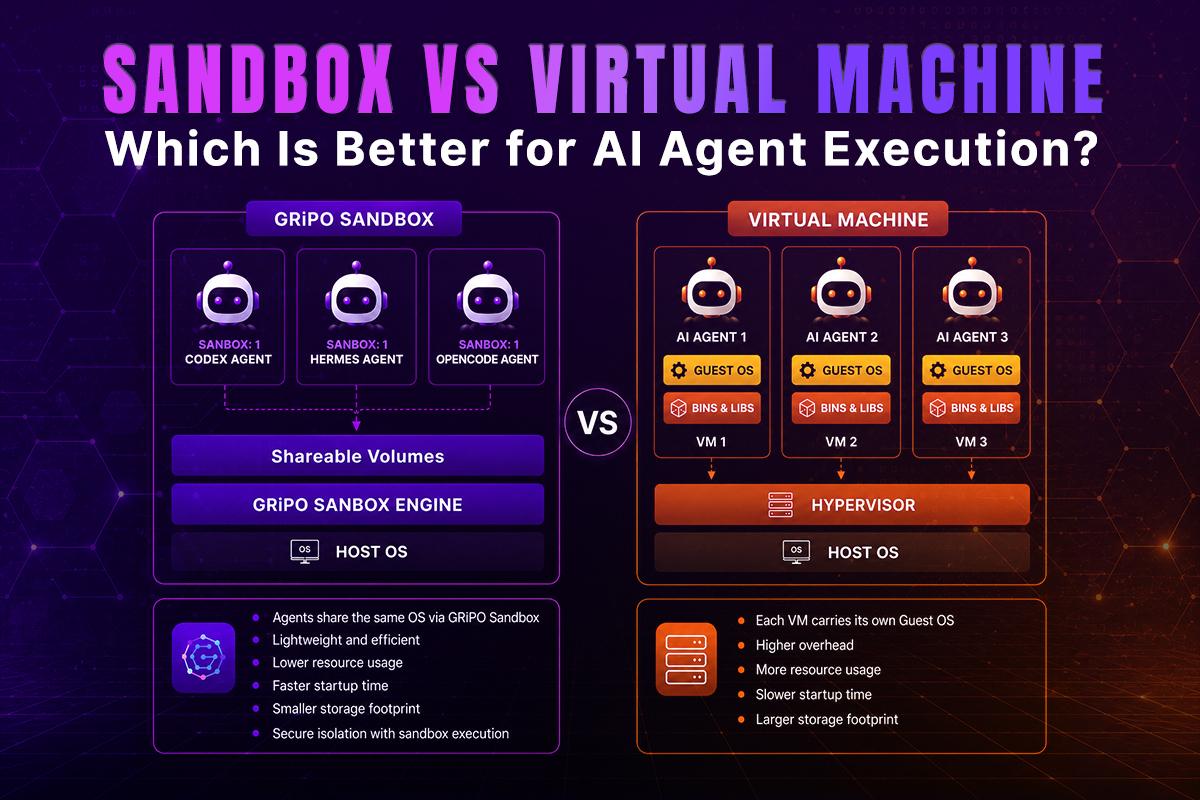
Sandbox vs Virtual Machine: What’s the Difference?
The biggest difference is the execution model.
A VM virtualizes an entire machine environment.
A sandbox focuses on restricting a workload inside a controlled execution boundary.
This distinction becomes important when workloads are dynamic.
AI agents often create temporary files, install dependencies, execute commands, run tests, inspect repositories, and terminate.
That workload pattern is very different from running a database server or production application continuously.
Sandbox vs VM Comparison
| Capability | Sandbox | Virtual Machine |
| Isolation | Strong, implementation-dependent | Strong infrastructure-level isolation |
| Startup time | Usually very fast | Generally slower |
| Resource overhead | Usually lower | Higher |
| Full OS | Not necessarily | Yes |
| Short-lived workloads | Excellent fit | Possible but often inefficient |
| Long-running workloads | Possible | Excellent fit |
| AI code execution | Excellent fit | Excellent fit |
| Custom kernel | Usually no | Yes |
| Scaling ephemeral jobs | Highly suitable | More operationally expensive |
| Persistence | Usually temporary | Strong persistence options |
| Infrastructure management | Lower in managed systems | Higher |
| Security controls | Configurable | Extensive |
| Best use case | Controlled execution | Complete isolated machines |
There is an important caveat: “Isolated environment” is a broad architectural term.
Not every sandbox provides the same level of isolation.
A basic process-level Isolated environment should not automatically be considered equivalent to a hardened microVM.
Security depends on the implementation.
Why AI Agents Need Isolated Execution
Traditional applications generally execute code according to predefined application logic.
AI agents introduce another variable:
The execution path can be generated dynamically.
An agent may decide what command to execute based on:
- User instructions
- Repository contents
- Tool responses
- Documentation
- API responses
- Files
- Previous execution results
- Other agents
That flexibility is powerful, but it increases the attack surface.
Consider an agent working inside a repository containing a malicious installation script.
The agent runs:
npm install
The package manager executes the project’s installation lifecycle.
If the agent is running directly on a developer machine, the malicious process could potentially attempt to access files, credentials, network services, SSH configuration, cloud credentials, or other local resources.
Inside a properly configured sandbox, those capabilities can be restricted.
The agent can still perform its job.
But the environment limits what happens if the workload behaves unexpectedly.
This is one of the most important reasons to use sandboxed execution for AI agents.
The Security Problem With Running AI Agents on Your Laptop
A developer laptop contains far more sensitive information than most people realize.
An AI coding agent might encounter:
- .env files
- SSH keys
- Git credentials
- Cloud credentials
- Kubernetes configuration
- Terraform state
- API tokens
- Private repositories
- Local databases
- Browser data
- Internal documentation
- Customer information
Even if the AI agent itself is trustworthy, the code it executes may not be.
That’s the fundamental security challenge.
You aren’t only trusting the agent.
You’re trusting every piece of code, dependency, repository, tool response, and instruction that influences the agent’s execution.
A Isolated environment reduces the blast radius.
Instead of:
AI Agent → Developer Laptop → Everything
you can build:
AI Agent → Restricted Sandbox → Controlled Resources
That architectural change matters.
Sandbox vs VM for AI Agent Execution
For AI agents, the most important factors aren’t simply isolation and security.
You also need to consider execution speed.
An autonomous coding agent may create and destroy dozens of environments during development, testing, evaluation, or automation.
Suppose an engineering platform needs to execute 10,000 agent tasks per day.
Each task might need:
- Repository checkout
- Dependency installation
- Code execution
- Testing
- Build operations
- API calls
- Artifact generation
- Environment cleanup
Creating a dedicated VM for every short-lived task can become expensive and operationally complex.
A sandbox-oriented architecture is often better suited to this pattern because environments can be created specifically for the execution task and destroyed afterward.
Performance and Startup Time
Startup latency matters when AI agents execute many small workloads.
Imagine an agent needs to run a simple validation script.
If the execution environment takes several minutes to provision, the infrastructure becomes part of the bottleneck.
A lightweight Isolated environment can often start considerably faster than a complete VM because it doesn’t need to initialize an entire operating system from scratch.
This makes sandboxes attractive for:
- Coding agents
- CI tasks
- Automated testing
- Code evaluation
- Pull request analysis
- Security scanning
- Temporary development environments
- Workflow automation
VMs remain appropriate when the workload needs a complete machine environment or long-running infrastructure.
Resource Efficiency
VMs reserve resources for an entire guest operating system.
That isn’t necessarily wasteful.
For a persistent workload, the overhead may be perfectly reasonable.
But consider thousands of ephemeral agent executions.
Each task might only require:
- 1 CPU
- 512 MB–2 GB RAM
- Temporary storage
- Network access
- A few minutes of runtime
Using heavyweight infrastructure for every execution can create unnecessary resource overhead.
Sandboxes can provide a more granular execution model.
Resources can be assigned to the workload rather than provisioning a complete machine for every task.
This becomes particularly useful when an enterprise is running large numbers of AI agents concurrently.
Security: Sandbox Does Not Automatically Mean Secure
This distinction is critical.
Putting an AI agent inside something called a “sandbox” doesn’t automatically make the system secure.
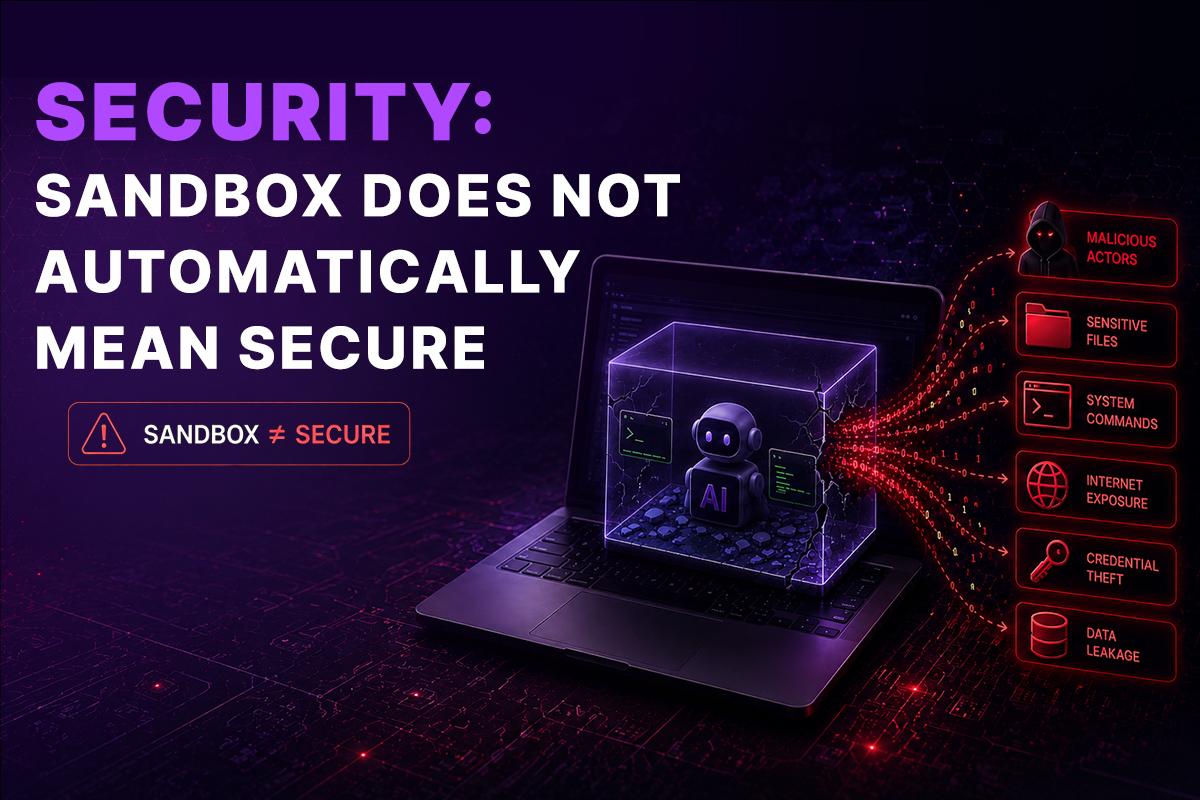
A production-grade implementation should consider multiple layers.
1. Filesystem isolation
The agent should only see files required for the task.
Avoid exposing the host filesystem.
2. Network restrictions
Not every agent needs unrestricted internet access.
Depending on the workload, allow only:
- Required package repositories
- Approved APIs
- Internal services
- Specific domains
3. Credential isolation
Never expose broad cloud credentials to an agent when a narrowly scoped identity will work.
Use short-lived credentials and least-privilege access wherever possible.
4. Resource limits
Set CPU, memory, disk, and execution-time limits.
This protects the infrastructure against runaway processes.
5. Process restrictions
Limit unnecessary system capabilities and privileged operations.
6. Cleanup
Destroy or reset temporary environments after execution.
Temporary execution environments should not accidentally become persistent storage for secrets or sensitive data.
Can Sandboxes and VMs Be Used Together?
Absolutely.
In fact, combining the two can provide a strong architecture for enterprise AI execution.
For example:
Enterprise Platform
|
AI Agent Orchestrator
|
Execution Scheduler
|
+————+————+
| |
Sandbox Pool Sandbox Pool
| |
Agent Task Agent Task
| |
Restricted Runtime Restricted Runtime
|
Infrastructure VM
|
Hypervisor
A Isolated environment can run inside a VM.
The VM provides infrastructure-level isolation.
The sandbox provides workload-level controls.
This creates defense in depth.
For highly sensitive workloads, an enterprise may choose additional isolation boundaries such as dedicated nodes, microVMs, separate networks, or hardened container runtimes.
The architecture should match the threat model.
When Should You Use a Sandbox?
A sandbox is usually a strong choice when your workload is:
- Short-lived
- Dynamic
- Untrusted or semi-trusted
- Code-execution heavy
- Highly parallel
- Ephemeral
- Resource constrained
- AI-driven
Typical examples include:
AI Coding Agents
Agents such as Claude Code, Codex, and other CLI-based coding agents need to execute commands against repositories.
A sandbox allows those agents to work without giving them unrestricted access to the host machine.
Automated Code Testing
A workflow can clone a repository, install dependencies, run tests, generate reports, and destroy the environment afterward.
Pull Request Automation
An AI agent can inspect a pull request, execute tests, analyze changes, and report results without accessing the rest of the developer environment.
AI Evaluation
Organizations evaluating AI-generated code may need to execute thousands of potentially untrusted submissions.
Sandboxed execution is well suited to this workload.
DevOps Automation
Agents can run Terraform, Python, shell commands, cloud CLI tools, or Kubernetes operations within controlled environments.
When Is a Virtual Machine the Better Choice?
A VM remains the better option when you need:
- A complete operating system
- Custom kernel configurations
- Long-running services
- Persistent workloads
- Strong machine-level isolation
- Specialized networking
- Legacy applications
- Dedicated infrastructure
- Full administrative control
For example, running a production PostgreSQL server is fundamentally different from executing a temporary AI-generated Python script.
The former benefits from persistent infrastructure.
The latter often benefits from ephemeral execution.
Choosing the right tool starts with understanding the workload rather than following a technology trend.
How GRiPO Uses Sandboxed Execution for AI Agents
GRiPO approaches AI agent execution around the idea that agents should have the ability to execute real work without receiving unrestricted access to the surrounding infrastructure.
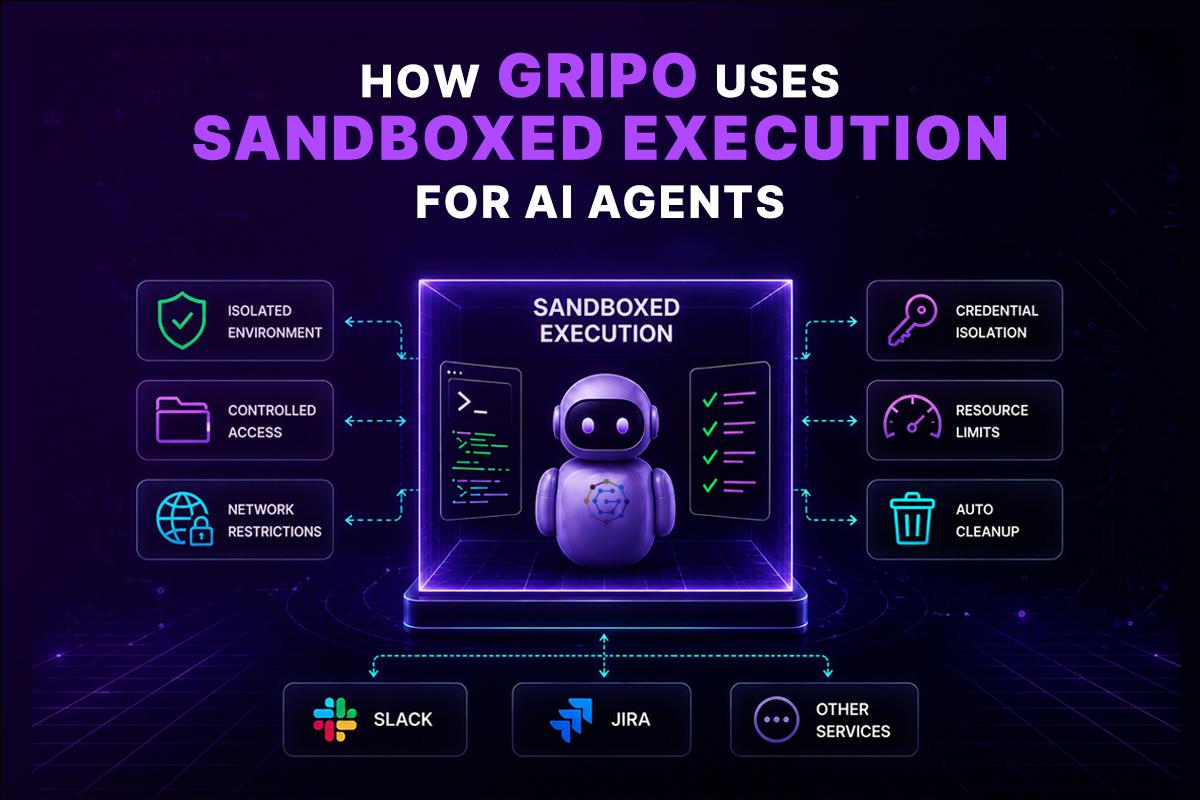
With GRiPO, engineering teams can use isolated execution environments for workflows that involve code, commands, AI agents, and DevOps automation.
An agent can work inside a controlled environment where teams can define what it can access and what happens after the task completes.
This is useful for workflows such as:
Repository → AI Agent → Sandbox → Tests → Results → Workflow
For example:
- A GitHub event triggers a GRiPO workflow.
- The workflow creates an isolated execution environment.
- The repository is provided to the agent.
- The AI agent analyzes the code.
- The agent executes tests or diagnostic commands.
- Results are returned to the workflow.
- Additional plugins can send the result to Slack, Jira, or another service.
- The temporary environment can be discarded.
The advantage isn’t simply running an AI model.
It’s controlling the execution layer around the model.
That distinction becomes increasingly important as AI agents gain more autonomy.
A Practical Enterprise Architecture
A production architecture for AI agent execution might look like this:
User / Developer
|
v
Workflow Trigger
|
v
GRiPO Workflow
|
+—— Plugin / API Integrations
|
v
AI Agent
|
v
Isolated Sandbox
|
+—+—+
| |
Code Tools
| |
+—+—+
|
v
Execution Results
|
v
Workflow Actions
|
+—+——-+———+
| | |
Slack Jira Dashboard
The important security principle is that the agent doesn’t automatically inherit the privileges of the machine running the orchestration platform.
Instead, the execution environment becomes a controlled boundary.
Enterprise AI Agent Security Checklist
Before deploying autonomous AI agents, evaluate these questions:
- Is the agent isolated from the host operating system?
- Can the agent access SSH keys?
- Can it read .env files outside its workspace?
- Are cloud credentials short-lived and scoped?
- Is outbound network traffic restricted?
- Are CPU and memory limits enforced?
- Is execution time limited?
- Can the agent access production systems?
- Are filesystem permissions restricted?
- Are agent actions logged?
- Are execution environments destroyed after use?
- Can security teams audit agent activity?
- Are sensitive credentials stored outside the execution environment?
- Is there a defined incident-response process for compromised agents?
These controls matter regardless of whether the underlying implementation uses containers, microVMs, VMs, or another isolation mechanism.
Sandbox vs Virtual Machine: Which Should You Choose?
There isn’t a universal winner.
The better question is:
What type of workload are you trying to isolate?
Choose a sandbox when you need fast, ephemeral, controlled execution for AI agents, code execution, testing, automation, or other dynamic workloads.
Choose a virtual machine when you need a complete operating system, persistent infrastructure, custom system configuration, or long-running services.
For some enterprise environments, the strongest solution is a combination of both.
A VM can provide the infrastructure boundary while sandboxes provide additional workload-level isolation.
That gives engineering teams multiple layers of control instead of relying on a single security mechanism.
Key Takeaways
- A sandbox provides a controlled environment for executing code and processes.
- A virtual machine virtualizes an entire operating system and provides strong infrastructure-level isolation.
- AI agents benefit from isolated execution because they can dynamically execute commands and interact with code.
- Sandboxes are particularly well suited to short-lived and highly parallel AI workloads.
- VMs remain valuable for persistent workloads and full operating-system requirements.
- A sandbox isn’t automatically secure; filesystem, network, credential, process, and resource restrictions still matter.
- Enterprise architectures can combine VMs and sandboxes for defense in depth.
- The best execution environment depends on workload requirements and the organization’s security model.
What is a sandbox in AI?
A sandbox is an isolated execution environment that allows an AI agent to run code and commands while restricting access to the host system, files, credentials, networks, and other resources.
Is a sandbox more secure than a virtual machine?
Not necessarily. Security depends on the sandbox implementation. A hardened VM can provide extremely strong isolation. A well-designed sandbox can provide strong isolation with lower overhead for specific workloads.
Why do AI agents need a sandbox?
AI agents can dynamically execute commands, install packages, modify files, and interact with external systems. A sandbox limits the potential damage if an agent or the code it executes behaves maliciously or unexpectedly.
What is the difference between a code sandbox and a VM?
A code sandbox is designed primarily to provide controlled code execution, while a VM provides an entire virtualized machine environment with its own operating system.
Can Claude Code run in a sandbox?
Yes. Claude Code can be executed inside an isolated environment where filesystem, network, credentials, and system access can be controlled according to the security requirements of the workload.
Can AI agents run inside virtual machines?
Yes. VMs are commonly used to isolate workloads and can provide a complete operating-system environment for AI agents.
Are sandboxes cheaper than virtual machines?
They can be more resource-efficient for short-lived workloads because they don’t necessarily require a complete guest operating system for every execution. Actual cost depends on the underlying sandbox technology and workload.
Are containers the same as sandboxes?
No. A container is a packaging and isolation technology. A sandbox is a broader concept describing a controlled execution environment. Containers can be used as part of a sandbox architecture, but container isolation isn’t automatically sufficient for every untrusted workload.
Should an AI coding agent run directly on a developer laptop?
For sensitive environments, unrestricted execution on a developer laptop creates unnecessary risk. An isolated execution environment can reduce exposure to local credentials, files, and other sensitive resources.
Can a sandbox access the internet?
Yes, if network access is permitted. Production systems should consider restricting outbound traffic to only the domains and services required by the workload.
Can a sandbox and VM be used together?
Yes. A sandbox can run inside a VM or other infrastructure isolation layer. Combining isolation mechanisms can provide defense in depth for sensitive enterprise workloads.
What is the best execution environment for AI agents?
There isn’t one universal answer. Sandboxes are generally well suited to ephemeral code execution and autonomous AI workloads, while VMs are better suited to complete operating-system environments and persistent infrastructure. Some enterprise architectures use both.