
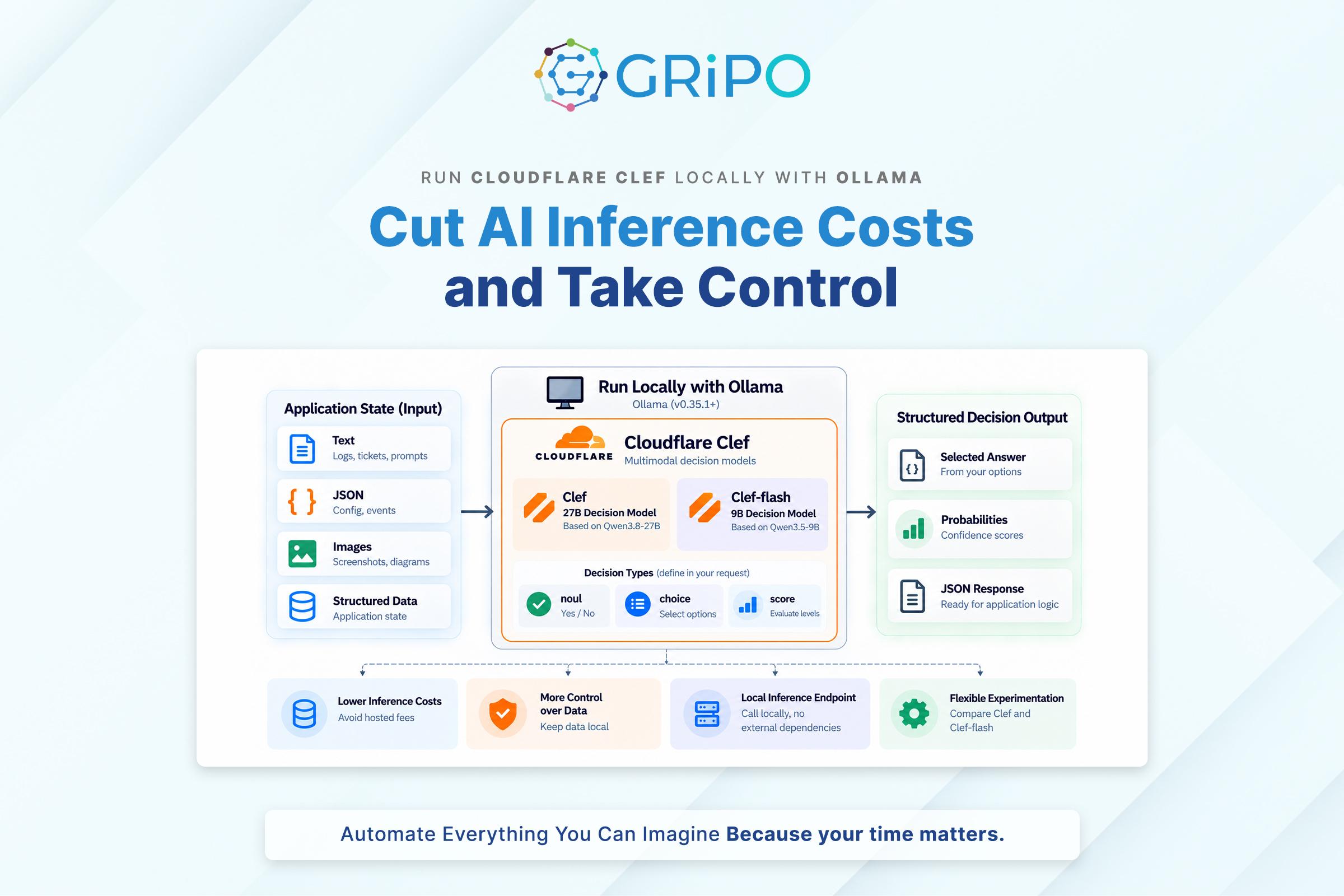
Cloudflare’s Clef is designed for a specific job: making structured decisions from application state rather than generating paragraphs of text, which makes it particularly useful for developers building classification systems, AI agent guardrails, security workflows, and automated DevOps operations. With Ollama, developers can now run Cloudflare Clef locally without sending every decision request to a hosted inference service.
This creates new possibilities for reducing inference costs and choosing where decision-based AI runs, especially for applications that process thousands of support tickets, security events, infrastructure alerts, or tool calls, where paying for hosted inference on every request can become a significant recurring expense. Running the model on hardware you already own can reduce usage-based charges while giving you greater control over where application data is processed.
The local deployment option is more accessible because Clef is available in the Ollama model library, alongside Clef-flash, a smaller model designed for faster decision-making. Both models support text and image inputs and expose decision functionality through Ollama’s /v1/systemone API, with Ollama version 0.35.1 documented as the minimum requirement. You can find the available models and setup details in the official Ollama Clef documentation.
However, local inference is not automatically free or cheaper than hosted inference, since hardware costs, electricity consumption, maintenance, throughput, and engineering time all contribute to the total cost of ownership. The real advantage is the ability to evaluate the models in your own environment, measure their actual operating costs, and determine whether local inference makes financial and operational sense for your workload.
This guide explains how to install Clef with Ollama, make your first decision request, compare Clef with Clef-flash, estimate the potential cost savings, and integrate local decision-making into production workflows.
What Is Cloudflare Clef?
Cloudflare Clef is an open-weight decision model fine-tuned from Qwen3.8-27B. Unlike a conventional generative LLM that primarily produces text token by token, Clef evaluates application state against typed questions and scores the valid answers. The result is a structured decision that application code can consume.
For example, suppose a monitoring system detects repeated checkout failures. Instead of asking an LLM to write an incident summary, the application can ask whether the incident is urgent, which team should handle it, and what severity level applies. The model evaluates the supplied context and returns answers for those questions.
Clef supports three decision types: noul for yes-or-no decisions, choice for selecting from predefined options, and score for evaluating against ordered levels. You define the questions and the valid answer space, so the model’s output fits the decision your application needs to make. See the Ollama Clef model page for the supported request structure.
This design is useful when an application has complex input but bounded output. It can help classify support tickets, route incidents, evaluate proposed tool calls, and assess operational events before an automated workflow proceeds. The model supplies an assessment; your application should still enforce authorization, business policies, and execution controls.
Why Run Cloudflare Clef Locally?
Hosted inference is convenient because the provider manages the serving infrastructure. You don’t need to download model weights, provision GPUs, or maintain an inference runtime. But a hosted service can introduce recurring usage charges, network dependencies, and data-handling considerations.
Running Clef locally gives you another option. Once the model is downloaded, your application can send requests to the local Ollama service without paying a separate per-request inference fee to a remote model provider. This can be particularly attractive for development, evaluation, internal automation, and steady workloads where hardware is already available.
There are four practical benefits.
Lower marginal inference costs: Local inference avoids a separate hosted inference charge for each request. Your costs instead come from hardware, electricity, maintenance, and the opportunity cost of using that hardware.
More control over data processing: Requests can remain on your machine or within your own infrastructure, provided your application, logs, telemetry, and network configuration are also kept local. This can help with sensitive logs, internal tickets, infrastructure metadata, and security events.
Predictable access to a local model: Your application can call a local endpoint without relying on an external inference service for every decision. You still need to handle local service failures, resource exhaustion, and model loading delays.
Flexible experimentation: You can compare Clef and Clef-flash against the same internal evaluation set, adjust the hardware, and measure accuracy and latency before choosing a deployment approach.
Local deployment does introduce operational responsibilities. Your team must manage model updates, hardware capacity, availability, monitoring, access controls, and backups of configuration. For low-volume workloads, hosted inference may remain simpler and cheaper.
Clef vs. Clef-flash: Which Model Should You Choose?
Ollama offers two Cloudflare decision models: Clef, the larger 27-billion-parameter model designed for quality-focused evaluations, and Clef-flash, a smaller 9-billion-parameter variant intended for lower-latency decisions and environments with more limited hardware resources.
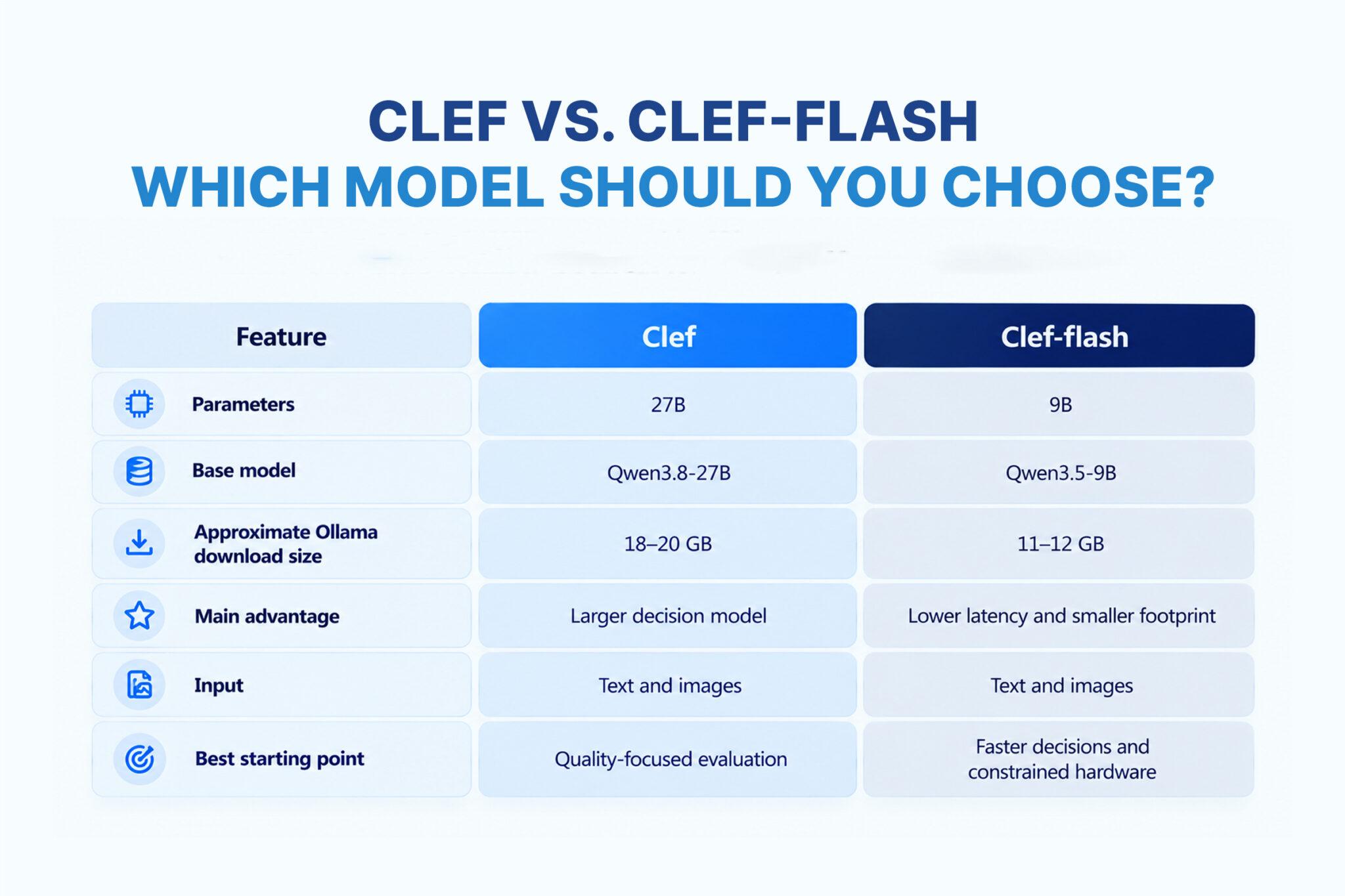
Download sizes are approximate and may vary by model tag and quantization, so check the current Clef and Clef-flash model pages before downloading.
Choosing between these models should depend on your application’s decision-making requirements rather than parameter count alone, because a smaller model may deliver better results for a specific task, while a larger model may not justify its additional memory and compute requirements. Evaluate both models against representative inputs from your actual workload, comparing decision quality, latency, resource consumption, and operating costs before selecting one for production.
Hardware Requirements Before You Install
Clef is a 27B model, so its memory requirements are substantially higher than those of small language models. The Ollama library lists its standard download at approximately 18–20 GB. Clef-flash is smaller, at roughly 11–12 GB. Those figures describe model storage, not the complete amount of memory required to run the model.
You also need memory for runtime overhead, the context, image processing, and other application processes. Longer contexts can increase memory usage significantly. A GPU with enough VRAM can improve throughput, while a CPU-only setup may work but could be too slow for a latency-sensitive production workload.
As a practical starting point, consider the following guidance rather than treating it as an official minimum:
- Clef-flash: A machine with 16 GB or more of system RAM is a reasonable starting point for evaluation. A compatible GPU with sufficient VRAM can improve performance.
- Clef: Start with 32 GB or more of system RAM and, if using a GPU, enough VRAM to accommodate the selected quantization and context. A 24 GB GPU may be a more practical target for some quantized configurations, but actual fit depends on runtime settings.
- CPU-only deployment: Possible configurations depend on available RAM and quantization, but benchmark latency before relying on it for production decisions.
- Long-context workloads: Start with a smaller context window and increase it only when the task requires it. The maximum context advertised by a model page doesn’t mean your hardware can run that context efficiently.
These are planning estimates, not guarantees. Verify that your machine can load the chosen model and leave sufficient memory for the operating system and the application that will call it.
Step 1: Install Ollama and Verify Your Version
Start by installing Ollama for your operating system using the official Ollama download page, which provides the appropriate installer for Windows, macOS, and Linux. If Ollama is already installed, verify your current version before proceeding to ensure it meets Clef’s requirements.
Open a terminal or command prompt and run the following command:
ollama --versionClef’s documented minimum Ollama version is 0.35.1, so if your installed version is older, upgrade Ollama before attempting to download or run the model.
Once installation is complete, ensure the Ollama service is running, as standard desktop installations typically start it as a background service. You can verify that the local API is accessible by running:
curl /api/tagsIf the service is running correctly, the endpoint should return a JSON response listing the models currently installed on your system. If the connection fails, check that Ollama is installed correctly and its service is running before moving on to the next step.
Step 2: Download Cloudflare Clef
Once Ollama is installed and running, download Cloudflare’s Clef decision model from the Ollama library by opening your terminal and executing the following command:
ollama pull clefOllama will download the model files to your machine, and the initial download may take some time depending on your internet connection and available disk space. Before starting, make sure your system has sufficient free storage to accommodate the model and its associated files.
After the download finishes, verify that Clef appears in your local model inventory by running:
ollama listThe output should include clef among the installed models, confirming that the download has completed successfully. If you also want to evaluate the smaller variant, you can download Clef-flash using the following command:
ollama pull clef-flashYou don’t need to download both models to get started, so choose the one that best fits your initial testing requirements. If you’re working on a laptop or building a high-volume classification workflow where response time and resource consumption matter, Clef-flash is a sensible starting point for benchmarking, while Clef is worth evaluating when decision quality is the primary concern and your hardware can accommodate its larger resource requirements.
Step 3: Make Your First Local Decision
Cloudflare Clef uses Ollama’s /v1/systemone endpoint, which differs from the familiar /api/chat and /v1/chat/completions endpoints used by generative chat models. Instead of requesting a conversational response, you submit an application state and a collection of named questions, allowing the model to evaluate the supplied information and return structured, typed answers.
The following example checks whether a piece of text contains a greeting. Although this is a simple classification task, it provides a practical way to verify that Clef has loaded successfully and that the decision endpoint is responding as expected.
Open your terminal and execute the following request:
curl /v1/systemone \
  -H "Content-Type: application/json" \
  -d '{
    "model": "clef",
    "state": "Hello World",
    "questions": {
      "says_hello": {
        "type": "noul",
        "instructions": "Does the state text contain a greeting?",
        "criteria": {
          "true": "The state text contains a greeting.",
          "false": "The state text does not contain a greeting."
        }
      }
    }
  }'
In this request, model specifies the locally installed Clef model, state contains the text being evaluated, and questions defines the decision the model must make. The says_hello question uses the noul type and provides explicit criteria describing what the true and false outcomes represent, giving the model a bounded task instead of asking it to generate an unrestricted text response.
If the request succeeds, the response should contain the result for says_hello, along with probability information provided by the endpoint. Because the exact response structure depends on the API schema, inspect the returned JSON rather than assuming it follows the format of a standard chat completion.
A successful request confirms that Ollama can run Clef locally and evaluate a structured decision without sending the inference request to a hosted model API. For additional examples, supported question types, and the latest request and response schemas, consult the Ollama Clef model documentation and the Ollama decision-model guide.
Step 4: Build a Practical Classification Workflow
Real-world applications often require more than a simple yes-or-no decision, particularly when teams need to classify incoming incidents, determine ownership, and assess urgency before triggering an operational workflow. For example, a support or DevOps team could use Clef to evaluate incident reports and identify the appropriate team for investigation, while simultaneously determining whether the issue represents an urgent customer-facing incident.
In this scenario, the incident report becomes the state, and Clef evaluates two separate questions against the same input: which team should investigate the issue, and whether the report describes an urgent incident. The following example demonstrates how to define both decisions in a single request:
curl /v1/systemone \
  -H "Content-Type: application/json" \
  -d '{
    "model": "clef",
    "state": "Checkout has failed for every customer for 20 minutes after a deployment.",
    "questions": {
      "team": {
        "type": "choice",
        "instructions": "Which team should investigate this issue?",
        "criteria": {
          "platform": "Infrastructure, deployment, or runtime problems",
          "payments": "Payment processing or checkout integration problems",
          "support": "Customer guidance or account questions",
          "review": "Insufficient information or unclear ownership"
        }
      },
      "urgent": {
        "type": "noul",
        "instructions": "Does this report describe an urgent customer-facing incident?",
        "criteria": {
          "true": "A current issue is affecting customer-facing service.",
          "false": "The report does not establish an urgent customer-facing incident."
        }
      }
    }
  }'
The request defines two independent questions using the same incident context: team uses the choice type to select from predefined ownership categories, while urgent uses the noul type to evaluate whether the incident meets the specified urgency criteria. This allows the application to obtain structured classification results without requiring the model to generate a free-form explanation for every decision.
Once the application receives the results, it can use the team classification and urgency assessment to determine the next operational steps, such as creating an incident record, notifying the appropriate on-call channel, or collecting deployment metrics to support the investigation. However, these actions should remain subject to the organization’s operational policies and authorization controls rather than being triggered solely by the model’s output.
For example, an urgent classification should not automatically initiate a production rollback without additional checks, because the decision to reverse a deployment may depend on service ownership, deployment policies, the availability of a verified rollback procedure, and any required human approval. The application should validate the decision, evaluate the relevant safeguards, and execute only the actions permitted by its established rules.
This illustrates a practical advantage of decision models in DevOps automation: Clef can interpret application context and return structured decisions, while the surrounding application remains responsible for policy enforcement, permissions, and controlled execution.
Step 5: Estimate Whether Local Inference Saves Money
Running Clef locally with Ollama can reduce hosted inference charges, particularly for applications that process a high volume of recurring classification and decision requests. However, the actual savings depend on request volume, hardware requirements, model performance, and operating expenses, so you should compare the complete monthly cost of both approaches rather than assuming that downloading a model makes inference free.
Hosted inference costs typically depend on the number of requests, the provider’s pricing model, and any additional platform or network charges. For a workload with predictable usage, you can estimate the monthly expense by multiplying the expected number of requests by the average cost per request and adding any applicable service fees.
Local inference costs include hardware purchase or rental amortization, electricity consumption, maintenance, monitoring, and engineering time. You should also consider the cost of keeping the machine available, managing model updates, and ensuring that local inference can handle the required workload without creating performance bottlenecks.
For example, if your team already owns a GPU workstation that remains idle for much of the day, running Clef locally may have a relatively low incremental cost. However, if you need to purchase an expensive GPU server and keep it running continuously to process a small number of requests, hosted inference may be the more economical option.
To make a reliable comparison, measure request latency and throughput under realistic workloads, then estimate the hardware capacity required to support your expected demand. Account for concurrent requests, model-loading overhead, input context size, peak traffic, and resource contention, since these factors can affect both operating costs and the responsiveness of your application.
Calculate Your Break-Even Point
A practical starting point is to compare the total monthly expense of hosted inference against the fully loaded cost of running Clef locally, including the hardware and operational resources required to achieve equivalent performance.
- Hosted inference: Monthly request charges + platform fees + applicable network costs.
- Local inference: Hardware amortization or rental + electricity + maintenance + monitoring + engineering time.
If local inference costs less while meeting your decision-quality, throughput, and latency requirements, deploying Clef with Ollama may be financially worthwhile. If the local deployment requires expensive hardware, additional operational effort, or fails to meet your service-level objectives, the expected savings may disappear.
The most reliable approach is to benchmark Clef against your actual workload, calculate the total cost of ownership for both deployment options, and make the decision using measured performance and realistic monthly cost estimates rather than theoretical savings alone.
Step 6: Measure Accuracy, Latency, and Resource Use
Before integrating Clef into a production workflow, build a representative test set that reflects the decisions your application will encounter in practice, including routine cases, ambiguous inputs, edge cases, and scenarios where the correct outcome is difficult to determine. Evaluate Clef and Clef-flash using the same inputs and question definitions so that you can compare their decision quality, performance, and resource requirements under consistent conditions.
Track at least four key metrics during testing:
- Decision quality: Measure classification accuracy and examine the types of errors each model makes, particularly false positives, false negatives, and incorrect classifications that could trigger inappropriate operational actions.
- Latency: Record median response time and tail latency under realistic workloads, including concurrent requests and periods of increased demand, to understand how consistently each model responds.
- Resource utilization: Monitor RAM, VRAM, CPU utilization, and GPU utilization to determine the hardware requirements of each model and identify potential resource bottlenecks.
- Operational reliability: Track request timeouts, failed responses, model-loading delays, and recovery behavior to establish whether the deployment can operate reliably under expected production conditions.
Model confidence or probability values can provide useful information, but they should not be treated as proof that a decision is correct. Evaluate whether these values correlate with actual outcomes across your test set, and establish appropriate decision thresholds, validation rules, and fallback behavior before allowing the model to trigger high-impact actions automatically.
It is equally important to benchmark the complete application workflow rather than measuring model inference in isolation, because a fast decision request may have little effect on overall execution time if the application spends most of its time collecting logs, querying cloud APIs, retrieving contextual information, or waiting for human approval. Testing the entire workflow will help you identify where local inference improves performance, where other components introduce delays, and whether Clef or Clef-flash is the better fit for your production requirements.
Security Considerations for Local Clef
Running Clef locally with Ollama can help keep inference requests within your own environment, giving your team greater control over how application data is processed. However, local deployment does not automatically guarantee privacy or security, because your application may still transmit data to external APIs, write sensitive inputs to logs, or expose the Ollama endpoint to unauthorized machines if the surrounding infrastructure is not configured correctly.
Start by restricting access to the local Ollama API and keeping it bound to trusted network interfaces unless remote access is explicitly required. Avoid exposing the service directly to the public internet without an appropriate authentication mechanism and network-security layer, and protect the host machine, model files, configuration, and application logs against unauthorized access. You should also avoid including credentials, API keys, or other secrets in the model’s input state unless they are genuinely required for the decision being evaluated.
For enterprise deployments, security requires ongoing operational controls in addition to network isolation. Establish model versioning, monitoring, access controls, and a documented process for evaluating model updates before rolling them out to production. When Clef is integrated into an automated infrastructure workflow, its output should be validated against deterministic policies and authorization rules before any command or operational action is executed.
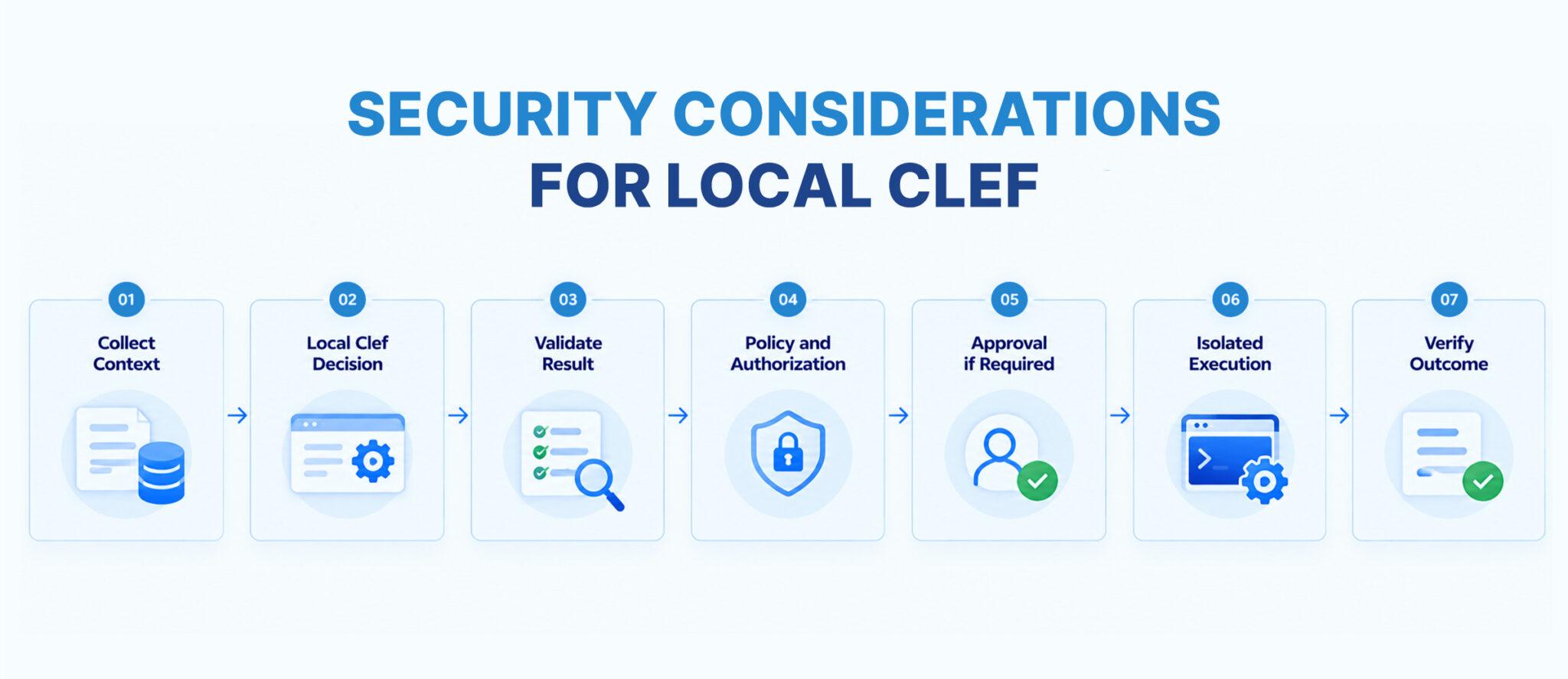
A secure architecture separates decision-making from execution, ensuring that the model can inform an action without independently gaining authority over infrastructure. A typical workflow looks like this:
Collect Context
      |
      v
Local Clef Decision
      |
      v
Validate Result
      |
      v
Policy and Authorization
      |
      v
Approval if Required
      |
      v
Isolated Execution
      |
      v
Verify Outcome
In this architecture, the application first collects the relevant context and submits it to the locally running Clef model, then validates the returned decision before checking whether the proposed action complies with established policies and authorization requirements. Actions that require additional oversight proceed through an approval stage, while permitted operations run inside an isolated execution environment and are verified afterward to confirm that the intended outcome was achieved.
This approach makes local inference one component of a controlled and auditable automation system rather than an unrestricted authority over infrastructure. By combining local decision-making with least-privilege access, deterministic policy enforcement, isolated execution, and outcome verification, engineering teams can benefit from local AI inference while maintaining appropriate security and operational safeguards.
Where GRiPO Fits
Local Clef can provide the decision step, but production automation also needs integrations, orchestration, execution, and verification. That’s where a workflow platform can be useful.
GRiPO brings together visual workflow automation, AI agents, plugins, and isolated code execution. A workflow could collect a monitoring event, retrieve deployment context, call a locally hosted decision service, apply policy checks, and then notify an engineer or execute an approved runbook.
For example, a workflow could identify a possible cloud-cost anomaly, classify the resource and recommended action, notify its owner, and wait for approval before running a cleanup script. GRiPO’s sandbox execution provides an isolated place for supported scripts and CLI tools, while workflow logic controls how the result moves through the system.
The exact integration depends on your deployment: the GRiPO workflow must be able to reach the Ollama service securely, and the local endpoint should not be exposed publicly just to make the connection work. Where a workflow runs outside the local machine, use an appropriate private network path or authenticated gateway.
The value is the separation of responsibilities. Clef makes the decision, GRiPO orchestrates the workflow, and the execution environment runs approved operations with the necessary controls.
Final Recommendation
Running Cloudflare Clef locally with Ollama is a practical option for engineering teams that need structured decision-making while seeking greater control over inference costs, deployment flexibility, and data processing. The best starting point is a small proof of concept that verifies the /v1/systemone endpoint works correctly and compares Clef with Clef-flash using representative examples from your actual workload, allowing you to evaluate decision quality, latency, and resource consumption before committing to either model.
Once you have established that the models meet your technical requirements, assess the financial implications by comparing the complete cost of local inference against hosted alternatives, including hardware, electricity, maintenance, monitoring, and engineering time rather than considering API charges alone. Equally important, keep policy enforcement and authorization separate from model output, particularly when decisions can trigger infrastructure changes, affect production services, or expose sensitive information.
If local inference meets your quality, performance, security, and cost requirements, you can expand gradually from development experiments to internal classification workflows and, eventually, carefully controlled production automation. This measured approach allows your team to validate the benefits of local decision models, identify operational limitations early, and adopt AI-powered automation without compromising reliability or governance.
FAQ Section
Can you run Cloudflare Clef locally?
Yes. You can run Cloudflare Clef locally using Ollama. Install Ollama 0.35.1 or later, download the model with ollama pull clef, and use the /v1/systemone endpoint to submit decision requests.
How do I install Cloudflare Clef with Ollama?
Install Ollama, verify your version, and run ollama pull clef. Once the model is downloaded, send a request to /v1/systemone containing the model name, input state, and typed questions.
Is Cloudflare Clef free to run locally?
The Clef model weights are available under the Apache 2.0 license, and Ollama supports local inference without a separate hosted inference charge per request. Hardware, electricity, maintenance, and engineering time still create costs. Review the applicable license and distribution terms for your use case.
What hardware is needed to run Cloudflare Clef?
The standard Ollama download is approximately 18–20 GB. A machine with 32 GB or more of system RAM is a reasonable starting point for evaluating Clef, while a compatible GPU with sufficient VRAM can improve performance. Actual requirements depend on quantization, context size, and runtime configuration.
What is the difference between Clef and Clef-flash?
Clef is a 27B-parameter model intended for decision workloads where model quality is a priority. Clef-flash is a smaller 9B model designed for faster decisions and a lower resource footprint. Test both against your own workload before selecting one.
Does local Clef need an internet connection?
An internet connection is needed to download Ollama and the model initially. After the model is installed, inference can run locally without sending each decision request to a hosted model service, provided your application and surrounding workflow do not depend on external services.
What is the Ollama /v1/systemone endpoint?
It is Ollama’s endpoint for decision models compatible with the System One API approach. Requests provide a state and named questions, with each question specifying its type and instructions. The response contains the corresponding typed answers.
Can Cloudflare Clef process images locally?
Yes. The Ollama Clef and Clef-flash listings describe support for text and image inputs. Image requests can include base64-encoded PNG, JPEG, or WebP data through the documented API format.
Does running Clef locally guarantee data privacy?
No. Local inference can reduce data sent to hosted inference providers, but privacy also depends on application behavior, logs, telemetry, network configuration, and access controls. Review the complete data flow before processing sensitive information.
Is local inference always cheaper than cloud inference?
No. Local inference can be cost-effective when suitable hardware is already available and the workload is steady. For low-volume workloads, purchasing and maintaining a GPU server may cost more than using a hosted service.
Can Clef make decisions automatically in production?
Clef can provide structured assessments for application workflows, but it should not be the sole authority for sensitive actions. Use deterministic policies, authorization checks, monitoring, and human approval where required before executing infrastructure or security changes.
Can GRiPO work with a locally hosted Clef model?
A GRiPO workflow can be designed to call a local decision service when the deployment has a secure network path to the Ollama endpoint and the necessary integration is configured. Workflow logic can then validate the decision, apply policy, and execute approved actions in an isolated environment.
Key Takeaways
- Cloudflare Clef can run locally using Ollama, without a separate hosted inference charge for each local request.
- Ollama requires version 0.35.1 or later for Clef.
- Clef has 27B parameters; Clef-flash has 9B and is designed for faster decisions.
- The /v1/systemone API accepts application state and typed questions.
- Local inference offers more control over data processing, but doesn’t eliminate infrastructure and maintenance costs.
- Model quality, latency, memory requirements, and total cost should be measured on representative workloads.
- Production decisions still require policy enforcement, authorization, monitoring, and safe failure handling.
- GRIPO can orchestrate local decision services with integrations, workflow logic, and isolated execution.