
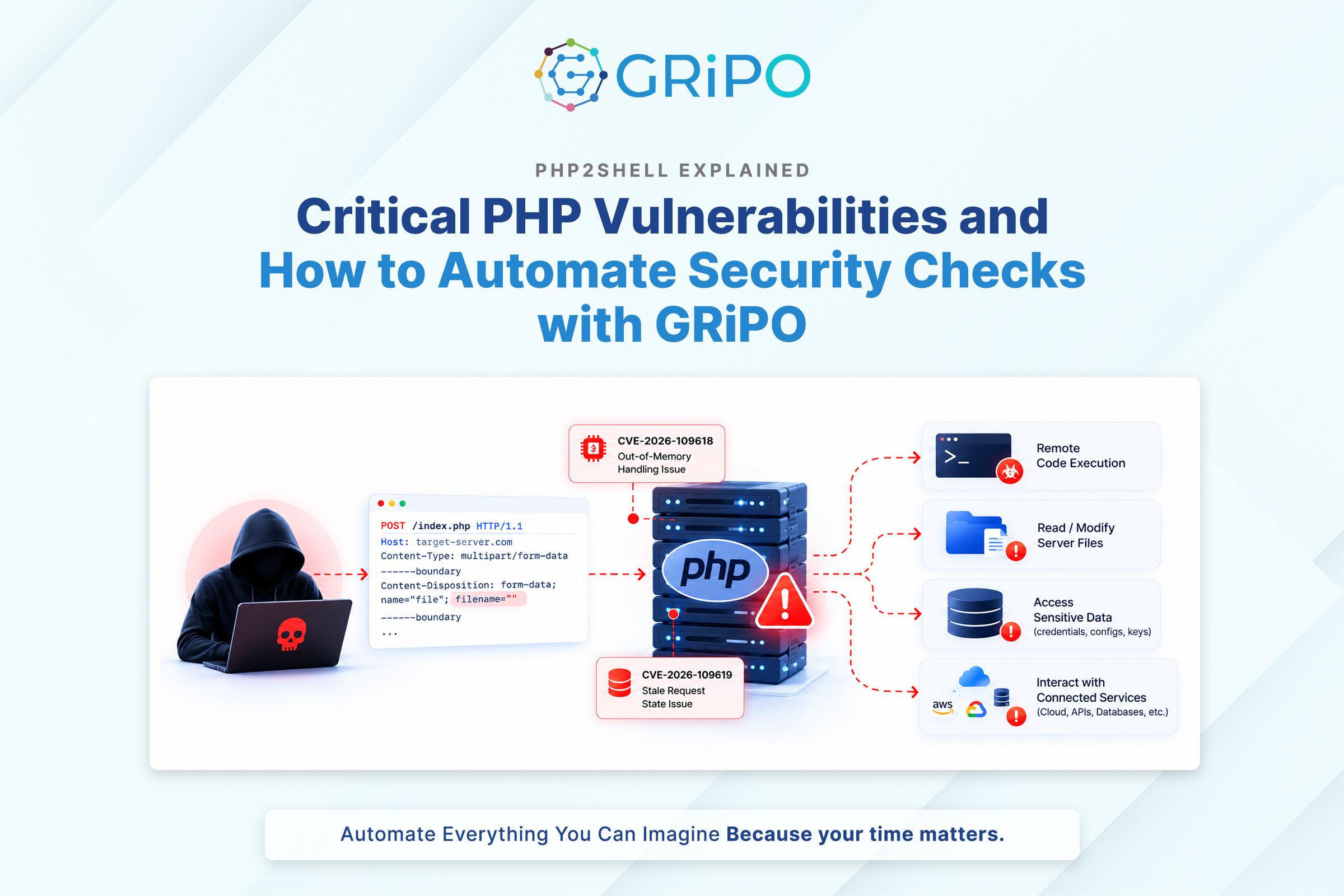
A PHP security update released on October 21, 2026, addressed two critical vulnerabilities collectively known as PHP2Shell. Tracked as CVE-2026-109618 and CVE-2026-109619, the flaws can allow remote code execution under affected conditions, potentially exposing application data, credentials, and connected services.
Both vulnerabilities carry a CVSS v4.0 score of 9.2. The PHP development team released patched versions for supported branches and recommends updating affected installations. The advisory covers environments including PHP-FPM, Apache mod_php, php-cgi, FrankenPHP, and LiteSpeed.
The risk extends beyond a particular framework or CMS. WordPress, Drupal, Joomla, Laravel, and custom PHP applications can all depend on a vulnerable PHP runtime. Updating application plugins alone will not fix a vulnerability in the PHP engine.
Security update – October 25, 2026: A separate PHP remote code execution vulnerability, CVE-2026-115560, was disclosed on October 23. The PHP2Shell releases do not fix this separate issue. Review the latest PHP and vendor advisories for applicable updates and temporary mitigations.
This guide explains the vulnerabilities, affected versions, safe patching procedures, and how automation can help teams verify remediation across large server fleets.
What Is PHP2Shell?
PHP2Shell refers to two critical vulnerabilities in PHP’s core runtime. Both involve unsafe handling of memory or internal request state during exceptional execution paths.
- CVE-2026-109618: A remote code execution vulnerability associated with out-of-memory handling and improperly initialized request state.
- CVE-2026-109619: A remote code execution vulnerability associated with stale internal state referencing memory after it has been freed.
The upstream PHP versions that fix both vulnerabilities are:
| PHP Branch | Fixed Version |
| PHP 8.5 | 8.5.12 |
| PHP 8.4 | 8.4.27 |
| PHP 8.3 | 8.3.36 |
| PHP 8.2 | 8.2.35 |
These are upstream version thresholds. Linux distributions, hosting providers, and enterprise vendors may backport fixes into packages with different version strings. Always check the relevant vendor’s security advisory.
PHP 8.1 and older branches need particular attention because they are outside the upstream project’s normal security-support policy. Some vendors may provide backported fixes, but administrators must verify the status of their specific package. PHP 8.2 is also approaching its planned end of security support on December 31, 2026, so teams should plan migration to a supported branch.
Importantly, an application’s version does not establish whether its PHP runtime is secure. A fully updated WordPress site can still run on a vulnerable PHP installation.
How the Two PHP2Shell Vulnerabilities Work
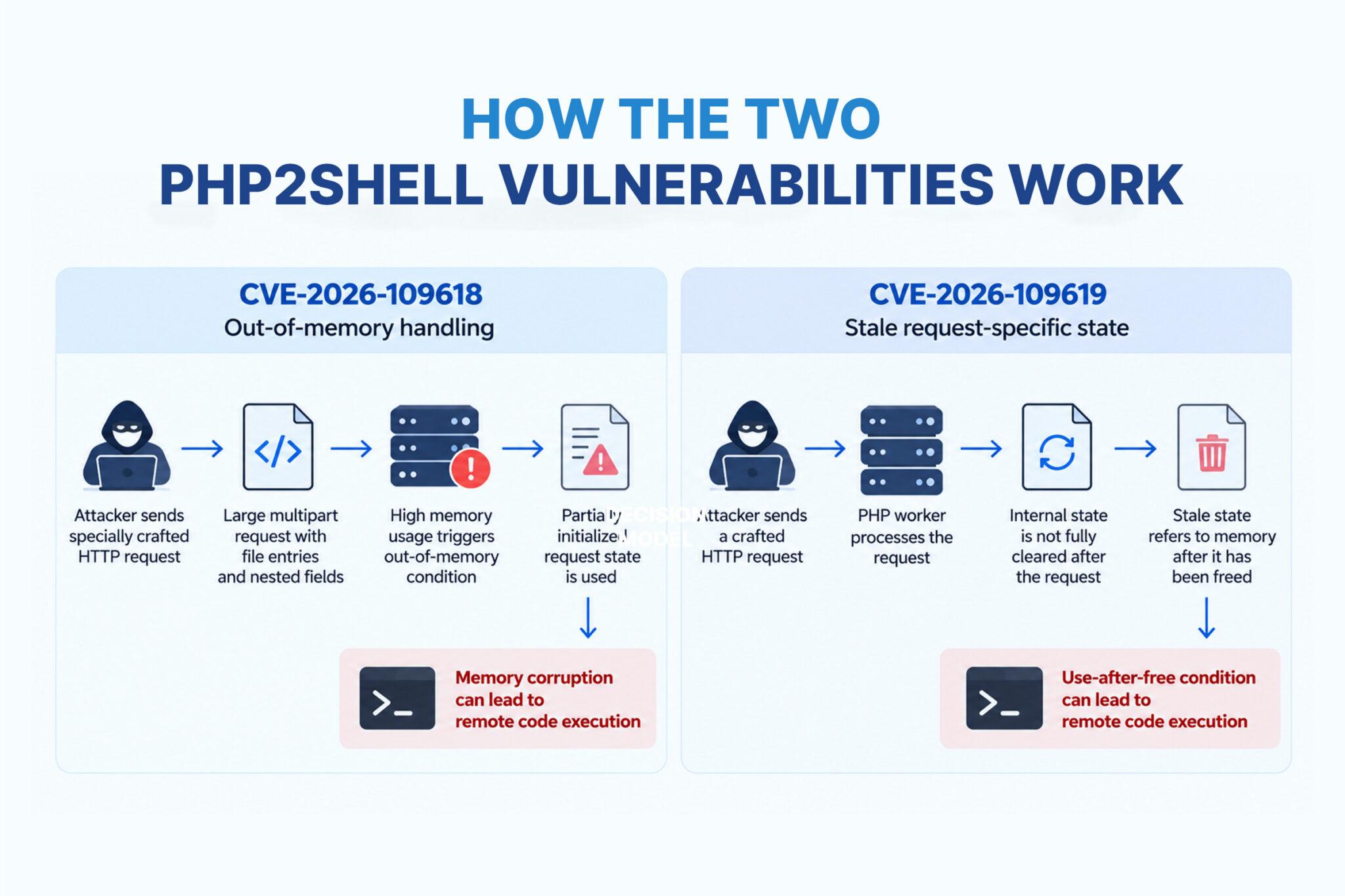
CVE-2026-109618: Unsafe out-of-memory handling
PHP manages memory while processing incoming requests. Under certain exceptional conditions, an out-of-memory event can interrupt an operation before internal request data has been fully initialized.
The vulnerable execution path does not safely handle this incomplete state. Cleanup code may behave as though initialization succeeded, allowing partially initialized memory to be interpreted as valid internal data. Under affected conditions, this can lead to memory corruption and remote code execution.
One described attack path involves specially structured multipart HTTP requests with empty-filename file entries and nested array-style field names. Processing these entries can consume memory and may help trigger an allocation failure at a critical moment. Exploitability depends on the PHP build, configuration, and request-processing path.
This is not simply a memory-limit problem. Changing the PHP memory limit is not a substitute for installing a fixed release. Follow the official PHP advisory before applying any temporary configuration change.
CVE-2026-109619: Stale internal request state
PHP workers can process multiple requests during their lifetime. Internal state associated with one request must be reset before the memory used by that request is released.
The second vulnerability occurs when a reference to request-specific memory remains after that memory has been freed. A subsequent request may encounter the stale reference before normal initialization replaces it.
This is a form of use-after-free. If newly allocated data reuses the freed memory region, PHP may interpret attacker-influenced data as a trusted internal structure. Under the right conditions, this can lead to memory corruption and remote code execution.
Techniques such as heap grooming may influence memory allocation patterns, but memory disclosure alone does not guarantee reliable code execution. The practical risk depends on the affected runtime and execution environment.
Restarting workers after an update is important because existing processes may continue running previously loaded code. However, restarting without applying the security fix does not resolve the vulnerability.
How to Check Whether Your PHP Server Is Affected
Before patching, identify the runtime that actually handles web requests.
Start by checking the command-line PHP version:
php -vThen inspect the executable and its configuration:
which php
php --iniThese commands provide useful inventory information, but they do not prove that the website’s runtime is patched. The CLI version may differ from the PHP version used by the web server.
Check the relevant deployment:
- PHP-FPM: Identify the active service, pool, package, and socket or port used by the web server.
- Apache mod_php: Verify the loaded PHP module and its package version.
- php-cgi, FrankenPHP, and LiteSpeed: Follow the relevant runtime and package-management procedures.
- Docker and Kubernetes: Check the image tag and digest used by each running workload, not just the host.
- Managed hosting: Ask the provider to confirm the patched build serving each application.
For larger environments, maintain an inventory containing the host or workload identity, PHP runtime type, version, package source, application owner, exposure, and patch status. Include staging, development, internal applications, and less frequently used services.
How GRiPO Helps Detect PHP2Shell Across Hundreds of Machines
Finding one vulnerable server is manageable. Identifying the same issue across hundreds of machines, containers, and application environments requires a repeatable process.
GRiPO is an AI-powered workflow automation platform that can help teams coordinate inventory checks, notifications, remediation tracking, and post-update verification through configured integrations and controlled execution.
A PHP2Shell workflow could follow these steps:
- Collect inventory: Retrieve PHP versions, workload identities, environments, and patch status from connected systems.
- Identify potentially vulnerable installations: Compare inventory data against maintained PHP security advisories and vendor-specific fixed-version rules.
- Prioritize exposure: Flag internet-facing systems and critical applications for urgent review.
- Notify owners: Send findings to the responsible DevOps or security team and create remediation tickets.
- Coordinate patching: Track updates through the organization’s approved change process.
- Verify remediation: Recheck the runtime after deployment and flag systems that remain vulnerable or cannot be verified.
- Report progress: Summarize affected, remediated, pending, and unverified workloads.
Instead of checking every server manually, teams can process inventory from multiple machines through a repeatable workflow in a single run, subject to configured integrations, permissions, and execution capacity.
GRiPO’s visual workflows, plugins, AI agents, and sandboxed code execution can help coordinate these tasks. AI agents can summarize findings and organize exceptions, while explicit version rules and vendor advisories should determine whether a runtime is considered patched.
Detection and remediation must remain separate. Creating a patching task does not prove that a server is secure. A workflow should confirm the actual runtime serving requests and account for vendor backports, multiple PHP installations, and container deployments. Any update or restart should use scoped permissions, approved change procedures, and audit logging.
Explore GRiPO at https://gripo.io/.
How to Patch PHP2Shell Safely
Applying the appropriate security update is the primary remediation step. The exact procedure depends on the operating system, package source, hosting provider, and PHP installation method.
1. Identify the package owner
Determine whether PHP is managed by the operating system, an enterprise Linux vendor, a hosting panel, a custom build, or a container image. Avoid replacing a vendor-managed binary with an arbitrary installation that could break dependencies or leave other runtimes vulnerable.
2. Install a fixed build
Use the fixed upstream versions listed earlier, or the equivalent patched package confirmed by your operating-system, hosting, or PHP vendor.
For older PHP branches, verify whether a supported backport is available. If no suitable fix exists, prioritize migration to a supported and patched runtime.
3. Restart the relevant services
Restart the applicable PHP-FPM service, web server, application container, or runtime according to vendor guidance. Running workers may continue using code loaded before the package update.
For Docker and Kubernetes, rebuild or pull a patched image, deploy it through the normal release process, and confirm that old replicas have been replaced.
4. Verify the deployed runtime
Check the package version and service status, then confirm the runtime inside the environment actually serving requests. Verify each relevant PHP-FPM pool, hosting-managed installation, and running container.
5. Test critical application functions
After patching, test logins, file uploads, APIs, background jobs, scheduled tasks, and required PHP extensions. Record the deployed package or image version, deployment time, test results, and responsible owner.
The remediation is complete only when the fix is deployed and verified—not merely when an update has been requested.
What If You Cannot Patch Immediately?
There are no complete configuration-only mitigations for CVE-2026-109618 and CVE-2026-109619. If an immediate update is blocked, reduce exposure where possible, consult your hosting or platform vendor, and follow the official advisories.
If operationally feasible, take the affected service offline or restrict external access until a fix can be applied. A web application firewall, rate limiting, hidden version banners, or a maintenance window should not be treated as a replacement for patching.
Temporary risk-reduction measures
The PHP advisories describe measures that may reduce exposure to specific attack paths. Their applicability depends on the runtime and configuration.
For CVE-2026-109618:
- Review memory_limit: The advisory identifies administratively setting memory_limit=-1 as a temporary mitigation. This removes PHP’s per-request memory limit and can increase the risk of memory exhaustion. Do not apply it blindly; follow the official advisory and assess availability risks.
- Keep request limits conservative: Review post_max_size and upload_max_filesize, and enforce suitable limits on decoded request size, multipart parts, headers, field counts, and nested input depth where supported.
- Apply limits at the correct layer: Do not rely solely on Content-Length. Use appropriate web-server or application request limits, with container or cgroup resource limits as an additional availability safeguard.
For CVE-2026-109619:
- Review session upload progress: The advisory describes disabling session upload progress as a mitigation for specific attack paths.
- For PHP 8.5, review fatal-error backtraces: The documented temporary measure is to set fatal_error_backtraces=0 administratively and restart relevant workers.
- Review early configuration diagnostics: Investigate invalid or deprecated per-request settings that can generate warnings before normal request initialization. Hiding errors does not resolve the underlying flaw.
For the separate CVE-2026-115560, the PHP Security Team recommends disabling session upload progress until an appropriate security update is available. The setting is:
session.upload_progress.enabled=0
Review the latest PHP and vendor advisories to confirm applicability, test for application impact, and restart relevant workers if required. Do not assume this setting fixes every PHP2Shell attack path.
Temporary measures reduce specific risks; they do not replace the appropriate security update.
How to Harden a PHP Server Beyond This Vulnerability
Patching PHP2Shell should be the immediate priority. These additional controls can help limit the impact of future vulnerabilities.
Run PHP with least privilege
PHP workers should not run as root. Use restricted service accounts and limit access to application files, upload directories, temporary files, and secrets. Separate applications that do not need to trust one another so that compromising one does not automatically expose another.
Protect credentials and secrets
Database passwords, cloud credentials, API tokens, and private keys should not be readable by every application process. Use managed secret storage or appropriately restricted secret injection. Avoid committing production secrets to source control or baking them into container images.
If compromise is suspected, rotate potentially affected credentials from a clean administrative environment.
Restrict outbound network access
Where practical, limit outbound connections to destinations required by the application. Separate application workloads from administrative interfaces and sensitive internal services. Network restrictions help contain a compromise but do not fix the vulnerable runtime.
Keep applications and dependencies updated
Review framework versions, Composer dependencies, PHP extensions, CMS core files, themes, and plugins. Remove unused components and monitor security advisories relevant to the actual dependency set.
Improve logging and detection
Centralize web-server, PHP-FPM, operating-system, application, and security logs where possible. Monitor unexpected child processes, suspicious outbound connections, unusual file modifications, and access to locations the application should not change.
The absence of an alert does not prove that a server is clean.
Use isolation as a containment layer
Containers, process restrictions, resource limits, and carefully configured execution environments can reduce the blast radius of a compromised service. Their effectiveness depends on privileges, mounted files, host configuration, and network access. Isolation complements patching; it does not replace it.
What to Do If You Suspect Exploitation
If an affected server shows signs of suspicious activity, treat the situation as a potential security incident.
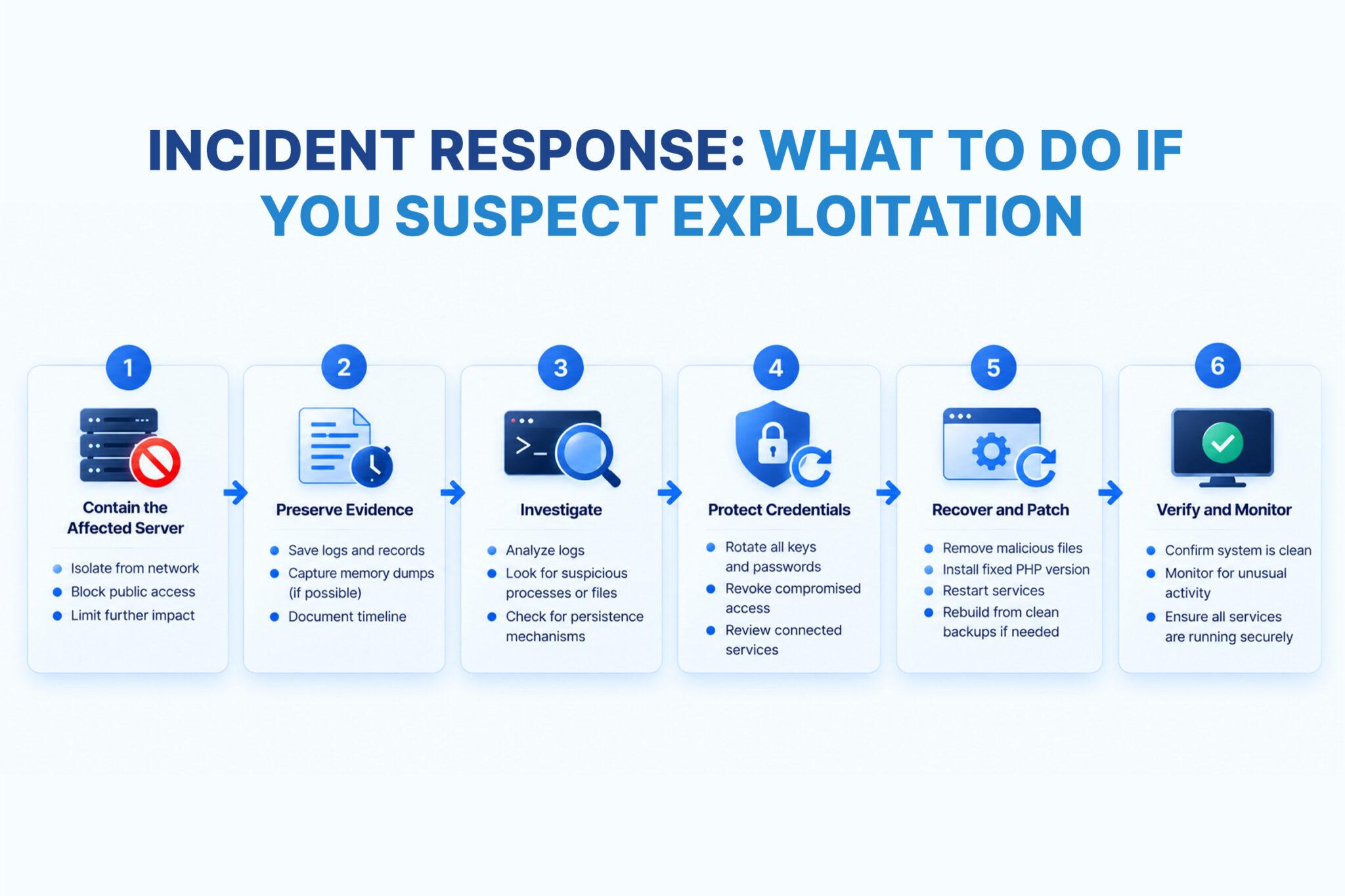
- Contain exposure: Restrict public access or isolate the affected workload where business continuity permits.
- Preserve evidence: Retain relevant web-server, PHP, system, cloud, and endpoint logs before rebuilding or deleting the environment.
- Investigate activity: Review unexpected processes, file changes, scheduled tasks, outbound connections, and configuration changes.
- Protect credentials: Rotate potentially exposed secrets from a clean administrative environment and investigate suspicious account activity.
- Patch and recover: Deploy a fixed runtime. If compromise is confirmed or cannot be ruled out, follow your incident-response and recovery plan rather than relying only on an in-place update.
- Verify recovery: Confirm that the runtime is patched, persistence has been addressed, critical functions work, and monitoring is active.
For systems that handle sensitive data or critical business functions, involve your internal security team or an incident-response provider. Patching closes a vulnerability but does not, by itself, establish that a previously exposed server is clean.
Final Recommendation: Patch First, Verify Everywhere
PHP2Shell demonstrates why runtime security requires more than updating application code. Teams should identify affected PHP installations, apply the appropriate vendor-supported fixes, restart relevant workers, and verify the runtime actually serving requests.
For larger environments, GRiPO can help coordinate inventory checks, remediation tracking, owner notifications, and post-update verification through configured automation workflows. The objective is to identify affected machines efficiently and confirm that remediation reaches every relevant workload.
Frequently Asked Questions
What is PHP2Shell?
PHP2Shell is the name associated with two critical PHP runtime vulnerabilities, CVE-2026-109618 and CVE-2026-109619, which can allow remote code execution under affected conditions.
Which PHP versions need attention?
Affected upstream versions include PHP 8.5.11 and earlier, 8.4.26 and earlier, 8.3.35 and earlier, and 8.2.34 and earlier. Older branches also require review. Check your vendor’s advisory for backported fixes.
Which PHP versions fix PHP2Shell?
The upstream fixed versions are PHP 8.5.12, 8.4.27, 8.3.36, and 8.2.35. Confirm the appropriate package with your operating system, hosting provider, or PHP vendor.
Can PHP2Shell affect WordPress websites?
Yes. A WordPress site can be affected if its underlying PHP runtime is vulnerable. Updating WordPress plugins alone does not patch the PHP engine.
Does PHP-FPM need to be patched?
Yes. PHP-FPM is among the affected serving environments. Update the runtime and verify that the relevant workers are running the patched build.
Can a web application firewall prevent PHP2Shell?
A WAF may block some suspicious requests, but it is not a complete fix. Install the appropriate PHP security update.
Is changing php.ini enough to fix PHP2Shell?
No. Some configuration changes may reduce exposure to specific attack paths, but they do not eliminate the underlying vulnerabilities.
How can I check whether my PHP server is patched?
Start with php -v, then check the web-serving runtime, PHP-FPM pools, containers, or hosting-managed installations. Verify the deployed package against the relevant vendor advisory.
What should I do if I suspect exploitation?
Contain the affected system, preserve logs, investigate suspicious activity, protect potentially exposed credentials, patch the runtime, and follow your incident-response procedures.
Does updating PHP require application testing?
Yes. Test critical application paths, uploads, APIs, background jobs, and extensions after updating and restarting the relevant services.
How can GRiPO help with PHP security remediation?
GRiPO can coordinate configured inventory checks, remediation tasks, notifications, and verification through workflows and integrations. The relevant data sources, permissions, and actions must be configured and validated for your environment.
Does patching PHP2Shell also fix CVE-2026-115560?
No. The October 21, 2026, PHP2Shell releases do not address the separate CVE-2026-115560 disclosure. Review the latest PHP security advisories and vendor guidance for additional required actions.
Key Takeaways
- PHP2Shell consists of two critical PHP runtime vulnerabilities: CVE-2026-109618 and CVE-2026-109619.
- Install the appropriate patched PHP build and verify vendor-specific backports.
- Check every relevant web-serving runtime, container, and hosting-managed installation.
- Restart affected workers and test critical application functions after patching.
- Temporary mitigations and WAF rules do not replace the security update.
- Investigate possible compromise instead of assuming that patching alone restores trust.
- Use automation to coordinate remediation across large fleets, but mark systems as fixed only after verification.
Secure your operations with GRiPO: Explore how workflow automation can help your team coordinate repeatable security checks and remediation tasks at https://gripo.io/.