
Artificial intelligence is changing how developers write, review, and maintain software. Modern coding agents no longer stop at generating code snippets. They can inspect repositories, execute shell commands, install dependencies, update configuration files, troubleshoot build failures, and automate repetitive engineering tasks.
OpenClaw belongs to this new generation of AI coding assistants. Running locally gives developers fast access to project files without relying entirely on cloud infrastructure. That convenience is one reason local AI agents are becoming increasingly popular.
But convenience introduces an important question.
How much of your computer can an AI agent actually access?
Many developers assume “running locally” automatically means “private.” That’s only partially true. Your prompts may never leave your machine, but the AI agent still operates inside an environment that contains valuable information.
That environment often includes:
- Source code
- Git repositories
- Environment variables
- SSH keys
- Cloud credentials
- Infrastructure configuration
- Internal documentation
- API tokens
- Customer data
- Database connection strings
If an AI agent has permission to read files or execute commands, it may access far more than the single file you’re currently editing.
This isn’t a flaw unique to the AI coding agent. The same consideration applies to any local AI coding agent capable of interacting with your operating system.
The real security question isn’t whether an AI model is trustworthy.
It’s whether the environment surrounding that model has appropriate boundaries.
Why Developers Choose Local AI Agents
There are good reasons why engineering teams prefer local AI assistants.
Running an agent locally often provides:
- Faster response times
- Lower latency
- Better integration with IDEs
- Offline development
- More control over execution
- Easier experimentation
- Reduced dependence on external services
For many workflows, local execution is exactly the right choice.
A developer might ask an AI agent to:
- Explain unfamiliar code
- Generate unit tests
- Refactor a service
- Review a pull request
- Update Terraform modules
- Create Kubernetes manifests
- Investigate CI/CD failures
- Debug application logs
These tasks require access to project files. That’s expected.
Problems arise when the AI agent gains access to much more than the project itself.
What Can OpenClaw Potentially Access?
The answer depends on how you’ve configured the agent, what permissions you’ve granted, and which tools or plugins are enabled.
In many development environments, an AI agent may be able to interact with resources such as:
| Resource | Potential Impact |
| Source code | Intellectual property exposure |
| .env files | API keys and secrets |
| Git configuration | Repository information |
| SSH keys | Infrastructure access |
| AWS credentials | Cloud resource management |
| Azure service principals | Administrative access |
| Google Cloud credentials | Project-wide permissions |
| Kubernetes configuration | Cluster administration |
| Terraform state files | Infrastructure secrets |
| Local databases | Customer or application data |
| Build artifacts | Internal binaries |
| Browser cookies | Session information (depending on permissions) |
Not every installation exposes all of these resources. However, many developer laptops already contain years of accumulated credentials and configuration files.
An AI agent doesn’t need to search intentionally for sensitive information to encounter it. A broad file search, recursive directory scan, or shell command can reveal data that was never meant to be part of the conversation.
Why Running AI Agents Locally Creates Security Risks
Most discussions about AI coding assistants focus on whether AI providers can see your source code. While that’s an important consideration, it’s only part of the security picture. A more immediate risk is local execution.
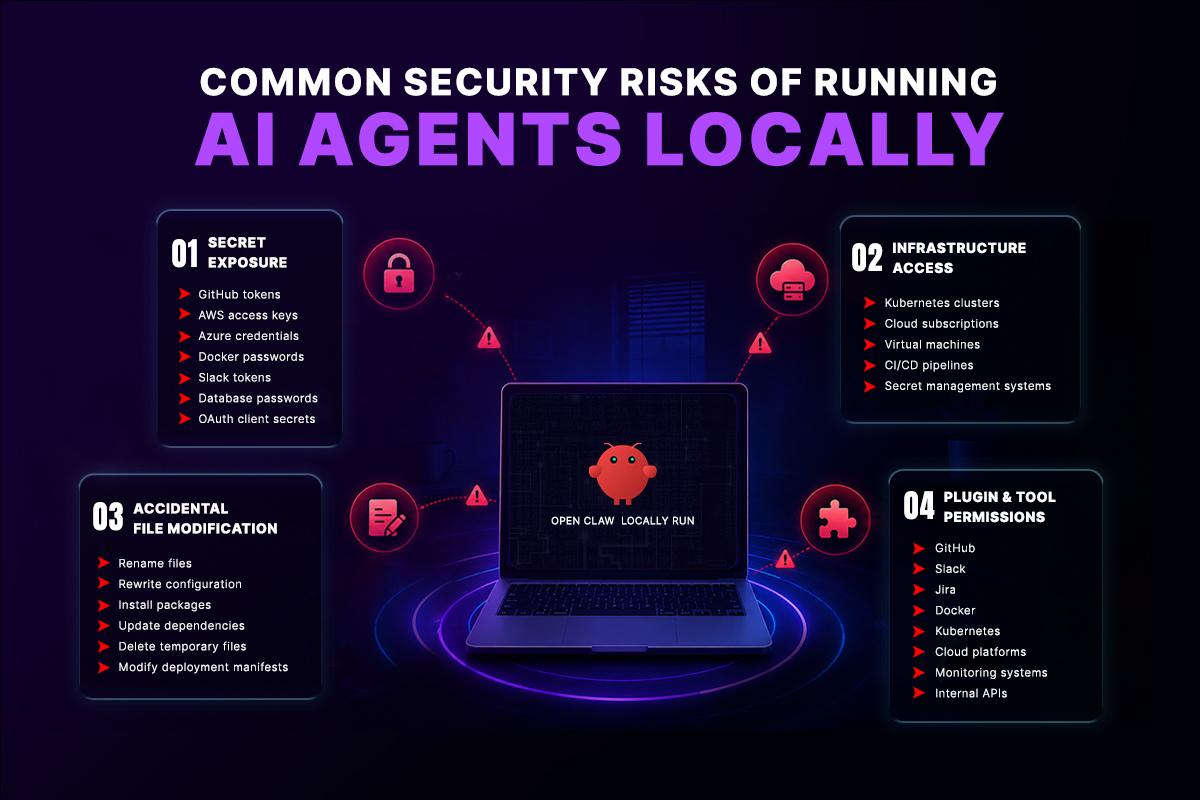
When an AI agent runs on your workstation, it typically inherits the same permissions as your user account. If it can read files or execute shell commands, it may interact with any resource you already have access to. That can include production Kubernetes credentials, Terraform state files, GitHub personal access tokens, Docker registry credentials, VPN certificates, cloud CLI authentication, internal documentation, and multiple customer repositories.
This doesn’t require malicious behavior. A poorly written prompt, an unexpected plugin action, or an automation mistake can expose sensitive data, modify important files, or execute commands with unintended consequences. The broader the agent’s permissions, the larger the potential blast radius.
Some of the most common security risks include:
1. Secret Exposure
Developer workstations often contain far more credentials than expected, including:
- GitHub personal access tokens
- AWS access keys
- Azure credentials
- Docker registry passwords
- Slack tokens
- Database credentials
- OAuth client secrets
If these files are accessible to the AI agent, they may become part of the environment it can inspect or use during its workflow.
2. Infrastructure Access
Many engineering laptops are already authenticated to production systems, such as:
- Kubernetes clusters
- Cloud subscriptions
- Virtual machines
- CI/CD pipelines
- Secret management systems
Without proper isolation, an AI agent capable of executing shell commands may also be able to interact with these environments.
3. Accidental File Modification
Modern AI coding agents can automate repetitive engineering tasks, including:
- Renaming files
- Updating configuration
- Installing packages
- Modifying dependencies
- Deleting temporary files
- Editing deployment manifests
Automation improves productivity, but mistakes can scale quickly if changes occur without review or controlled execution.
4. Expanding Permissions Through Integrations
Many AI coding agents integrate with external services such as GitHub, Slack, Jira, Docker, Kubernetes, cloud platforms, monitoring systems, and internal APIs. Each integration expands the agent’s capabilities and potentially increases its access to sensitive systems.
For this reason, organizations should follow the principle of least privilege, grant only the permissions required for each task, and monitor AI agent activity through auditing and logging.
Why AI Sandboxes Reduce Security Risks
The most effective way to reduce the risks of AI coding agents isn’t to stop using them,it’s to control where they run.
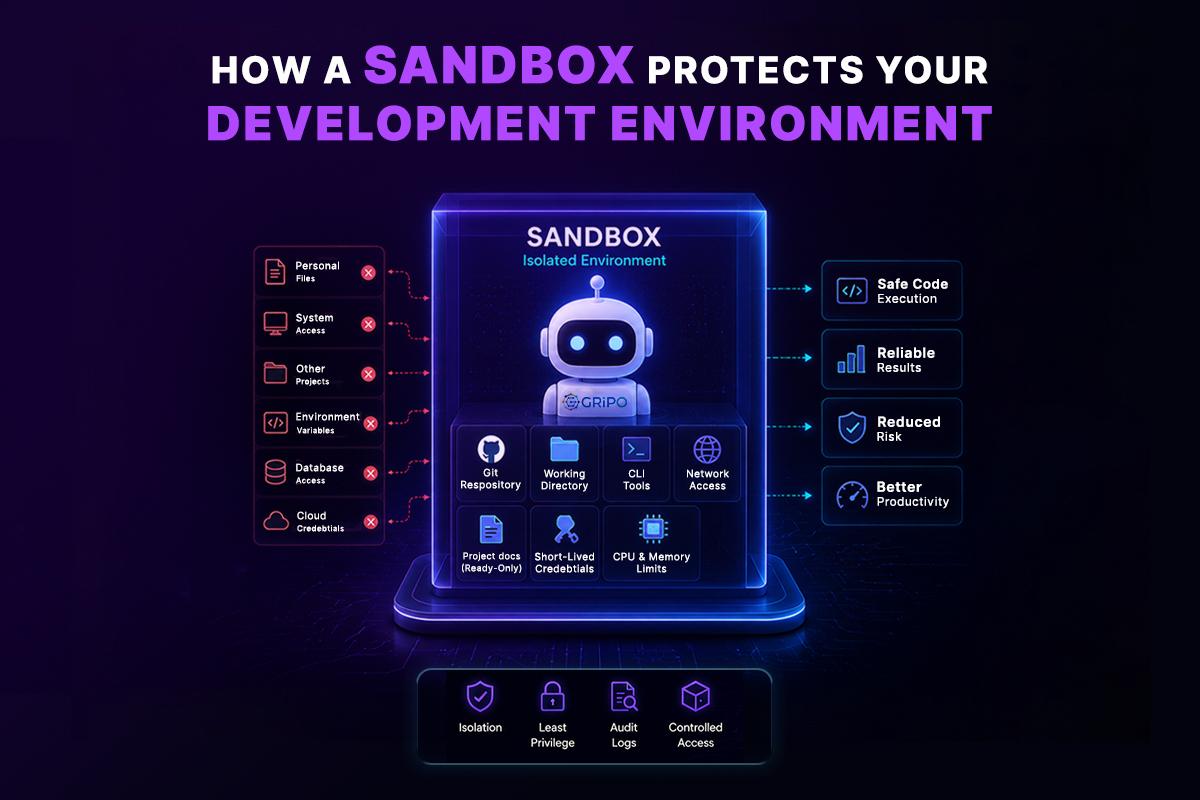
An AI sandbox is an isolated execution environment that separates AI-driven tasks from your primary workstation. Instead of giving an AI agent unrestricted access to your laptop, the sandbox provides only the files, tools, credentials, and permissions required for a specific workflow. Everything else remains inaccessible.
For example, an AI agent might receive access to:
- A single Git repository
- A temporary working directory
- Specific command-line tools
- Limited network access
- Read-only project documentation
- Short-lived credentials
- Defined CPU and memory resources
If the agent attempts to access files or resources outside its assigned workspace, they simply don’t exist within the sandbox. This dramatically reduces the attack surface while still allowing the agent to perform useful development tasks.
This architectural approach follows the principle of least privilege, ensuring AI agents receive only the resources required for the task at hand rather than unrestricted access to an entire developer workstation. As a result, mistakes, unexpected behavior, or overly broad commands have a much smaller impact.
Most enterprise sandbox platforms achieve this isolation using lightweight containers. Each sandbox starts from a clean, reproducible environment containing only the operating system, development tools, and dependencies required for the workflow. Depending on the task, that environment may include tools such as Git, Python, Node.js, Terraform, Kubernetes CLI (kubectl), Docker CLI, or cloud command-line interfaces.
Once the workflow finishes, the container can be destroyed automatically, removing temporary files, credentials, and execution state. Every new task starts from a fresh environment, preventing one workflow from affecting another and reducing the chance that sensitive information persists after execution.
This security model has protected production workloads for years through isolated containers, restricted permissions, network controls, and temporary storage. Applying the same principles to AI-assisted development allows organizations to significantly reduce unnecessary exposure without sacrificing the speed, flexibility, or productivity benefits that make AI coding assistants valuable.
Sandbox Doesn’t Mean Sacrificing the Developer Experience
One of the biggest concerns developers have is whether moving an AI coding agent into a sandbox will make development slower or less convenient.
In reality, a well-designed sandbox should feel almost identical to working on a local machine.
The AI agent can still clone repositories, install dependencies, execute shell commands, run tests, generate code, and interact with familiar development tools. From the developer’s perspective, the workflow remains largely unchanged.
The difference is that the execution happens inside an isolated environment instead of directly on your workstation.
Developers can connect to the sandbox using their preferred IDE or terminal, work with the same repositories, and use the same command-line tools they already rely on. The AI agent experiences a complete development environment without gaining unrestricted access to personal files, browser sessions, SSH keys, or unrelated projects stored on the local computer.
This approach provides the best of both worlds.
Developers keep the productivity benefits of local AI-assisted development while organizations significantly reduce the security risks associated with exposing an entire workstation to an autonomous AI agent.
A sandbox shouldn’t feel restrictive. It should feel like another development machine-one that’s purpose-built for secure AI execution.
Local Machine vs. Sandbox Execution
Choosing where an AI agent runs has a direct impact on security, operational risk, and governance.
| Feature | Local Machine | Sandbox |
| Access to personal files | Full user access | Only assigned workspace |
| Access to SSH keys | Usually available | Only if explicitly mounted |
| Cloud credentials | Often inherited | Temporary or restricted |
| Environment variables | Entire system | Only required variables |
| Network permissions | Full | Configurable |
| File persistence | Permanent | Ephemeral if desired |
| Auditability | Limited | Centralized logs |
| Enterprise policy enforcement | Difficult | Easier |
| Multiple isolated sessions | Limited | Yes |
| Blast radius | High | Significantly reduced |
The goal isn’t to eliminate AI automation. It’s to ensure automation operates within controlled boundaries.
Why Enterprise AI Requires Production-Grade Security
For individual developers, running an AI coding assistant directly on a laptop is often the fastest and most convenient option. Enterprise engineering teams, however, must balance developer productivity with security, compliance, governance, and operational reliability.
As organizations deploy AI coding agents across dozens or hundreds of engineers, questions extend far beyond whether the agent can write code. They need to know:
- Which repositories can the agent access?
- Who approved those permissions?
- Can every action be audited?
- How are credentials protected?
- What happens if a workflow behaves unexpectedly?
- Can the execution be reproduced later?
Answering these questions becomes much easier when AI agents execute inside isolated environments rather than directly on personal workstations. Every execution starts from a known state, follows consistent security policies, and produces an audit trail that security teams can review.
This approach reflects the same security principles organizations already use to protect production systems. Modern applications don’t run with unrestricted access to infrastructure they operate within carefully controlled environments that use:
- Role-Based Access Control (RBAC)
- Network segmentation
- Secret management
- Logging and monitoring
- Identity verification
- Rate limiting
- Least-privilege permissions
AI agents should be treated the same way. Rather than operating as trusted users with unrestricted workstation access, they should run as controlled workloads with clearly defined permissions, monitored activity, and consistent security policies.
By applying production-grade security practices to AI-assisted development, organizations reduce operational risk while creating AI workflows that are secure, auditable, predictable, and scalable.
Temporary Credentials Are Better Than Permanent Secrets
One of the biggest security improvements comes from replacing long-lived credentials with temporary access.
Many developer laptops accumulate secrets over time:
- AWS access keys
- GitHub personal access tokens
- Kubernetes kubeconfig files
- Docker registry passwords
- Database credentials
- API tokens
These credentials often remain valid for months.
If an AI agent has access to the developer’s home directory, those secrets may also become accessible.
A better approach is to provide credentials only when a workflow requires them.
For example:
- Create a temporary token.
- Inject it into the sandbox.
- Complete the task.
- Revoke the token.
- Destroy the environment.
Even if something goes wrong, the credential has a limited lifespan and reduced scope.
Real-World Example: Reviewing a Pull Request
Imagine an engineering team using the AI coding agent to review pull requests.
Running Locally
The AI agent has access to:
- The repository
- SSH keys
- Cloud credentials
- Every cloned project
- Local notes
- Browser sessions
- Infrastructure configuration
The review may complete successfully, but the execution environment includes far more information than necessary.
Running in a Sandbox
The AI agent receives:
- A cloned copy of the pull request
- Read-only access to repository history
- Git installed
- Required language runtime
- Temporary credentials if needed
Nothing else.
If the task requires no cloud access, the sandbox simply doesn’t provide it.
This follows the principle of least privilege, giving the AI agent exactly what it needs-and nothing more.
Real-World Example: Automated Incident Response
Consider a production outage affecting a Kubernetes cluster.
Instead of relying on a single AI agent, GripoFlow can orchestrate multiple isolated agents through a workflow.
One agent analyzes logs from your monitoring platform.
Another inspects Kubernetes resources inside a dedicated sandbox.
A third reviews recent deployment changes and identifies potential root causes.
The workflow can automatically create a Jira issue, notify the engineering team through Slack, generate a remediation plan, and pause for human approval before applying any production changes.
Each AI agent performs a specialized task with only the permissions required for that responsibility, improving both security and operational reliability.
Security Best Practices for Local AI Agents
If you’re running the AI coding agent or any similar coding agent, consider the following practices.
1. Use a Dedicated Workspace
Avoid giving the agent access to your entire home directory.
Clone only the repository you want the agent to analyze.
2. Remove Unnecessary Credentials
Delete unused authentication files.
Rotate old API keys.
Avoid storing secrets in plaintext.
3. Prefer Temporary Access
Use short-lived cloud credentials whenever possible.
This limits exposure if a token is accidentally accessed.
4. Separate Development from Production
Never authenticate directly to production infrastructure from the same environment where AI agents execute.
Use dedicated development accounts or isolated environments instead.
5. Review Tool Permissions
Many AI agents integrate with external services.
Verify exactly what each plugin can:
- Read
- Modify
- Execute
- Delete
- Deploy
Disable integrations that aren’t required.
6. Keep Dependencies Updated
Outdated libraries increase the risk of known vulnerabilities.
Regularly update:
- AI tooling
- Container images
- Language runtimes
- Operating system packages
7. Monitor Execution
Logging isn’t just useful during incidents.
It also helps answer questions like:
- Which commands executed?
- Which files changed?
- Which credentials were used?
- Which APIs were called?
Observability becomes increasingly valuable as AI automation grows.
Secure AI Requires More Than Sandboxing
Running AI agents inside isolated sandboxes is an important first step, but enterprise engineering teams quickly discover that secure execution alone isn’t enough. As AI becomes part of the software delivery lifecycle, organizations also need governance, compliance, operational consistency, and scalable automation.
Beyond security, enterprise teams care about:
Governance
Administrators need to define and enforce consistent security policies across every AI workflow, ensuring permissions, approvals, and execution standards remain the same regardless of who initiates the task.
Compliance
Isolated execution simplifies auditing and evidence collection for security frameworks such as SOC 2, ISO 27001, and internal compliance requirements by creating consistent, traceable execution environments.
Reliability
Every workflow begins from the same known environment, reducing configuration drift and eliminating many of the “works on my machine” issues that slow engineering teams.
Cost Control
Ephemeral sandbox environments are created only when needed and destroyed when work is complete, reducing unnecessary infrastructure costs compared to maintaining long-running development environments.
Scalability
Organizations can execute dozens or even hundreds of isolated AI agents simultaneously without workflows interfering with one another, making AI automation practical across large engineering teams.
However, enterprise software delivery extends beyond running individual AI agents securely. A typical deployment may involve code review, infrastructure validation, automated testing, compliance verification, deployment approvals, monitoring, and team notifications. Managing these activities manually around an AI assistant quickly becomes inefficient.
Instead of treating AI agents as isolated chat sessions, organizations increasingly build structured workflows where multiple specialized AI agents collaborate to complete complex engineering tasks.
For example, one AI agent can review code inside an isolated sandbox, another can validate infrastructure changes, while a third performs security analysis or investigates production incidents. Their outputs automatically become inputs for the next stage of the workflow, creating repeatable automation pipelines that remain secure, auditable, and easy to manage.
This modular approach allows every AI agent to operate with only the permissions required for its specific responsibility while improving maintainability, reducing operational risk, and enabling engineering teams to automate increasingly complex DevOps processes without sacrificing control.
Why Agent Persistence Matters
Many AI coding assistants behave like temporary conversations. Once the session ends or an error occurs, the agent loses its working context and developers often have to start over.
For simple coding tasks, this may only cost a few minutes.
For enterprise engineering workflows, it can mean repeating hours of analysis.
Imagine an AI agent reviewing thousands of files, understanding a complex microservices architecture, generating deployment plans, and validating infrastructure changes. If deployment pauses because a Kubernetes cluster is unavailable, an approval is pending, or a cloud API temporarily fails, restarting the entire process wastes both engineering time and compute resources.
Real-world engineering is full of interruptions.
Deployments pause.
Infrastructure changes fail validation.
Cloud services experience outages.
Production incidents evolve while investigations are still in progress.
These situations shouldn’t force an AI agent to repeat work it has already completed.
GripoFlow addresses this through agent persistence.
Consider a workflow with four sandboxed AI agents. The first agent analyzes the code, the second performs a security scan, the third validates the infrastructure, and the fourth generates the deployment report. If the fourth sandbox fails because of a temporary network issue, the workflow doesn’t need to rerun all four stages. Thanks to sandbox persistence, it resumes from the last successful step, preserving the outputs and execution state from the previous sandboxes. This reduces execution time, avoids repeating completed tasks, lowers AI token consumption by eliminating unnecessary reprocessing, and makes complex AI workflows more reliable and cost-efficient.
As AI agents take on increasingly complex operational responsibilities, persistence becomes just as valuable as intelligence.
Build Repeatable AI Workflows Instead of Repeating Prompts
One of the biggest challenges with AI assistants is consistency.
Two engineers can ask the same question using different prompts and receive different answers.
That flexibility is useful during experimentation, but enterprise engineering requires predictable and repeatable outcomes.
Organizations don’t want deployment procedures, incident investigations, or infrastructure changes to depend on how someone writes a prompt.
They want standardized operational processes.
GripoFlow enables engineering teams to capture those processes as reusable workflows.
Instead of repeatedly explaining how an AI agent should review pull requests, investigate incidents, deploy infrastructure, or troubleshoot Kubernetes clusters, teams can define those steps once and reuse them across projects.
Each workflow combines isolated sandboxes, AI agents, approval steps, plugins, and enterprise integrations into a repeatable automation pipeline.
Over time, these workflows become reusable engineering knowledge that improves consistency, simplifies onboarding, and reduces operational risk.
How GripoFlow Turns Secure AI Agents into Enterprise Automation
Many AI platforms focus primarily on model capabilities.
GRiPO approaches the problem from a broader operational perspective.
Instead of assuming AI agents should execute directly on developer laptops, GRiPO enables teams to run coding agents inside isolated sandbox environments designed for engineering workflows.
A sandbox can include only the tools required for a specific task, such as Git, Terraform, Docker, Python, Kubernetes utilities, or cloud command-line interfaces. Permissions, network access, and credentials can be restricted based on the workflow rather than inherited from a developer’s machine.
This model allows engineering teams to automate activities such as:
- Reviewing pull requests
- Investigating incidents
- Executing infrastructure automation
- Running deployment workflows
- Troubleshooting Kubernetes clusters
- Performing operational runbooks
Because each execution occurs inside an isolated environment, organizations gain greater control over permissions, auditability, and operational consistency without sacrificing the productivity benefits of AI-assisted development.
The objective isn’t to replace developers. It’s to provide AI agents with an environment that reflects modern enterprise security practices.
Beyond isolated execution, GripoFlow enables AI agents to collaborate across structured workflows.
One sandbox can prepare infrastructure changes, another can validate security policies, and another can execute deployment tasks. Their outputs become inputs for the next stage of the workflow, allowing complex engineering processes to be automated without giving a single AI agent unrestricted access to every system.
GripoFlow also integrates with the tools engineering teams already use, including GitHub, Kubernetes, Slack, Jira, cloud platforms, and internal APIs. Combined with reusable plugins and workflow orchestration, organizations can build AI-powered automation that is secure, repeatable, and aligned with existing DevOps practices.
Frequently Asked Questions About OpenClaw Sandbox Security
Can multiple AI agents work together securely?
Yes. Platforms like GripoFlow allow multiple AI agents to run inside separate isolated sandboxes while communicating through controlled workflows. Each agent receives only the permissions required for its specific task, improving both security and scalability.
What is an AI sandbox?
An AI sandbox is an isolated execution environment where AI agents can safely run code, execute commands, and interact with approved resources without accessing your entire workstation. It provides the tools needed for development while protecting sensitive files and infrastructure from unnecessary exposure.
Is OpenClaw safe to run on a local machine?
OpenClaw can be safe when configured correctly, but like any AI coding agent, it inherits the permissions of the environment where it runs. If your workstation contains source code, API keys, SSH keys, cloud credentials, or customer data, the agent may be able to access those resources. Running the AI coding agent inside a secure sandbox significantly reduces this risk by isolating the execution environment.
Why should developers use a sandbox for AI coding agents?
A sandbox protects your source code, credentials, and infrastructure by limiting what an AI agent can access. Instead of exposing your entire computer, the agent only receives the repositories, tools, and permissions required for a specific task, improving both security and operational control.
Can OpenClaw access my API keys and environment variables?
Yes. If your API keys, .env files, SSH keys, or cloud credentials are accessible to your user account, the AI coding agent may also access them depending on its permissions and the commands it executes. A sandbox helps isolate these sensitive resources from the AI agent.
Does running OpenClaw in a sandbox affect the developer experience?
No. A properly designed sandbox provides the same development tools, repositories, and command-line interfaces developers already use. You can continue writing code, running tests, and using your preferred IDE while the AI agent operates in an isolated environment that protects your local machine.
What is a Claude Code sandbox?
A Claude Code sandbox is an isolated environment where Claude Code can safely analyze repositories, execute commands, and generate code without unrestricted access to a developer’s workstation. It helps organizations adopt AI coding assistants while reducing security risks.
What sensitive information should never be exposed to an AI coding agent?
Engineering teams should protect resources such as API keys, SSH keys, Kubernetes configurations, Terraform state files, cloud credentials, database passwords, OAuth tokens, certificates, customer data, and internal documentation. A sandbox helps prevent unnecessary exposure of these assets.
Can AI coding agents modify files on my computer?
Yes. Many AI coding agents can create, edit, rename, or delete files and execute shell commands if they have permission. Running them inside an isolated sandbox limits the impact of accidental or unintended file modifications.
Why do enterprise organizations prefer sandboxed AI execution?
Enterprise teams need consistent security controls, audit logs, governance, and compliance. Running AI agents inside isolated sandboxes enables organizations to enforce least-privilege access, monitor activity, protect sensitive systems, and reduce operational risk across engineering workflows.
What are the benefits of temporary credentials in AI workflows?
Temporary credentials reduce the impact of credential exposure by limiting access to a specific task and automatically expiring after use. Compared to long-lived API keys or cloud credentials stored on developer laptops, temporary credentials provide stronger security and better compliance.
How is GripoFlow different from a traditional sandbox?
GripoFlow combines secure sandbox execution with workflow automation, AI agent orchestration, reusable plugins, and persistent execution. Instead of running a single isolated AI session, organizations can build automated workflows where multiple AI agents collaborate securely across the software delivery lifecycle.
What is agent persistence, and why is it important?
Agent persistence allows an AI agent to resume its work after an interruption instead of starting from the beginning. This is particularly valuable for long-running DevOps workflows such as infrastructure automation, deployment pipelines, and incident response, where rebuilding context can waste significant time and computing resources.
What are the best practices for securing AI coding agents?
Use isolated sandbox environments, follow the principle of least privilege, use temporary credentials, review plugin permissions regularly, store secrets securely, keep dependencies updated, enable logging and auditing, and require human approval before making production changes.
Should I stop running AI agents on my local machine?
Not necessarily. Local AI agents are excellent for many development tasks and can improve productivity. However, when working with sensitive codebases, production infrastructure, enterprise systems, or customer data, running AI agents inside a secure sandbox provides stronger security, better governance, and greater operational control without sacrificing the developer experience.