
A production environment can generate thousands of signals before an engineer has finished investigating a single incident. Kubernetes reports unhealthy pods. Datadog raises an alert. GitHub records a deployment. AWS emits a service event. Jira contains an unresolved issue with a similar error pattern.
The challenge is not always a lack of information. It is deciding what the information means, who should handle it, and which action should happen next.
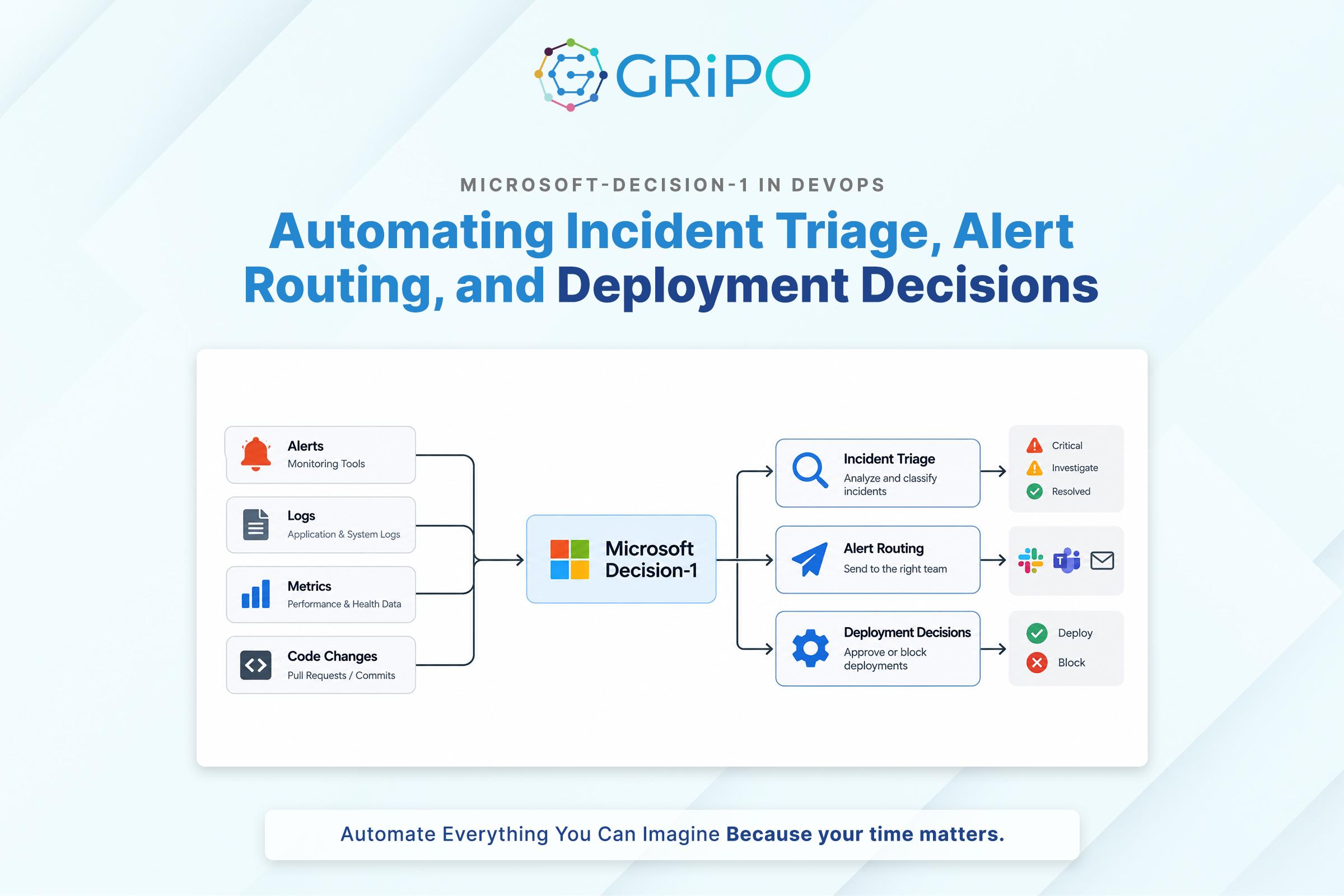
This is where Microsoft-Decision-1 becomes relevant to DevOps automation. Introduced by Microsoft in October 2026, the model is designed for structured decision tasks such as classification, routing, prioritization, verification, and workflow control. Rather than generating a free-form explanation, it evaluates a defined set of possible answers and returns structured decisions with probability scores.
For engineering teams, that creates a potential way to add model-based decisions to incident management and CI/CD workflows without using a generative LLM for every classification or routing step.
The distinction matters, but it should not be mistaken for autonomous operations. Microsoft-Decision-1 does not replace monitoring, deterministic deployment checks, incident runbooks, or engineering judgment. Its output is one input to a controlled workflow.
This article examines three practical applications incident triage, alert routing, and deployment decisions along with implementation patterns, failure handling, security considerations, and the conditions under which this approach is worth evaluating.
What Microsoft-Decision-1 Adds to a DevOps Workflow
Traditional automation works well when the decision can be expressed as an explicit rule.
For example:
if error_rate > 5:

    page_on_call()
The problem is that operational situations are not always captured by a single metric. A high error rate might be expected during a controlled load test. A lower error rate could still indicate a serious incident if every payment request is failing for one customer segment.
Teams often introduce LLMs to interpret this additional context. An LLM can summarize logs, compare symptoms, explain deployment changes, and recommend a course of action. However, a workflow that only needs to select one of four incident categories may not need a generated paragraph for every alert.
Microsoft-Decision-1 is designed for this narrower task. According to Microsoft’s launch announcement, it is based on post-training Qwen3.5-9B for fast, single-pass decision scoring. It supports binary decisions, multiple-choice decisions, ordered scoring, and rubric-based evaluation through a structured API.
The model can help answer questions such as:
- Is this alert likely to represent a customer-facing incident?
- Which team should receive this event?
- How severe is the deployment risk on a defined scale?
- Does this change require additional review?
- Should a workflow continue automatically or request human assessment?
These are examples of possible DevOps applications, not a claim that the model has been specifically validated for every operational scenario. Each use case needs its own evaluation against real data.
A useful design principle is to keep three responsibilities separate:
- Decision model: Evaluates the supplied state against a defined question.
- Policy and workflow logic: Determines which actions are allowed and what happens next.
- Execution system: Performs the approved operation and verifies the result.
That separation makes the system easier to test, audit, and change.
Use Case 1: Incident Triage Before an Engineer Gets Paged
Imagine a SaaS platform where alerts arrive from Kubernetes, application monitoring, cloud infrastructure, and external service checks. Some require immediate intervention. Others are duplicates, symptoms of a known issue, or low-priority warnings.
If every event follows the same paging path, the on-call team can spend too much time sorting notifications instead of resolving incidents.
A decision model can be evaluated as an additional triage stage.
How the workflow could operate
The monitoring system detects an event and passes a structured summary to the workflow. That summary might include the affected service, error rate, alert description, recent deployment identifier, environment, and whether customer-facing requests are failing.
Microsoft-Decision-1 evaluates a small set of defined questions:
- Is the event likely to be customer-impacting?
- What severity category best fits the available evidence?
- Is the event sufficiently understood to follow an established runbook?
The workflow then applies explicit rules. A high-severity event can trigger the established paging policy. A low-severity event might enter an investigation queue. An ambiguous event can be sent to a human for classification.
A simplified example:
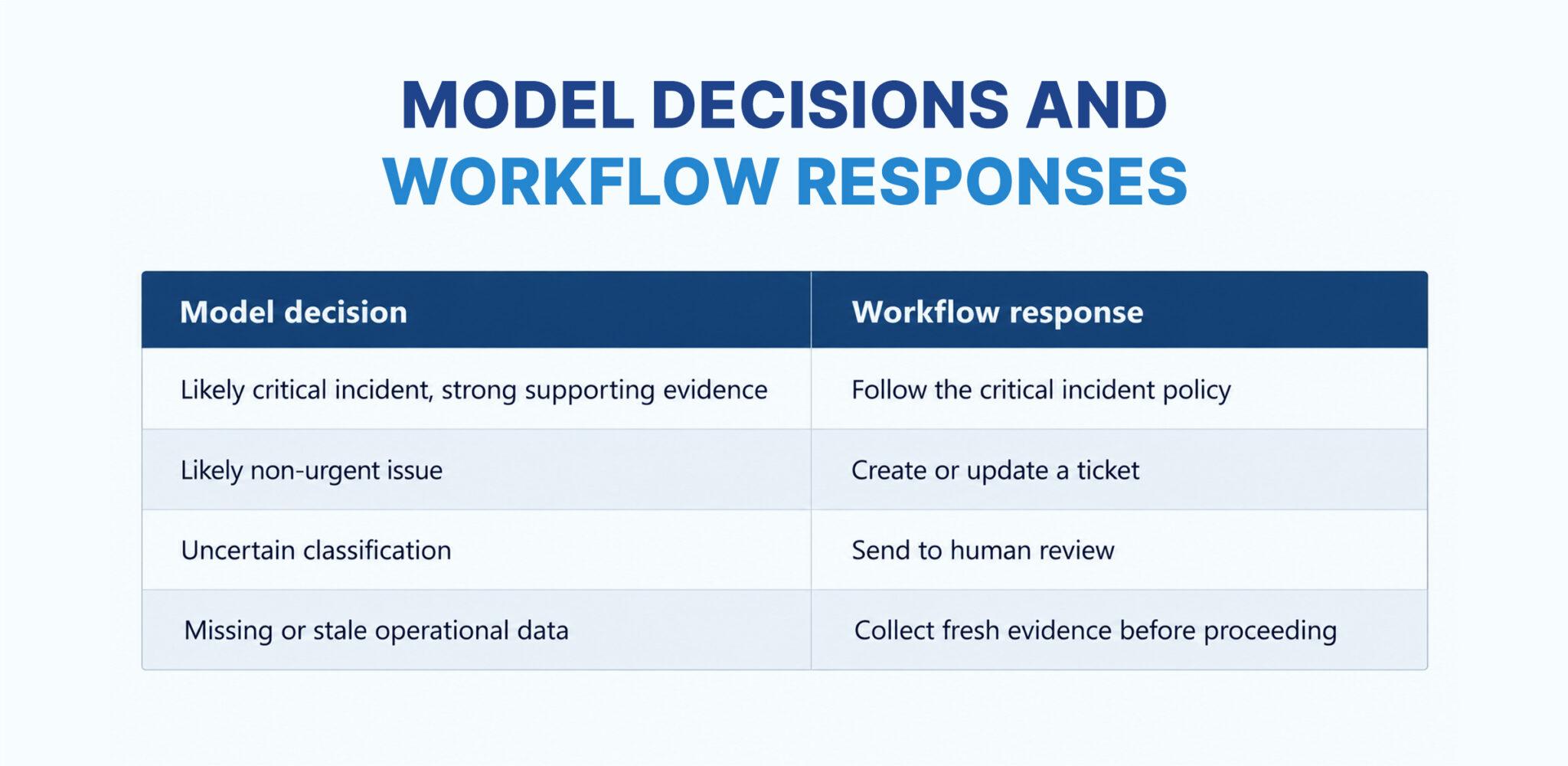
The model should not invent incident severity thresholds. The engineering team defines the categories and validates how the model assigns them.
Example: Kubernetes restart storm
Suppose a deployment introduces a configuration error and several pods begin restarting. The monitoring system observes elevated restart counts, increased error rates, and a recent rollout. A decision model could classify the event as a likely production incident and select the platform team as the initial owner. The workflow can then attach the relevant metrics and deployment identifier to a PagerDuty notification or Jira ticket.
An LLM may be useful afterward to summarize logs, compare recent configuration changes, or prepare an investigation brief. The decision model handles the bounded classification; the LLM handles deeper interpretation when needed. This design can reduce repetitive classification work, but only if the model performs reliably on the team’s actual alerts. A misclassified critical incident can be much more expensive than a false escalation, so the evaluation must account for both.
Use Case 2: Intelligent Alert Routing Across Teams
Alert routing often begins with static ownership rules. A service belongs to a team, a repository has a code owner, and a cloud account has an assigned support group.
Those rules remain useful. The difficulty appears when an alert crosses team boundaries.
A checkout failure, for example, might originate in the application, a payment integration, a database connection pool, or a deployment configuration. Sending every such alert to the same team creates unnecessary handoffs.
A decision model can evaluate contextual information and choose among predefined ownership categories.
Define routing options carefully
Consider the following choices:
- platform: Infrastructure, Kubernetes, networking, or deployment-runtime problems.
- payments: Payment processing or checkout integration problems.
- application: Application logic or service-level defects.
- database: Database availability, query, or connection issues.
- review: Evidence is incomplete or the ownership is unclear.
The review option is important. Without an explicit path for uncertainty, a model may be forced to select a team even when the input does not justify a confident choice.
The workflow should also retain deterministic ownership rules. If a repository’s code ownership file explicitly identifies the responsible team for a known component, that authoritative mapping may be more appropriate than a model-generated selection.
A practical routing sequence is:
- Collect the alert and related service metadata.
- Retrieve ownership information and recent change history.
- Use the model to classify the likely issue category.
- Check the result against ownership and escalation policies.
- Assign the event, attach context, and record the decision.
- Escalate ambiguous or conflicting cases.
This approach can improve routing when an alert contains useful contextual clues, while keeping the final assignment inside a workflow that the engineering organization controls.
Use Case 3: Deployment Decisions in CI/CD
Deployment automation is another possible application, but it requires a particularly clear boundary between model judgment and hard release requirements.
CI/CD systems already have deterministic checks for unit tests, integration tests, vulnerability thresholds, artifact signatures, and deployment health. These checks should remain authoritative when the release policy requires a specific condition to pass.
A decision model can supplement those checks by evaluating contextual risk.
For example, a workflow might combine:
- The size and scope of a change
- Whether a sensitive configuration file changed
- The service’s recent incident history
- Whether the deployment affects a critical customer path
- The results of required security and test checks
- Whether a rollback plan is available
The model could return a risk category such as low, medium, high, or review-required. The deployment controller then applies the release policy.
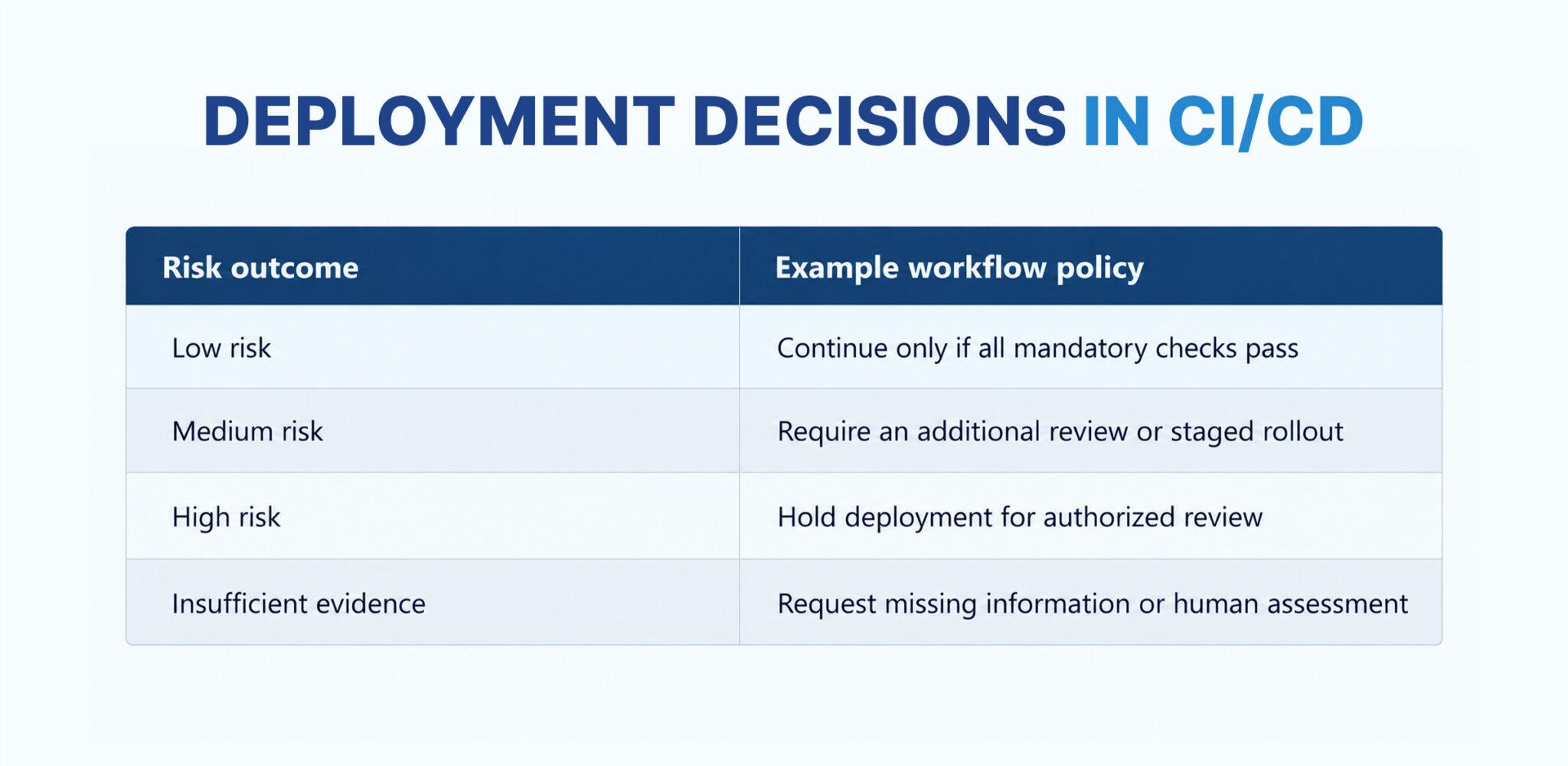
The important distinction is that the model’s risk score does not override a failed security scan or an unmet release requirement. A low-risk classification is not permission to bypass policy.
Example: A sensitive configuration change
A pull request changes a Kubernetes deployment manifest and modifies an environment variable used by a payment service. All unit tests pass, but the change touches a sensitive production path. A decision model could be asked to classify the change into a predefined review category based on the diff summary and supporting metadata. If the result indicates that security or platform review is appropriate, the workflow can request the relevant approval.
The final deployment decision still depends on the required checks, code-owner approval, release policy, and deployment controller. For teams exploring AI-assisted CI/CD, this division of responsibilities is more defensible than allowing a model to approve and execute production changes without independent safeguards.
A Technical Pattern for Structured Decisions
Microsoft’s official Microsoft-Decision-1 documentation describes a request structure built around a state and one or more typed questions. The state can contain text or JSON, while each question defines the decision the application needs.
The following is an illustrative request body for incident classification. It shows the shape of the decision request; the endpoint, deployment name, and authentication must be configured for the team’s Microsoft Foundry deployment.
{

  "model": "YOUR_DEPLOYMENT_NAME",

  "state": {

    "service": "checkout-api",

    "environment": "production",

    "error_rate": "35%",

    "recent_deployment": true,

    "customer_impact": "Checkout requests are failing"

  },

  "questions": {

    "severity": {

      "type": "choice",

      "instructions": "Classify the incident severity using the supplied evidence.",

      "criteria": {

        "critical": "Widespread customer impact or a major production outage",

        "high": "Significant service degradation requiring prompt response",

        "normal": "Limited impact that can follow the normal incident process",

        "review": "Insufficient or conflicting evidence"

      }

    },

    "customer_impact": {

      "type": "noul",

      "instructions": "Does the supplied state indicate current customer-facing impact?",

      "criteria": {

        "true": "The evidence indicates that customer-facing requests are failing",

        "false": "The evidence does not establish current customer-facing impact"

      }

    }

  }

}
This example is a starting point, not a production-ready incident classifier. The team should validate the state schema, question wording, supported request fields, and response handling against the deployed API and its current documentation.
The workflow must also interpret the response correctly. A probability score represents the model’s assessment among the defined options; it is not proof that the selected category is correct.
For example, a team might choose to automate routing only when the model’s top option exceeds a threshold established through testing. Lower-confidence or conflicting results can be sent to review. The threshold should be determined from the cost of false routing and missed escalation, not copied from an unrelated example.
How to Evaluate It Before Production
A short proof of concept is useful, but a few successful demonstrations do not establish that a model is suitable for incident response or release management.
Build an evaluation around historical events and the decisions the team actually needs to make.
1. Create a labeled dataset
Collect representative alerts, incident summaries, and deployment changes. Include common events, unusual cases, noisy alerts, incomplete records, and examples where the correct result is to request human review.
Use existing incident outcomes and engineering review where available. Remove secrets and unnecessary personal information before sending data to an external inference service.
2. Measure errors by operational impact
Overall accuracy can hide important failures. A model that classifies most low-priority alerts correctly but misses a substantial share of critical incidents may not be appropriate for automated paging.
Track at least:
- Critical-incident recall
- False-positive paging rate
- Routing accuracy by team
- Deployment-risk classification errors
- Human-review rate
- Decision latency
- Cost per evaluated event
The right metrics depend on the use case. A deployment gate may prioritize avoiding unsafe approvals, while alert routing may prioritize preventing critical events from being downgraded.
3. Test sensitivity to wording and missing data
Decision models can be sensitive to question phrasing and option definitions. Test whether equivalent alerts produce consistent results when descriptions change, logs are shortened, or metadata is missing.
Keep a review or equivalent fallback option where appropriate. Never assume that a structured response is reliable merely because it conforms to the expected schema.
4. Compare against simpler alternatives
A decision model is not automatically better than deterministic rules or a small classifier. Benchmark it against the current system, including static routing, threshold-based rules, and any existing LLM-based approach.
If a simple rule already solves the task accurately and transparently, adding a model may increase cost and complexity without delivering meaningful value.
5. Roll out gradually
Begin in shadow mode: the model produces decisions, but the existing workflow remains authoritative. Compare its outputs with actual incident outcomes and human decisions.
After validation, enable low-risk automation for selected cases. Retain monitoring, audit logs, rollback procedures, and an easy way to disable model-driven routing or gates if behavior changes.
Security and Reliability Considerations
DevOps automation can access production infrastructure, source code, deployment credentials, cloud APIs, and incident systems. A decision model should not become a shortcut around existing access controls.
Keep authorization outside the model. The model can recommend a category or indicate that a condition appears to be met. Your policy engine and service identities determine which actions are allowed.
Use least-privilege credentials. A workflow that creates a ticket should not automatically have permission to delete production resources. Separate read, review, and execution privileges where practical.
Treat operational inputs as untrusted. Logs, ticket descriptions, commit messages, and external alert payloads can contain misleading text or prompt-injection attempts. Validate and normalize input, limit what is sent to the model, and do not interpret model output as executable instructions.
Protect secrets and sensitive data. Redact tokens, credentials, and unrelated customer information. Verify provider data handling, access controls, retention terms, and any residency requirements before sending production context to an inference service.
Keep an audit trail. Record the input references, model and deployment version, decision options, output probabilities, applied policy, resulting action, and verification result. Store only the data needed for operational traceability and compliance.
Verify actions independently. If a workflow triggers a rollback or scales a service, check whether the action succeeded and whether service health recovered. A model’s decision is not evidence that the operation worked.
These safeguards matter more than the model’s ability to return a structured answer quickly. Reliability comes from the full system around it.
Connecting Microsoft-Decision-1 to GRiPO Workflows
A decision model becomes operationally useful when its output is connected to the systems where engineers already work.
GRiPO is an AI-powered DevOps workflow automation platform built around visual workflows, isolated code execution, AI agents, and plugin-based integrations. These capabilities provide a way to design the surrounding process: collect operational data, call configured services, apply branching logic, involve an agent when deeper analysis is needed, and deliver the outcome to the appropriate tool.
For example, a GRiPO workflow could be designed to:
- Receive an alert from a configured monitoring integration.
- Retrieve relevant service or deployment context.
- Call Microsoft-Decision-1 through a securely configured API connection.
- Evaluate the returned decision against workflow policies.
- Route the event to Slack, Jira, PagerDuty, or another configured destination.
- Request deeper analysis or human approval when the result is uncertain.
- Record the outcome and verify the downstream action.
This is an architecture pattern to implement and validate, not a claim that every Microsoft-Decision-1 integration is available as a prebuilt GRiPO node. The model endpoint, authentication, response mapping, and permissions must be configured and tested for the environment.
GRiPO’s isolated execution capabilities can also help teams run supporting scripts and operational checks within controlled environments, while the workflow coordinates the broader process. Teams should still apply appropriate network restrictions, secret handling, least privilege, and production approval policies.
The goal is to make model-driven decisions part of a traceable operational workflow not to hand an AI model unrestricted control over infrastructure.
When Microsoft-Decision-1 Is and Is Not a Good Fit
It is worth evaluating Microsoft-Decision-1 when a workflow repeatedly asks a bounded question, such as which team owns an alert, whether a change requires additional review, or which severity category fits an event. It is especially relevant when the application needs a structured result rather than a generated explanation. It is less suitable as the sole component for diagnosing a novel outage, writing a remediation plan, generating code, or explaining a complex sequence of failures. Those tasks may need an LLM, domain-specific tooling, deterministic analysis, or human expertise.
Even for bounded decisions, the model should be compared with simpler baselines. A rule-based check is preferable when the requirement is unambiguous, such as blocking a deployment when a mandatory test fails. The strongest design often combines deterministic controls, decision scoring, generative reasoning, and human oversight. Each component has a defined role, and no single component is trusted to do everything.
Final Recommendation
Microsoft-Decision-1 gives DevOps teams another model to evaluate for the decision points that sit between monitoring signals and operational actions. Incident triage, alert routing, and deployment-risk classification are plausible applications because they can be expressed as bounded questions with defined outcomes.
Start with one narrow workflow and a labeled dataset. Measure routing accuracy, critical-event recall, latency, human-review rate, and cost against the existing approach. Run the model in shadow mode before allowing its output to influence production operations.
Then integrate it into a workflow with explicit policy checks, least-privilege permissions, human escalation, and post-action verification.
For GRIPO teams and other platform engineering organizations, the opportunity is not to replace every operational rule with AI. It is to use model-based decisions where they add measurable value, while keeping execution controlled, observable, and accountable.
Suggested FAQ schema content
What is Microsoft-Decision-1 in DevOps?
Microsoft-Decision-1 is a decision model that can be evaluated for bounded DevOps tasks such as incident classification, alert routing, deployment-risk assessment, and workflow control. Its output must be validated for the intended operational use case.
Can Microsoft-Decision-1 automate incident triage?
It can help classify incident information into predefined categories. Production workflows should combine those classifications with monitoring evidence, explicit severity policies, escalation rules, and human review when necessary.
Can Microsoft-Decision-1 route alerts to the correct engineering team?
It can evaluate alert context and select among defined ownership categories. Teams should validate routing accuracy against historical incidents and retain authoritative ownership rules and an escalation path for uncertain cases.
Can Microsoft-Decision-1 approve production deployments?
It can provide a risk classification or evaluate a bounded condition. It should not independently override mandatory CI/CD checks, security policies, required approvals, or deployment-controller safeguards.
How is Microsoft-Decision-1 different from a generative LLM?
Microsoft-Decision-1 focuses on structured decisions and probability scores for defined answers. Generative LLMs are better suited to tasks such as writing incident summaries, explaining logs, generating code, and exploring complex problems.
Does Microsoft-Decision-1 provide a written explanation for every decision?
Its decision API returns structured decisions rather than a free-form rationale. Applications should retain the evidence used in the evaluation and provide explanations through their own policy logic, supporting data, or a separate reasoning component when needed.
What data can a DevOps workflow send to Microsoft-Decision-1?
The documented API accepts a state containing text or JSON, along with typed questions. Teams should send only relevant operational context and redact credentials, secrets, and unnecessary sensitive information.
How should teams handle low-confidence decisions?
Define thresholds using representative test data and the consequences of incorrect decisions. Route uncertain results to human review, request additional evidence, or use a validated fallback rather than forcing every event into an automatic action.
Is Microsoft-Decision-1 suitable for Kubernetes operations?
It can be evaluated for tasks such as classifying Kubernetes alerts, routing cluster incidents, or scoring deployment risk. It does not replace Kubernetes health checks, observability, authorization, or established remediation controls.
Can Microsoft-Decision-1 work with CI/CD pipelines?
A pipeline can call the model through a configured API integration to evaluate bounded questions about a change. The resulting classification should supplement not replace mandatory tests, security scans, approval rules, and deployment policies.
How can GRIPO support Microsoft-Decision-1 workflows?
GRIPO can be used to design and coordinate workflows that connect configured APIs, operational tools, AI agents, and controlled execution. The specific Microsoft-Decision-1 integration must be configured and validated for the environment.
How should teams measure the success of AI-driven DevOps decisions?
Track decision accuracy, critical-incident recall, false-positive rates, routing errors, latency, human-review volume, and cost per correctly handled event. Compare results with the existing rule-based or LLM-based workflow before expanding automation.
Key takeaways
- Microsoft-Decision-1 is worth evaluating for bounded operational decisions, not as a replacement for the entire DevOps toolchain.
- Incident triage, alert routing, and deployment-risk classification offer practical starting points.
- Deterministic rules should remain authoritative for mandatory checks and access permissions.
- Low-confidence or ambiguous decisions need a defined fallback.
- Shadow testing and historical incident evaluation should precede production rollout.
- GRIPO can provide the workflow layer for coordinating configured model calls, integrations, approvals, and execution.
- The success metric is improved operational outcomes not simply the number of decisions automated.