

Artificial intelligence is changing how software is built. Tasks that once required hours of manual work-writing code, debugging applications, creating tests, explaining unfamiliar repositories, or automating repetitive development work-can now be completed in minutes with AI coding assistants.
One of Google’s newest tools in this space is Gemini CLI. Instead of working inside a browser, Google’s AI coding assistant operates directly from your terminal, allowing developers to interact with Gemini using natural language while working inside their projects.
For many developers, this feels like the next step in productivity. You can ask Gemini CLI to explain a large codebase, generate new features, refactor existing modules, create documentation, fix build failures, or even execute development tasks without constantly switching between applications.
That convenience also raises an important question.
How much of your computer can Gemini CLI actually access?
If you’re running Gemini CLI directly on your laptop, you’re giving an AI assistant access to the same development environment you use every day. Depending on how you use it and the permissions it has, that environment may include proprietary source code, API keys, cloud credentials, infrastructure configurations, customer data, SSH keys, and other sensitive assets.
This isn’t unique to Google’s AI coding assistant. The same consideration applies to any AI coding assistant that runs locally and interacts with your filesystem or terminal. The difference lies in how you choose to isolate and control that access.
The safest approach isn’t avoiding AI. It’s making sure AI operates inside an environment designed to limit risk.
That’s where a sandbox becomes essential.
What Is Gemini CLI?
Gemini CLI is Google’s command-line interface for interacting with Gemini models directly from the terminal. Rather than copying files into a web interface, developers can work with AI where they already spend most of their time-inside their development environment.
A typical workflow might include tasks such as:
- Explaining unfamiliar code
- Creating new functions
- Refactoring existing applications
- Generating unit tests
- Debugging runtime errors
- Reviewing pull requests
- Creating documentation
- Writing shell commands
- Automating repetitive development tasks
Because it operates from the terminal, Google’s AI coding assistant can become part of everyday engineering workflows. Developers may use it alongside Git, Docker, Kubernetes, Terraform, package managers, build systems, and CI/CD pipelines.
That tight integration makes development faster. It also means the AI is working much closer to your production assets than a browser-based chatbot ever could.
How Gemini CLI Works
At a high level, Gemini CLI acts as an intelligent assistant that receives your prompts, analyzes the available project context, and generates responses or suggested actions.
A simplified workflow looks like this:
Developer Prompt
│
▼
Google’s AI coding assistant
│
▼
Reads Project Context
│
▼
Analyzes Files
│
▼
Generates Code or Commands
│
▼
Developer Reviews and Executes
In many cases, developers intentionally provide additional context so Gemini can produce more accurate results. That context may include:
- Source code
- Configuration files
- Documentation
- Build scripts
- Project structure
- Error logs
- Terminal output
- Dependency manifests
The richer the context, the better the AI can understand your project.
However, richer context also means more information is available within the working environment. If sensitive files are accessible from the same machine, developers should carefully consider how that access is managed.
What Can Gemini CLI Access on Your Local Machine?
The exact capabilities depend on your configuration, permissions, and how you choose to use Gemini CLI. In general, anything available to your user account-or intentionally shared with the tool-may become part of its working context.
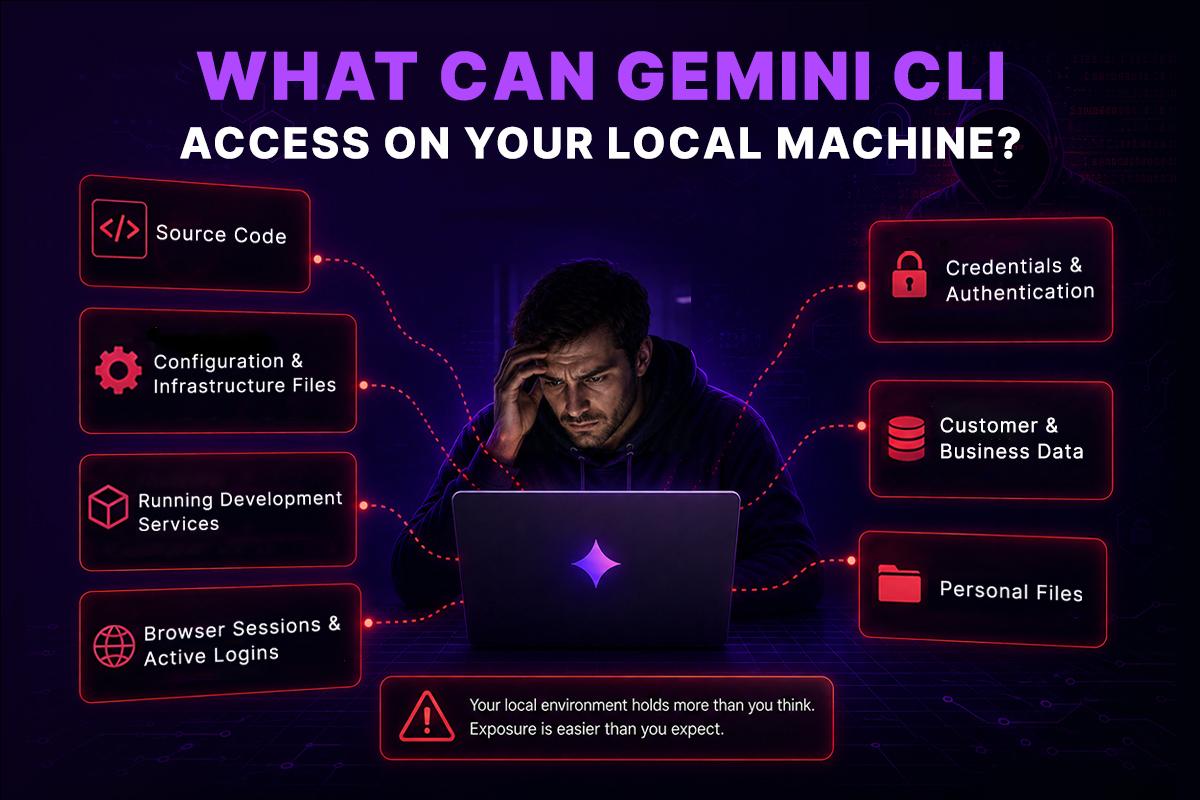
Modern developer workstations contain much more than application code. They often include infrastructure configurations, authentication credentials, cloud access, customer information, and personal files accumulated over years of development. While Google’s AI coding assistant only uses the context you provide or allow it to access, understanding what exists within that environment is an important part of managing security.
Source Code
Your application’s source code is usually the primary asset you want Google’s AI coding assistant to analyze. This can include:
- Backend services
- Frontend applications
- Microservices
- Internal libraries
- Proprietary algorithms
- Business logic
For many organizations, these repositories represent years of engineering investment and valuable intellectual property.
Configuration and Infrastructure Files
Development projects commonly include configuration files that describe how applications are built, deployed, and operated.
Examples include:
- .env
- .env.local
- docker-compose.yml
- package.json
- requirements.txt
- pom.xml
- Dockerfile
- Makefile
- nginx.conf
- Terraform modules
- Kubernetes manifests
- Helm charts
- Ansible playbooks
- CI/CD pipeline definitions
Although these files are essential during development, they often reveal internal architecture, deployment strategies, service endpoints, or infrastructure details that should be protected.
Credentials and Authentication
Most developers remain authenticated to the tools they use throughout the day. As a result, their workstation often stores credentials that provide access to cloud platforms, source code repositories, and internal services.
These may include:
- AWS credentials
- Google Cloud authentication
- Azure credentials
- Kubernetes kubeconfig files
- Terraform backend credentials
- GitHub personal access tokens
- GitLab access tokens
- SSH private keys
- Deployment certificates
- OAuth tokens
These credentials help streamline development workflows, but they also represent some of the most valuable assets on a developer’s machine.
Running Development Services
Many engineering teams run local infrastructure alongside their applications.
Examples include:
- Docker containers
- Kubernetes clusters
- PostgreSQL databases
- Redis instances
- Local APIs
- Internal microservices
When an AI tool operates within this environment, understanding the boundaries of what it can access becomes just as important as understanding what it can generate.
Browser Sessions and Active Logins
Developers are often signed in to multiple services simultaneously, including GitHub, GitLab, AWS, Azure, Google Cloud, Jira, Slack, and internal dashboards.
These active sessions improve productivity, but they also increase the value of the workstation. A trusted development machine frequently provides access to systems far beyond the current project.
Customer and Business Data
Development environments sometimes contain production-derived datasets, customer exports, analytics reports, support tickets, or database backups used for testing and troubleshooting.
Even when anonymized, this information may still reveal sensitive business details that should remain isolated from unrelated development tasks.
Personal Files
A developer’s workstation rarely contains only software projects.
It may also include:
- Financial records
- Tax documents
- Personal photos
- Browser downloads
- Meeting notes
- Contracts
- Password exports
- Identity documents
These files have nothing to do with software development, yet they often exist on the same machine where AI coding tools are executed.
Following the principle of least privilege means limiting access to only the resources required for a task. The fewer unrelated files available within the execution environment, the lower the potential impact of mistakes, unexpected behavior, or accidental exposure.
Understanding what exists on a developer workstation naturally leads to a broader question: Is the issue the AI tool itself, or the environment in which it runs?
The answer lies in understanding why local execution introduces security challenges and why many engineering organizations are choosing isolated execution environments for AI-assisted development.
Why Local Execution Creates Security Challenges
Running Gemini CLI locally isn’t inherently unsafe. The larger challenge is the environment in which it operates.
Modern developer workstations are highly trusted systems. Over time, they accumulate authenticated cloud sessions, infrastructure credentials, production tooling, private repositories, customer data, and personal files. When all of these assets exist on a single machine, that workstation becomes a high-value target.
Security teams refer to this as a large trust boundary. If an unintended action occurs, the potential impact extends beyond a single project because the same environment often has access to multiple business-critical systems.
This is why enterprise organizations isolate production from development, separate staging from production, and apply least-privilege access wherever possible. The same principle applies to AI coding assistants. Rather than giving them unrestricted access to a developer’s primary workstation, many teams are moving toward isolated execution environments that reduce the blast radius while preserving the developer experience.
Real Enterprise Scenarios
The risks become easier to understand when viewed through realistic engineering situations.
Scenario 1: Reviewing a Large Repository
A developer asks Gemini CLI:
“Explain how authentication works across this repository.”
To answer accurately, the tool needs to inspect multiple directories, configuration files, middleware, and authentication logic.
If secrets are stored alongside the application, they may exist within the same working environment even if they aren’t directly relevant to the request.
Keeping secrets separate from the execution environment reduces unnecessary exposure.
Scenario 2: Infrastructure Automation
An engineer asks:
“Update our Kubernetes deployment and generate the required Terraform changes.”
The repository may include:
- Kubernetes manifests
- Terraform modules
- IAM policies
- Cloud resource definitions
These files are valuable because they describe the organization’s infrastructure.
Running the task inside an isolated sandbox protects the host machine while allowing the AI agent to complete the work.
Scenario 3: Debugging Production Issues
An engineer copies production logs into Gemini CLI to investigate an incident.
Those logs might contain:
- Internal hostnames
- Service identifiers
- User IDs
- API responses
- Stack traces
- Database queries
Without careful handling, debugging data can reveal more information than intended.
A disposable sandbox helps contain temporary data and allows the environment to be destroyed after the investigation is complete.
Scenario 4: Working Across Multiple Clients
Consultants and managed service providers often switch between different customer projects on the same laptop.
Without isolation, repositories, credentials, cached files, and cloud sessions from multiple organizations coexist on one device.
Running each engagement inside its own sandbox creates clear separation between clients and reduces the chance of accidentally using the wrong credentials or exposing unrelated data.
Why Permissions Alone Aren’t Enough
A common assumption is that permission prompts solve the security problem.
They certainly help.
If an AI tool asks before executing a command or modifying files, the developer remains in control of critical actions.
But permissions only govern specific operations. They don’t change the environment itself.
Consider these questions:
- Are cloud credentials still stored locally?
- Are SSH keys still available?
- Are browser sessions still active?
- Is the developer authenticated to production?
- Does the laptop still contain personal documents?
- Are multiple repositories stored on the same machine?
The answer is usually yes.
Permissions reduce operational risk.
Isolation reduces environmental risk.
Enterprise security programs use both.
Why a Sandbox Provides a Stronger Security Boundary
A sandbox creates an isolated execution environment that is separated from your primary workstation.
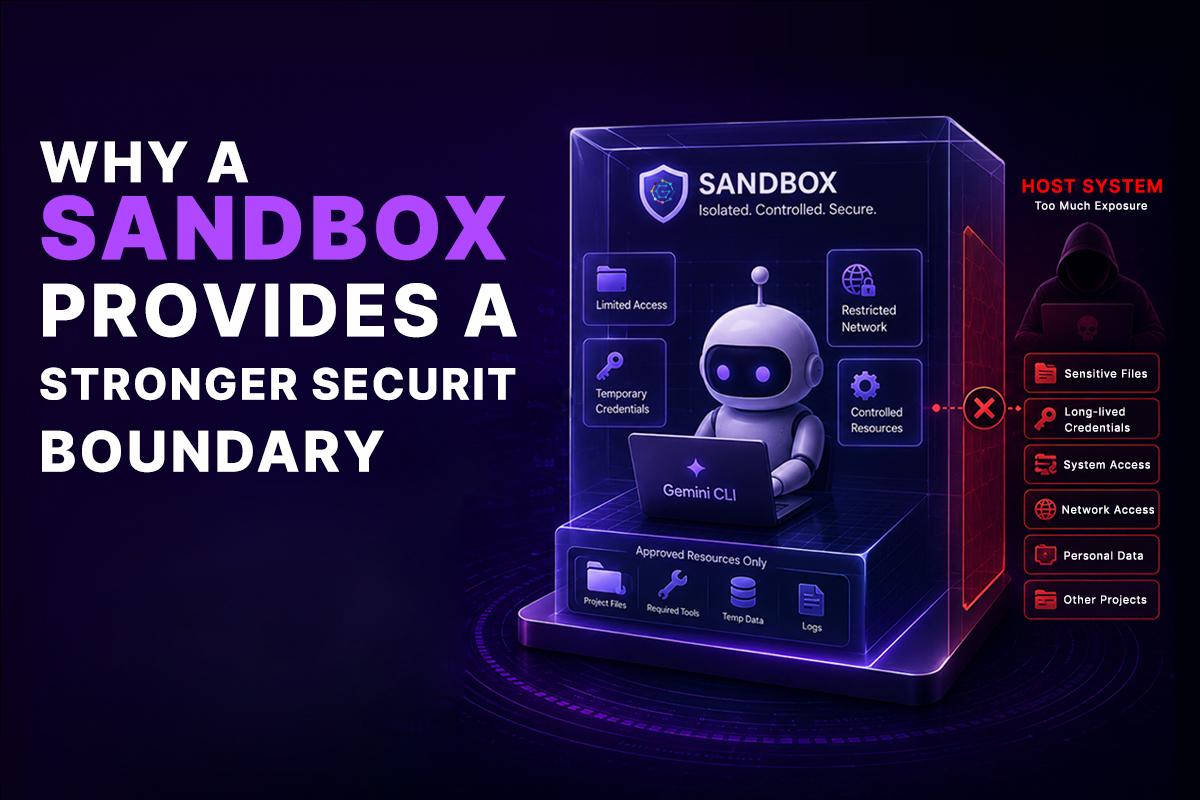
Instead of running Gemini CLI directly on your laptop, the AI agent operates inside a controlled environment with only the resources required for the task.
A properly designed sandbox allows developers to:
- Mount only the project they need.
- Expose only approved directories.
- Use temporary credentials instead of long-lived secrets.
- Restrict network access.
- Limit internet connectivity when appropriate.
- Remove unnecessary host access.
- Destroy the environment after work is complete.
This follows the principle of least privilege: give the tool only the access required to complete its job-and nothing more.
Local Machine vs. Sandbox
| Capability | Local Machine | Sandbox |
| Access to personal files | Often available | Isolated |
| Cloud credentials | Usually stored locally | Temporary or scoped |
| SSH keys | Commonly available | Optional |
| Network controls | Limited | Configurable |
| Project isolation | Low | High |
| Disposable environment | No | Yes |
| Auditability | Limited | Stronger |
| Blast radius after mistakes | Larger | Smaller |
| Enterprise governance | Difficult | Easier |
The objective isn’t to restrict developers.
It’s to create an environment where AI can work efficiently without inheriting unnecessary access to sensitive resources.
A Sandbox Shouldn’t Slow Developers Down
One concern teams often have is that moving AI agents into a sandbox will make development less convenient.
In practice, the opposite is often true when the environment is designed correctly.
Developers should be able to:
- Open repositories as they normally would.
- Install dependencies.
- Run builds and tests.
- Execute terminal commands.
- Debug applications.
- Use Git workflows.
- Connect to development services.
- Work with familiar tools and editors.
The experience should feel much like working on a local machine, while the underlying execution remains isolated from the host system.
This distinction is important. A sandbox isn’t just a security feature-it can also provide a consistent, reproducible development environment that reduces configuration drift, simplifies onboarding, and makes AI-assisted workflows easier to standardize across engineering teams.
GRiPO follows this approach by allowing AI coding agents to run inside isolated sandboxes that behave like full development environments. Developers continue using familiar workflows, while sensitive local files, credentials, and personal data remain outside the AI agent’s execution boundary. Beyond isolation, these sandbox environments can integrate with automated workflows, reusable plugins, and enterprise governance controls, making them suitable for teams that need both productivity and security.
Multi-Agent Systems: Why Isolation Matters Even More
Today’s engineering teams are moving beyond single AI assistants to multi-agent systems, where multiple specialized AI agents collaborate to complete complex workflows. For example, one agent may analyze a codebase, another generate infrastructure changes, another review security risks, and another create documentation or deployment plans.
While this approach improves productivity, it also increases the importance of security. Without proper isolation, multiple AI agents may require access to source code, cloud credentials, APIs, and infrastructure resources simultaneously, expanding the potential attack surface.
Running each AI agent inside its own secure sandbox provides a strong security boundary. Every agent receives only the permissions, files, tools, and credentials required for its specific task, following the principle of least privilege. This reduces risk, improves auditability, and enables organizations to scale AI-powered development safely.
With GRiPO, organizations can orchestrate multiple AI agents through automated workflows, allowing each agent to run in its own isolated sandbox while securely sharing outputs between workflow steps. This makes it possible to build powerful multi-agent DevOps, SecOps, and FinOps workflows without exposing your local machine or sensitive business data.
Frequently Asked Questions (FAQs)
How does GRiPO help secure Gemini CLI workflows?
GRiPO allows engineering teams to run Gemini CLI and other AI coding agents inside isolated sandbox environments that behave like full development workstations. Developers can continue using familiar tools and workflows while keeping sensitive local files, credentials, and personal data outside the AI agent’s execution boundary. In addition to secure execution, GRiPO supports reusable workflows, enterprise governance, and automation to help teams scale AI-assisted development safely.
Is Gemini CLI safe to use on a local machine?
Gemini CLI can be safe when used with appropriate security practices and permissions. However, because it runs within your development environment, it may have access to source code, credentials, configuration files, and other sensitive resources. Running Gemini CLI inside a secure sandbox helps reduce unnecessary exposure while maintaining a familiar development experience.
What can Gemini CLI access on my computer?
Depending on your configuration and permissions, Gemini CLI may access project files, source code, configuration files, cloud credentials, Git repositories, development tools, logs, and other resources you intentionally make available. The exact scope depends on how the tool is configured and the environment in which it runs.
Why should developers use a sandbox with Gemini CLI?
A sandbox isolates Gemini CLI from your primary workstation. Instead of giving the AI assistant unrestricted access to your laptop, it operates in a controlled environment with only the resources required for the task. This reduces the blast radius of mistakes while protecting sensitive files, credentials, and personal data.
Does using a sandbox affect the developer experience?
A well-designed sandbox should feel like a normal development environment. Developers can still clone repositories, install dependencies, run builds, execute terminal commands, debug applications, and use Git workflows without sacrificing productivity.
Can Gemini CLI access API keys and cloud credentials?
If API keys, cloud credentials, or authentication tokens are stored within the accessible development environment, they may become part of the working context. Following the principle of least privilege and using temporary credentials inside an isolated sandbox helps reduce this risk.
Is a sandbox better than running Gemini CLI directly on a laptop?
For individual experiments, running Gemini CLI locally may be sufficient. However, for enterprise development, a sandbox provides stronger isolation, better governance, improved security controls, and a reduced attack surface while preserving the developer workflow.
What are the benefits of running AI coding assistants inside a sandbox?
Using a sandbox provides several advantages, including isolated execution, temporary credentials, controlled network access, project separation, disposable environments, and improved compliance with enterprise security policies. These benefits help organizations adopt AI coding assistants more securely.
Can enterprises use Gemini CLI securely?
Yes. Many organizations use AI coding assistants securely by combining access controls, audit logging, role-based permissions, secure credential management, and isolated execution environments. These practices allow teams to improve developer productivity while protecting sensitive business assets.
What is the difference between permissions and sandbox isolation?
Permissions control what actions an AI assistant is allowed to perform, such as reading files or executing commands. A sandbox provides environmental isolation by separating the AI agent from the developer’s primary workstation. Together, permissions and sandboxing create a stronger security model than either approach alone.