
Artificial intelligence is quickly becoming part of the software development workflow. Tools like Codex can explain code, generate functions, refactor large projects, create tests, and even execute development tasks through terminal commands. They save time, reduce repetitive work, and help developers move faster.
That convenience comes with an important question:
What exactly can Codex access when it runs on your computer?
Many developers assume AI coding assistants only read the files they ask about. In reality, the level of access depends on how the tool is configured and what permissions it receives. If AI Agent has access to your local environment, it may also have access to everything stored there—including your source code, configuration files, cloud credentials, SSH keys, API tokens, browser sessions, and internal documentation.
For an individual hobby project, that risk may seem acceptable. For an enterprise engineering team working with customer data, production infrastructure, or proprietary software, it becomes a security and compliance concern.
This is where a sandbox becomes valuable. Instead of allowing AI agents to interact directly with a developer’s workstation, organizations can execute them inside isolated environments that expose only the files, permissions, and tools required for the task. The AI still performs useful work, but the surrounding system remains protected.
In this article, we’ll examine how AI Agent interacts with local machines, what risks organizations often overlook, and why isolated execution has become an essential part of secure AI-assisted software development.
What Is Codex?
Codex is an AI coding assistant designed to help developers write, understand, and modify software. Depending on how it is integrated, it can:
- Generate application code
- Refactor existing projects
- Explain unfamiliar codebases
- Create documentation
- Write unit and integration tests
- Execute terminal commands
- Analyze logs
- Debug production issues
- Assist with infrastructure automation
Unlike traditional autocomplete tools, modern AI coding agents work with much larger contexts. They may inspect an entire repository, examine project dependencies, read configuration files, or execute commands to gather additional information before producing an answer.
For example, when troubleshooting a Kubernetes deployment, an AI agent might:
- Read deployment manifests.
- Inspect Helm charts.
- Review Terraform modules.
- Execute diagnostic commands.
- Analyze application logs.
- Recommend infrastructure changes.
The more context an AI agent has, the better its responses become. The trade-off is that increased context also increases access to potentially sensitive information.
Why Running Codex on Your Local Machine Can Be Risky
A developer laptop contains far more than application source code.
Over the years, it becomes a central location for development tools, cloud credentials, infrastructure configuration, browser sessions, internal documents, and production access. AI agents operating directly on that machine may encounter information that was never intended to be shared.
Many developers underestimate how much valuable information exists outside the project directory.
A typical engineering workstation may contain:
- Multiple Git repositories
- AWS credentials
- Azure service principals
- Google Cloud authentication tokens
- Kubernetes kubeconfig files
- Terraform state files
- Docker configuration
- SSH private keys
- VPN certificates
- Production logs
- Internal architecture diagrams
- Database connection strings
- API tokens
- Customer datasets
- Financial reports
- HR documents
- Personal files
While AI Agent isn’t designed to misuse data, security engineering isn’t based on trust alone. It relies on limiting exposure, reducing permissions, and assuming that any software interacting with sensitive systems should have only the access it truly needs.
This is the foundation of the Principle of Least Privilege, one of the most widely adopted security practices in enterprise environments.
What Data Can Codex Potentially Access?
The answer depends on how it is configured and what permissions you grant.
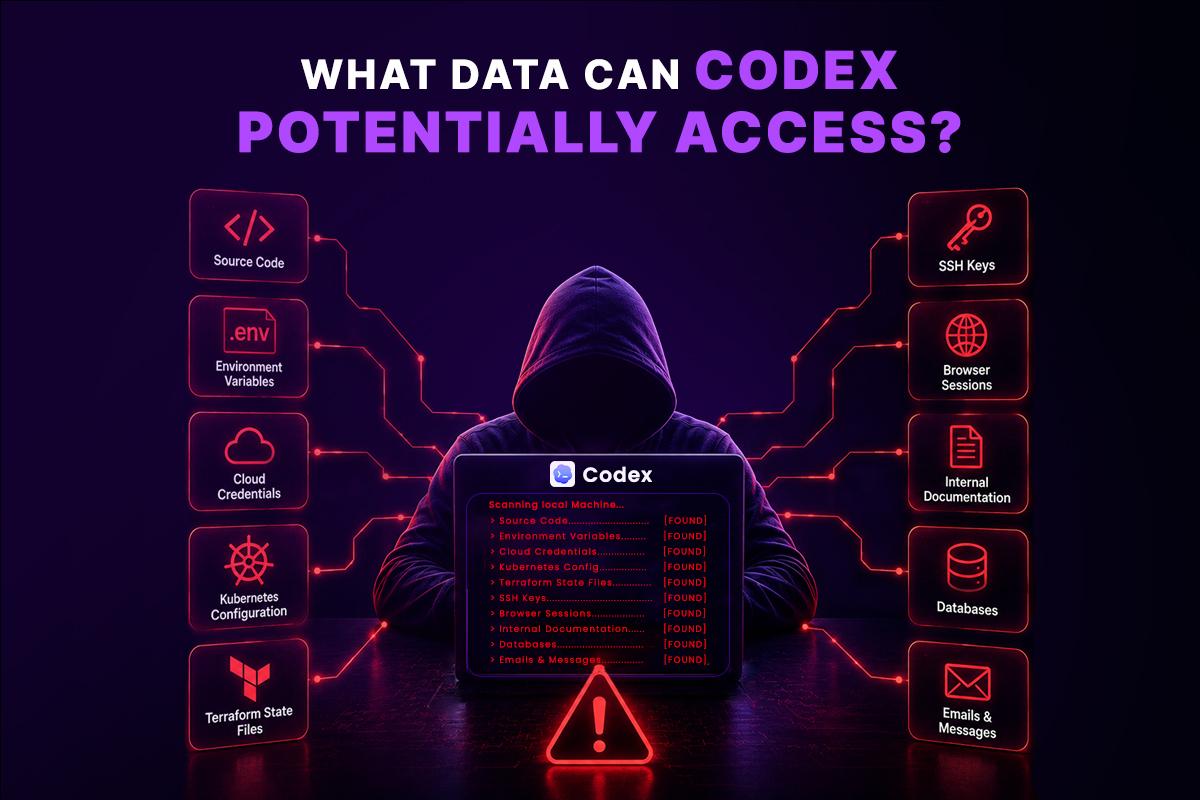
If Codex can read files from your workstation, it may encounter information far beyond the source code you intended to share.
Source Code
This is the most obvious category.
Entire repositories may include:
- Proprietary algorithms
- Internal business logic
- Unreleased features
- Security implementations
- Customer integrations
For startups and software companies, the codebase is often one of the organization’s most valuable assets.
Environment Variables
Many applications store secrets inside .env files.
These frequently include:
DATABASE_URL=
OPENAI_API_KEY=
AWS_SECRET_ACCESS_KEY=
JWT_SECRET=
REDIS_PASSWORD=
SMTP_PASSWORD=
Developers often forget these files exist because they are hidden from version control. Locally, however, they remain fully accessible.
Cloud Credentials
Cloud access is commonly stored on developer machines.
Examples include:
- AWS CLI credentials
- Azure CLI authentication
- Google Cloud SDK configuration
- IAM access keys
- Service account credentials
If exposed, these credentials may allow access to production infrastructure, storage buckets, databases, or deployment pipelines.
Kubernetes Configuration
Most DevOps engineers keep Kubernetes configuration locally.
Typical files include:
~/.kube/config
These configurations may contain:
- Cluster endpoints
- Authentication tokens
- Client certificates
- Administrative permissions
- Namespace information
In many organizations, these credentials provide direct access to production clusters.
Terraform State Files
Terraform state deserves special attention because it often contains information developers don’t realize is stored.
A single state file may include:
- Cloud resource identifiers
- Database endpoints
- Networking configuration
- IAM resources
- Secret references
- Infrastructure topology
Poorly managed state files have contributed to numerous cloud security incidents over the years.
SSH Keys
SSH keys provide access to:
- Git repositories
- Virtual machines
- Production servers
- Bastion hosts
- Internal infrastructure
Many engineers rarely rotate these keys, making them especially valuable from a security perspective.
Browser Sessions
Developers frequently remain logged into:
- GitHub
- GitLab
- Jira
- AWS Console
- Azure Portal
- Google Cloud Console
- Slack
- Internal dashboards
Although AI agents may not directly access browser memory, the surrounding workstation contains authentication artifacts, downloaded files, cached credentials, and session-related data that should be treated as sensitive.
Internal Documentation
Engineering teams often store confidential documents locally.
Examples include:
- Incident reports
- Security assessments
- Architecture diagrams
- Disaster recovery plans
- Customer implementation guides
- Compliance documentation
- Internal runbooks
These files may reveal far more about an organization’s infrastructure than source code alone.
A Realistic Example
Imagine a developer asks Codex:
“Help me troubleshoot why my Kubernetes deployment is failing.”
To answer that question accurately, AI Agent might need to inspect:
- Kubernetes manifests
- Helm values
- Terraform configuration
- Deployment scripts
- Container images
- CI/CD workflows
- Application logs
- Environment variables
Each additional source improves the quality of the response—but it also expands the amount of sensitive information the AI can access.
Now scale this across hundreds of developers in an enterprise. Without clear boundaries, every workstation becomes a unique security environment with different credentials, permissions, and confidential data. That inconsistency makes governance, auditing, and compliance much harder.
A sandbox addresses this challenge by providing a controlled execution environment where AI agents receive only the resources they need for the task at hand, rather than unrestricted access to a developer’s entire machine.
Why a Sandbox Changes Everything
One of the biggest misconceptions about AI coding agents is that security comes at the cost of productivity. Many developers assume that running AI Agent inside a sandbox will feel slower, more restrictive, or less capable than running it directly on their laptop.
That might have been true for traditional virtual machines or remote development environments. Modern sandbox platforms are different.
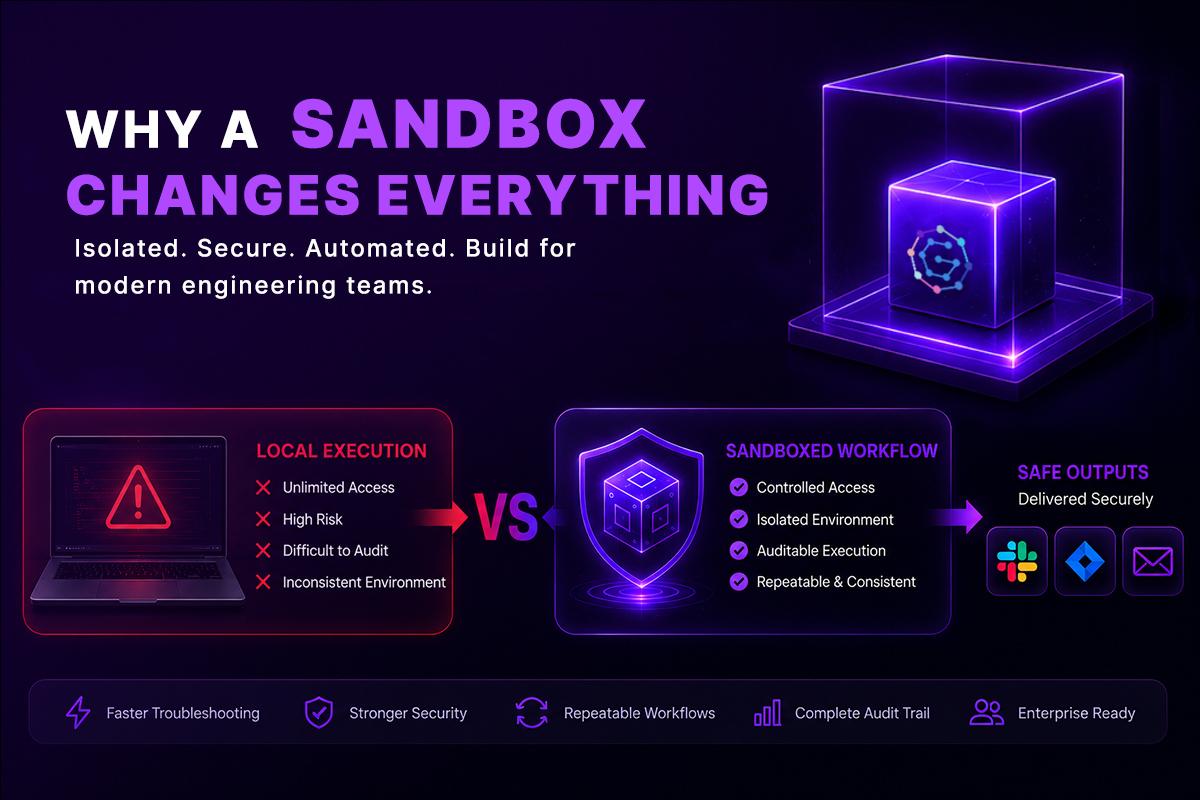
A well-designed code sandbox gives AI agents access to everything they need—source code, development tools, package managers, and command-line utilities—while keeping your local machine completely isolated.
From the developer’s perspective, the experience remains almost identical. From a security perspective, the difference is significant.
Instead of exposing an entire workstation, you expose only a temporary environment created specifically for the task.
What Is a Sandbox?
A sandbox is an isolated execution environment where applications or AI agents can safely perform work without direct access to the host operating system.
Think of it as creating a disposable development workspace.
Inside that workspace, you decide exactly what is available:
- A cloned Git repository
- Selected environment variables
- Specific CLI tools
- Temporary storage
- Limited network access
- Controlled permissions
- Approved plugins
Everything outside that environment remains inaccessible unless you explicitly allow it.
When the task finishes, the sandbox can be destroyed, leaving no credentials, temporary files, or unintended changes behind.
This approach follows one of the core principles of modern security architecture: isolation by default.
The Difference Between Local Execution and Sandboxed Execution
The difference isn’t about what AI Agent can do—it’s about where it does it.
| Local Machine | Sandbox |
| Access to personal files | Only mounted project files |
| Reads entire workstation | Reads only approved directories |
| Can discover hidden credentials | Secrets are injected only when required |
| Permanent environment | Ephemeral environment |
| Difficult to audit | Fully auditable execution |
| Shared developer machine | Isolated runtime |
| Different on every laptop | Consistent environment |
| Local permissions | Policy-controlled permissions |
Notice that none of these rows reduce the AI’s capabilities.
Instead, they reduce unnecessary exposure.
That’s an important distinction.
Security Isn’t About Distrusting Codex
Many discussions around AI security become emotional.
People ask:
“Do you trust Codex?”
That isn’t the right question.
Enterprise security has never been built on trust.
Organizations don’t assume developers will make mistakes.
They still implement:
- RBAC
- Multi-factor authentication
- Network segmentation
- Secret management
- Audit logging
- Endpoint protection
AI agents should follow the same principles.
Even if an AI model behaves exactly as intended, excessive permissions still increase organizational risk.
Security engineers focus on minimizing blast radius.
A sandbox does exactly that.
Limiting the Blast Radius
Imagine an AI agent accidentally executes an unexpected command.
On a local machine, the consequences could include:
- Reading unrelated repositories
- Accessing cloud credentials
- Discovering SSH keys
- Viewing confidential documents
- Modifying local configuration
- Consuming excessive resources
Inside an isolated sandbox, the same command affects only that isolated environment.
The host system remains untouched.
This significantly limits the impact of:
- Human mistakes
- Prompt injection
- Misconfigured tools
- Unexpected AI behavior
- Third-party integrations
Isolation doesn’t eliminate every risk.
It prevents small mistakes from becoming major incidents.
Sandboxes Don’t Slow Developers Down
One concern engineering teams often raise is developer experience.
They imagine switching between remote desktops, manually copying files, or waiting for virtual machines to start.
Modern sandbox platforms don’t work that way.
A sandbox can be provisioned automatically in seconds with:
- Git repository already cloned
- Dependencies installed
- Docker available
- Python configured
- Node.js installed
- Kubernetes CLI ready
- Terraform installed
- Required plugins connected
From the developer’s point of view, they’re interacting with a familiar development environment.
The difference is that the environment is isolated, reproducible, and disposable.
This consistency also eliminates the classic problem of:
“It works on my machine.”
Every sandbox starts from the same baseline configuration, making debugging and collaboration much easier.
Enterprise AI Requires More Than Isolation
Isolation solves one problem.
Enterprise automation introduces another.
Organizations rarely run a single AI agent.
A typical engineering workflow may involve several specialized agents working together.
For example:
- One agent reviews pull requests.
- Another analyzes infrastructure.
- Another generates documentation.
- Another investigates incidents.
- Another performs security checks.
- Another creates executive reports.
Running each agent independently creates operational overhead.
The real value comes from orchestrating them into repeatable workflows.
Beyond Secure Execution: Why Workflow Automation Matters
Many sandbox solutions stop at secure code execution.
That solves only part of the problem.
Engineering teams also need a way to coordinate AI-driven tasks across tools, environments, and departments without manually stitching everything together.
This is where GRiPO extends beyond traditional sandboxing.
Rather than treating each sandbox as an isolated island, GRiPO allows secure sandboxes, AI agents, plugins, and automation workflows to work together as a single system.
For example, a workflow can:
- Launch a fresh sandbox.
- Install Codex or another coding agent.
- Clone a GitHub repository.
- Execute automated code analysis.
- Trigger an infrastructure validation inside a separate sandbox.
- Pass findings to another AI agent for summarization.
- Open a Jira issue if risks are detected.
- Send a Slack notification to the engineering team.
- Archive execution logs for auditing.
Each stage runs in its own isolated environment, yet the workflow behaves as one connected automation pipeline.
This architecture offers a major advantage over running AI agents directly on developer laptops: automation becomes repeatable, auditable, and scalable, rather than depending on the state of an individual’s machine.
A Practical Example
Imagine your platform team receives an alert that a Kubernetes deployment failed after a release.
Instead of asking an engineer to investigate manually, an automated workflow could:
- Create an isolated sandbox.
- Clone the affected repository.
- Install Codex inside the sandbox.
- Collect Kubernetes events and pod logs.
- Run infrastructure validation with Terraform.
- Compare the latest deployment against the previous release.
- Generate a root-cause summary.
- Send the findings to Slack.
- Create a Jira ticket with all supporting evidence.
Throughout the investigation, the AI agent never needs direct access to an engineer’s laptop, browser sessions, personal files, or unrelated repositories. It works entirely within a controlled environment built for that specific incident.
The result is faster troubleshooting with stronger security, consistent execution, and a complete audit trail.
Connecting Multiple Sandboxes with GRIPO Workflows
Another advantage of GRiPO platforms is that isolated sandbox environments don’t have to operate alone. Each sandbox can specialize in a particular task while securely passing structured outputs to the next step in a workflow.
Consider a deployment pipeline:
GitHub Push
│
▼
Sandbox #1
Code Analysis
│
▼
Sandbox #2
Security Scan
│
▼
Sandbox #3
Infrastructure Validation
│
▼
Sandbox #4
Deployment Verification
│
▼
Slack Notification
Each sandbox has:
- Its own filesystem
- Its own permissions
- Its own runtime
- Its own lifecycle
No sandbox requires unrestricted access to another.
Only the approved outputs move through the workflow.
This approach keeps every stage isolated while allowing complex automation across teams and environments.
Enterprise Security Best Practices for Running AI Agent
Deploying AI coding agents in an enterprise environment requires more than installing a CLI tool. The surrounding architecture determines whether AI becomes a productivity multiplier or introduces new security and compliance risks.
The following practices have proven effective for organizations adopting AI-assisted development at scale.
1. Follow the Principle of Least Privilege
Every AI agent should receive only the permissions required for its current task.
For example:
- A documentation agent doesn’t need production credentials.
- A code review agent shouldn’t have deployment permissions.
- A testing agent doesn’t need access to financial systems.
- An infrastructure agent shouldn’t have unrestricted access to every cloud account.
Reducing permissions minimizes the impact of accidental actions or compromised workflows.
2. Use Ephemeral Execution Environments
Long-running development environments gradually accumulate credentials, temporary files, cached tokens, and configuration drift.
Ephemeral sandboxes avoid this problem.
Each execution should:
- Start from a clean image
- Install only required dependencies
- Execute the workflow
- Destroy the environment afterward
This ensures every run begins in a predictable, isolated state.
3. Manage Secrets Securely
Secrets should never be hardcoded into repositories or permanently stored inside execution environments.
Instead:
- Inject secrets only when needed.
- Use short-lived credentials where possible.
- Rotate tokens regularly.
- Audit secret usage.
- Remove secrets automatically after execution.
This significantly reduces the risk of accidental exposure.
4. Audit Every AI Action
AI-assisted workflows should be as observable as production applications.
Capture information such as:
- Commands executed
- Files accessed
- Workflow steps
- API calls
- Generated outputs
- User approvals
- Execution timestamps
Audit trails simplify troubleshooting, support compliance requirements, and help organizations understand how AI agents interact with their systems.
5. Keep Humans in Control
AI is excellent at accelerating routine engineering work, but high-impact decisions should still involve human review.
Examples include:
- Deploying production infrastructure
- Rotating credentials
- Deleting cloud resources
- Modifying security policies
- Changing IAM permissions
Approval gates ensure automation remains safe while preserving engineering oversight.
Compliance Considerations
Security is only one part of enterprise adoption.
Many organizations must also satisfy regulatory and compliance requirements.
Isolated execution supports several common frameworks by reducing unnecessary data exposure and improving auditability.
Examples include:
- SOC 2 — Demonstrates controls around security, availability, and confidentiality.
- ISO 27001 — Encourages risk-based security management and controlled access to information.
- OWASP — Promotes secure software development practices, including least privilege and defense in depth.
- NIST Cybersecurity Framework — Recommends identifying, protecting, detecting, responding to, and recovering from security events through layered controls.
While a sandbox alone doesn’t make an organization compliant, it helps implement many of the technical safeguards expected during security assessments.
Local Machine vs Sandbox vs Virtual Machine
Choosing where AI agents execute has a significant impact on security, consistency, and operational overhead.
| Feature | Local Machine | Sandbox | Traditional Virtual Machine |
| Access to host files | High | Controlled | Moderate |
| Startup time | Immediate | Seconds | Minutes |
| Reproducible environments | Limited | Excellent | Good |
| Disposable after execution | No | Yes | Optional |
| Fine-grained permissions | Limited | Yes | Limited |
| Easy to audit | Difficult | Yes | Moderate |
| Consistent across teams | No | Yes | Sometimes |
| Resource overhead | Low | Low | High |
| Best for enterprise AI | ❌ | ✅ | Partial |
Virtual machines provide isolation but are often heavier to provision and maintain. Sandboxes deliver similar isolation with faster startup times and better suitability for automated workflows.
The Future of AI-Assisted Development
AI coding agents will continue to evolve.
They’ll write more code, automate more infrastructure, investigate production incidents, optimize cloud costs, and coordinate increasingly complex engineering workflows.
As their capabilities expand, so does the importance of controlling where they execute and what they can access.
The future isn’t about choosing between productivity and security.
It’s about designing systems where both coexist.
Isolated execution environments, policy-driven permissions, auditable workflows, and reusable automation provide a foundation that allows organizations to adopt AI confidently without exposing sensitive data or compromising governance.
Frequently Asked Questions (FAQs)
Is it safe to run Codex on a local machine?
Running AI Agent on a local machine can be safe for personal projects when appropriate permissions and security practices are followed. However, enterprise developer workstations often contain sensitive assets such as source code, cloud credentials, SSH keys, API tokens, and customer data. Running Codex inside an isolated sandbox significantly reduces the risk of exposing those resources.
What data can Codex access on my computer?
Depending on its permissions and configuration, Codex may access source code, configuration files, environment variables, development logs, cloud credentials, Kubernetes configurations, Terraform files, SSH keys, and other project-related resources that are available within its execution environment.
Why should developers run Codex inside a sandbox?
A sandbox creates an isolated execution environment where Codex can perform development tasks without direct access to your entire workstation. This limits unnecessary exposure, reduces the blast radius of mistakes, and helps protect sensitive business and personal data.
What is a code sandbox?
A code sandbox is an isolated environment that allows developers or AI coding agents to execute code safely without affecting the host operating system. It provides controlled access to files, credentials, networking, and development tools while keeping the primary machine protected.
Does using a sandbox make Codex slower?
No. Modern sandbox environments are designed to provide a development experience that closely matches working on a local machine. Developers can install dependencies, run builds, execute terminal commands, debug applications, and use Git without significant performance differences.
Can Codex access cloud credentials?
If cloud credentials are stored on the developer’s workstation and are accessible within the execution environment, Codex may interact with them during development tasks. Using temporary credentials and isolated sandbox environments helps minimize this risk.
How does a sandbox improve enterprise security?
A sandbox improves security by isolating AI execution from the host machine. It allows organizations to expose only approved repositories, temporary credentials, and required tools while protecting local files, browser sessions, and unrelated business data.
What is the Principle of Least Privilege for AI coding assistants?
The Principle of Least Privilege means giving an AI coding assistant only the minimum permissions required to complete a specific task. This reduces unnecessary access to sensitive systems and limits the potential impact of accidental actions or security incidents.
Can multiple AI agents run securely in separate sandboxes?
Yes. Enterprise platforms can run multiple AI agents in separate isolated sandboxes, each with its own permissions, runtime, and lifecycle. This allows organizations to automate complex workflows while maintaining strong security boundaries between tasks.
Why are disposable sandbox environments important?
Disposable or ephemeral sandboxes ensure every AI task starts with a clean environment. Once the task is complete, the sandbox is destroyed, removing temporary files, cached credentials, and configuration changes that could otherwise create security risks.
How does GRIPO secure AI coding workflows?
GRIPO enables organizations to run Codex and other AI coding agents inside isolated sandbox environments. These sandboxes can be integrated into automated workflows with reusable plugins, audit logging, enterprise governance, and policy-controlled execution, helping teams improve both security and productivity.
Can sandbox environments support DevOps workflows?
Yes. A properly configured sandbox can include Git, Docker, Kubernetes, Terraform, package managers, CI/CD tools, and other development utilities. Developers continue using familiar workflows while benefiting from isolated execution and stronger security controls.
What is the difference between a sandbox and a virtual machine?
Both provide isolation, but modern sandboxes are typically faster to start, consume fewer resources, and are easier to automate. They are designed for short-lived, reproducible workloads, making them well suited for AI-assisted development and DevOps automation.
How do sandbox environments help with compliance?
Sandbox environments support security best practices by improving isolation, reducing unnecessary data exposure, enabling audit logging, and enforcing controlled access. These capabilities help organizations implement technical safeguards commonly associated with frameworks such as SOC 2, ISO 27001, OWASP, and the NIST Cybersecurity Framework.
What are the benefits of combining AI agents with workflow automation?
Combining AI agents with automated workflows allows engineering teams to perform repeatable tasks such as code analysis, security scanning, infrastructure validation, incident investigation, documentation generation, and reporting without manual intervention. When each step runs inside its own isolated sandbox, organizations gain improved security, consistency, scalability, and complete auditability.