

AI coding agents make it easier for developers to build software. Instead of switching between documentation, websites, and command-line tools, developers can rely on them to write code, explain unfamiliar functions, fix bugs, and automate repetitive tasks.
Claude Code is one of the latest AI Agents driving this change. Rather than simply answering programming questions, it works directly inside your development environment. It can inspect projects, understand code structure, edit files, run commands, and complete tasks that once required constant manual effort.
That level of access is what makes it so useful. It is also why security becomes an important consideration.
When Claude Code runs directly on your laptop, it shares the same environment as your source code, development credentials, local databases, SSH keys, cloud configuration files, browser sessions, and personal documents. Because it operates with the same permissions as your user account, it can access anything your operating system allows.
For personal projects, this may not seem like a major concern. However, for production applications, enterprise software, or large engineering teams, the security implications become much more significant.
The question is no longer, “Can AI write code faster?” Instead, it becomes, “Does it have access to more than it actually needs?”
Modern coding agents do much more than generate text. They inspect files, execute commands, interact with development tools, and make decisions based on the information available to them. Without proper isolation, convenience can quickly become unnecessary risk.
What Actually Happens When Claude Code Runs Locally?
Many developers think of AI coding assistants as advanced autocomplete tools. In reality, they’re much more than that. Once Claude Code connects to your development environment, it becomes an active participant in your workflow.
Depending on the permissions you’ve granted, it can:
- Read project files
- Modify source code
- Search directories
- Execute terminal commands
- Analyze Git history
- Generate configuration files
- Install dependencies
- Run tests
- Run CLI commands on your behalf
- Debug applications
- Interact with development tools
These capabilities make Claude Code incredibly useful, but they also change how it interacts with your system.
Many people assume it only works with the files they’re actively editing. In practice, modern coding agents often gather additional context to complete tasks more accurately. For example, while investigating a failing build, Claude Code may examine project structure, package dependencies, build configurations, previous commits, test suites, deployment scripts, and other related files.
Access to this additional context often leads to better suggestions. However, it also increases the amount of information available during the session.
The bigger concern is that a developer’s workstation contains much more than source code. It may also store API keys, access tokens, cloud credentials, SSH private keys, Kubernetes configurations, Terraform state files, browser sessions, saved passwords, VPN certificates, personal documents, financial information, and internal company projects. Even if none of these resources are related to the current task, they still exist within the same environment.
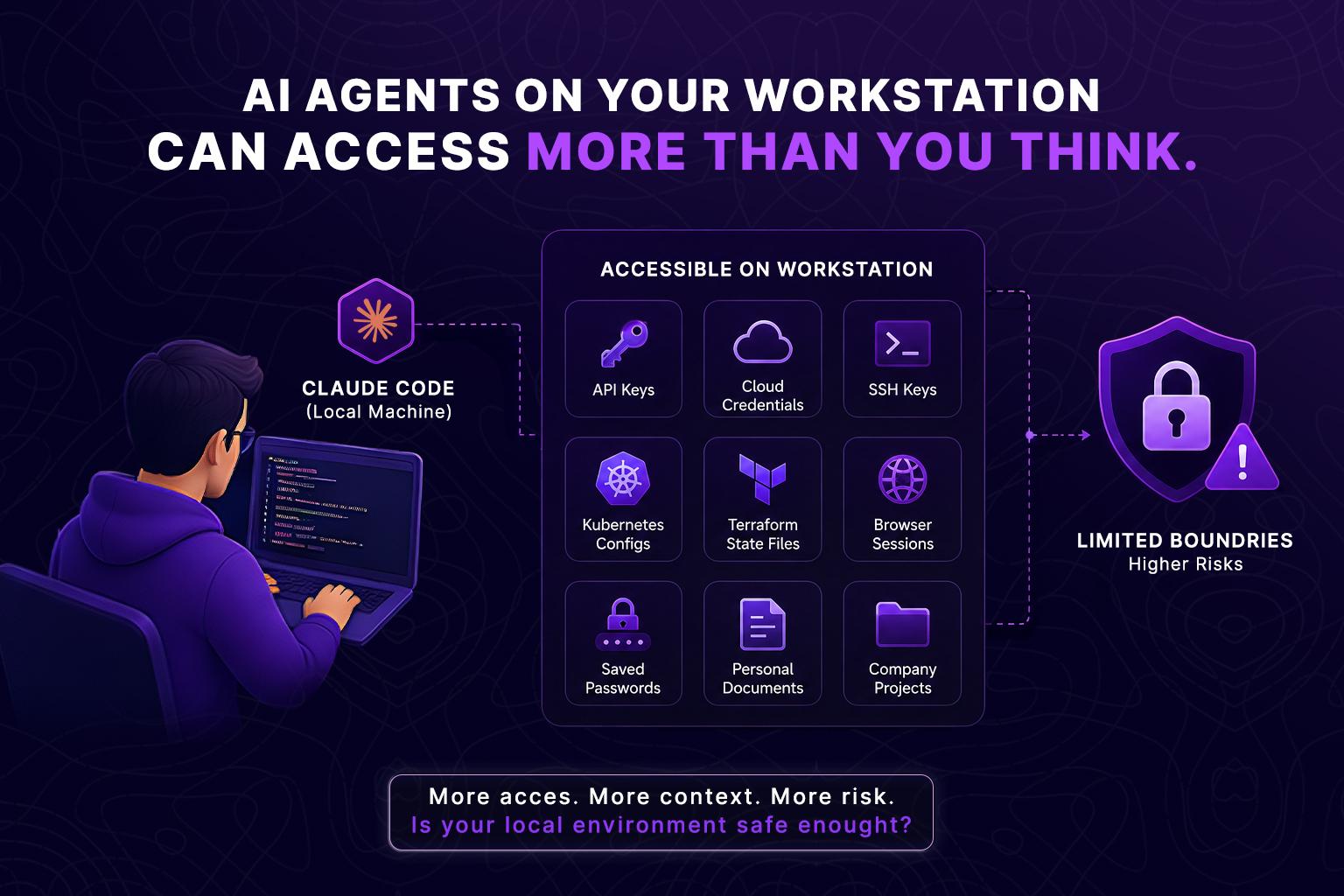
However, if troubleshooting requires checking deployment settings, infrastructure files, or build configurations, Claude Code may legitimately access files well beyond the original task. The issue is not that it is behaving incorrectly. It is simply using the information available to complete the job.
The real challenge is the environment itself. When AI agents run directly on a local workstation, there are very few natural boundaries separating project files, company resources, and personal information. As a result, every additional file, credential, or configuration that is accessible becomes part of the agent’s potential working context.
For individual developers, this level of access may be acceptable. For enterprise engineering teams, where consistency, security, and governance are essential, relying on unrestricted local environments becomes much harder to manage.
The Hidden Risk Isn’t the AI, It’s the Environment
Security discussions often focus on whether an AI model can be trusted, but that’s only part of the story. The bigger question is where it is allowed to operate.
Think about how developers protect production systems. Databases are not exposed directly to the internet. Administrative credentials are not shared with every employee. Production workloads do not run with unrestricted root access. Sensitive services are kept separate because limiting access reduces risk.
The same idea applies to AI-assisted development. If an AI agent has unrestricted access to your local environment, every additional file, credential, or configuration becomes part of what it can access and use. Even when it behaves exactly as intended, having access to more information increases the risk of accidental exposure.
Common examples include:
- Accidentally reading production configuration files.
- Including secrets in debugging output.
- Modifying files outside the intended project.
- Running commands against the wrong environment.
- Using outdated credentials stored locally.
These aren’t failures of AI. They’re failures of environment design.
Why Local Machines Aren’t Built for Autonomous AI Agents
There’s a fundamental difference between using an AI coding assistant and running autonomous AI agents.
For occasional code generation, running Claude Code on your laptop may be perfectly reasonable. It can help write a function, explain unfamiliar code, or suggest a refactor while you remain in control of every important decision.
The picture changes when AI agents begin handling multi-step workflows with minimal supervision. Instead of responding to a single prompt, they can:
- Plan workflows
- Make decisions
- Retry failed operations
- Execute multiple commands
- Coordinate with external services
- Trigger CI/CD pipelines
- Deploy infrastructure
- Open pull requests
- Generate documentation
- Monitor system health
Suppose you’re building an AI agent that automatically reviews every pull request, runs unit and integration tests, validates Terraform changes, checks Kubernetes manifests, updates Jira tickets, generates release notes, and opens a pull request with the required fixes.
This is no longer a one-off prompt. It is an automated workflow that must produce consistent and predictable results every time it runs.
A personal laptop is not designed for that. Every developer machine is different:
- Different operating systems
- Different installed tools
- Different package versions
- Different environment variables
- Different local credentials
- Different file structures
- Different network access
- Different security policies
Because of these differences, the same AI agent may behave differently from one machine to another. That makes debugging more difficult, reduces reliability, and creates challenges for security, governance, and compliance.
As AI agents become more autonomous, execution boundaries become just as important as model capabilities. An AI agent that can edit Kubernetes manifests, update Terraform configurations, and deploy cloud infrastructure should not run inside an unrestricted personal workstation.
Enterprise engineering teams already separate development, staging, and production environments because predictable systems are easier to secure, audit, and recover. Autonomous AI agents deserve the same approach. The challenge is not trusting the model, it is providing a controlled environment where it can operate safely and consistently.
The Hidden Cost of Local AI Workflows
Most discussions about AI security focus on protecting sensitive data. That’s essential, but it’s only one part of the equation. Engineering leaders also need to think about operational risk.
Imagine an AI agent troubleshooting a failed deployment.
- On one developer’s machine, the required CLI tools are already installed. The agent succeeds.
- On another machine, a dependency is missing. The workflow fails.
- On a third machine, outdated credentials point to an old staging environment. The AI deploys changes to the wrong cluster.
None of these failures are caused by the AI model itself. They’re caused by inconsistent execution environments. These differences become even more expensive when AI workflows are integrated into CI/CD pipelines or shared across engineering teams. Hours can be lost reproducing issues that only occur on specific machines. The more critical the workflow, the more valuable a standardized execution environment becomes.
What Is a Claude Code Sandbox?
A Claude Code sandbox is an isolated execution environment where AI agents can read files, generate code, and execute commands without direct access to a developer’s personal machine or sensitive enterprise systems. Unlike a regular setup on your local machine, a sandbox creates clear boundaries around what the AI can and cannot access.
A well-designed sandbox typically provides:
- An isolated filesystem
- Temporary credentials
- Restricted network access
- Controlled permissions
- Disposable environments
- Consistent software versions
- Activity logging
- Resource limits
Instead of working with your whole computer, the AI operates entirely within the specific resources you have made available, which helps to prevent accidental data exposure. You have complete control over the environment. When you are done with the session, the environment can be completely reset or destroyed, making it much easier to repeat AI workflows safely.
How Sandboxing Changes the AI Development Model
Think of a sandbox as a clean, purpose-built workspace. Instead of saying: “Here’s my entire laptop. Work carefully,” you’re saying: “Here’s a controlled environment containing only the files and tools needed for this task.”
That distinction has several advantages:
Better Security
Sensitive files remain outside the execution environment. Production credentials, personal documents, browser sessions, and unrelated repositories aren’t available unless explicitly included. Even if an AI workflow behaves unexpectedly, its impact is contained within the sandbox.
Predictable Execution
Every sandbox can start from the same baseline: the same operating system, dependencies, tool versions, and permissions. This eliminates many of the “works on my machine” problems that slow down software teams.
Easier Testing
AI agents often improve through experimentation. Developers adjust prompts, modify workflows, and evaluate different approaches before deploying automation into production. A disposable sandbox makes this process safer because each experiment begins from a clean environment rather than inheriting the state of previous tests.
Better Governance
Enterprise engineering teams increasingly need visibility into AI-assisted development. Questions such as these are becoming common:
- Which commands did the AI execute?
- Which files were modified?
- What credentials were used?
- Which workflow initiated the changes?
- Can the execution be reproduced?
These questions are difficult to answer when AI operates across hundreds of developer laptops. A centralized sandbox provides a much clearer operational picture.
Local Machine vs. Claude Code Sandbox
Choosing between local execution and a sandbox isn’t about replacing developer workflows. It’s about selecting the right environment for the right task.
| Capability | Local Machine | Claude Code Sandbox |
| Access limited to project files | ❌ Often broader than intended | ✅ Controlled by design |
| Isolation from personal data | ❌ Shared environment | ✅ Complete separation |
| Consistent execution | ❌ Depends on each machine | ✅ Standardized environment |
| Safe AI experimentation | ⚠️ Limited | ✅ Purpose-built |
| Temporary credentials | ❌ Usually manual | ✅ Easily managed |
| Auditability | ⚠️ Limited | ✅ Centralized logging |
| Enterprise governance | ❌ Difficult to enforce | ✅ Easier to standardize |
| Repeatable workflows | ⚠️ Machine-dependent | ✅ Reproducible |
| Cleanup after execution | ❌ Manual | ✅ Disposable environments |
For individual coding sessions, local execution may be sufficient. For AI agent development, shared automation, and enterprise operations, isolation becomes a practical requirement rather than a nice-to-have.
Where GRIPO Sandbox Fits
Many developers appreciate the speed and flexibility of Claude Code. The challenge is not the tool itself, it is the environment where it runs. GRIPO solves this by running AI agents in an isolated cloud sandbox instead of on a developer’s local workstation.
From the developer’s perspective, the experience remains familiar. You can continue working through your preferred terminal or editor, including Visual Studio Code, while the actual execution happens inside a controlled environment.
That separation offers several practical benefits:
- AI agents interact only with approved project resources.
- Sensitive local files remain outside the execution boundary.
- Workflows execute in a consistent environment every time.
- Teams can safely test automation before introducing it into production.
- AI behavior becomes easier to monitor, reproduce, and refine.
This approach is particularly valuable for organizations building reusable AI workflows across multiple teams. Instead of depending on each developer’s unique setup, everyone works from the same controlled foundation.
The Real Power Comes Next: Connected Sandboxes Inside a Workflow
Running Claude Code inside a sandbox makes AI development safer by isolating execution from your local machine. But isolation is only the first step.
The bigger opportunity is connecting multiple sandboxes together into a single automated workflow.
In most AI development tools, a sandbox is a temporary environment that starts, completes a task, and then shuts down. Each session is independent. If you want another AI agent to continue the work, you typically have to export the results, write custom integration code, or manually move data between systems.
GripoFlow takes a different approach. Instead of treating sandboxes as isolated environments, it allows them to communicate as part of a larger workflow. Each sandbox performs a specific task, passes structured output to the next step, and contributes to a complete automation pipeline. This creates modular, reusable workflows where multiple AI agents can collaborate without exposing local systems or relying on manual handoffs.
A Real-World Example: Claude Code and Hermes Working Together
Imagine your engineering team wants to scan every JavaScript project for vulnerable npm packages.
The workflow could look like this:
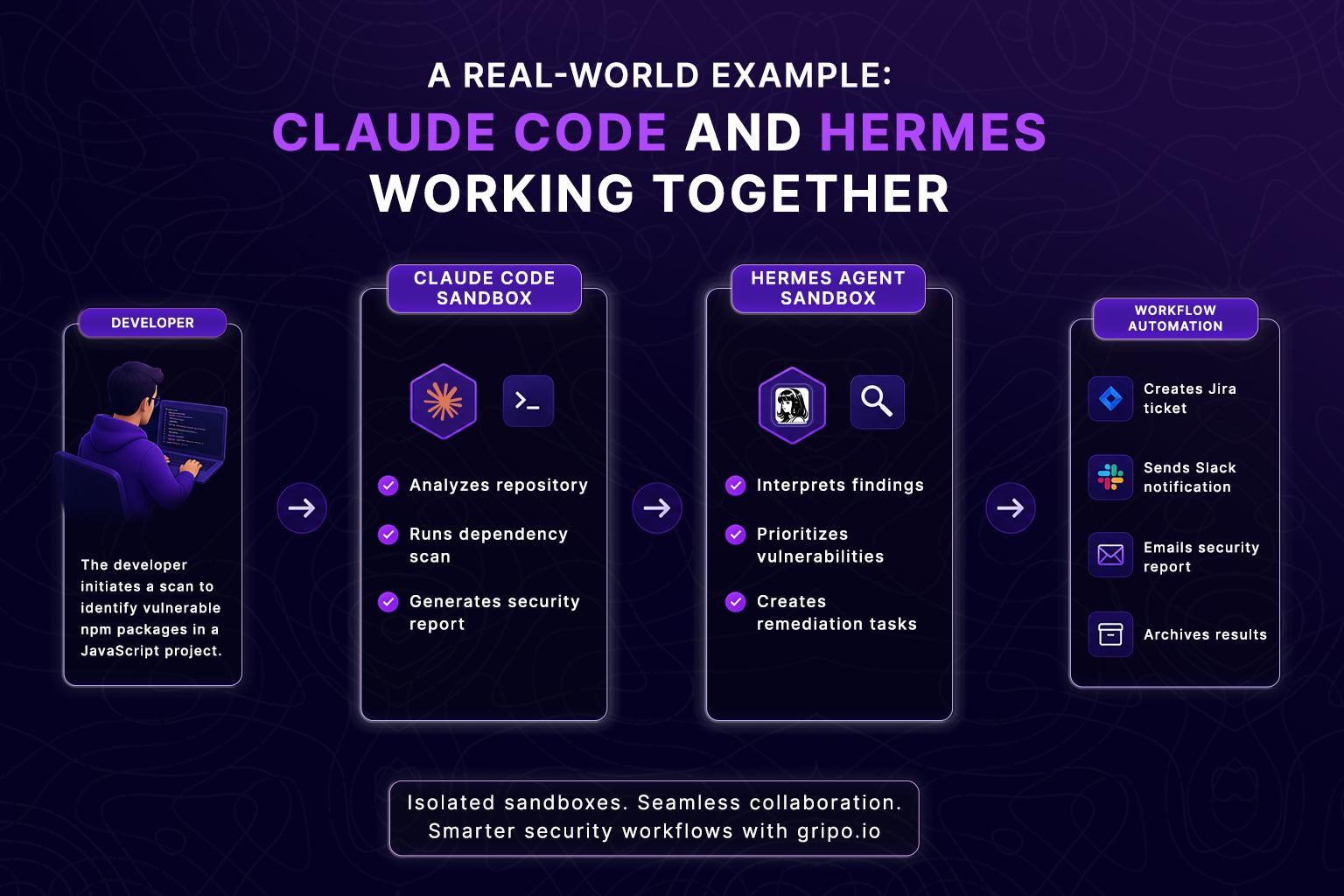
In this example, Claude Code focuses on understanding the repository and generating technical findings. Once its work is complete, the results are automatically handed to a Hermes agent running in a separate sandbox. Hermes analyzes the output, prioritizes issues based on severity, and triggers the next steps in the workflow.
Because each agent operates inside its own isolated environment, teams gain the benefits of separation while still enabling collaboration across the workflow.
Why Multi-Sandbox Workflows Matter
Breaking AI automation into specialized stages offers several advantages:
- Improved security – Each sandbox receives only the data required for its task, reducing unnecessary exposure.
- Specialized AI agents – Different models or agents can focus on code generation, security analysis, documentation, or infrastructure automation.
- Reusable workflows – Individual sandbox stages can be reused across different projects and teams.
- Greater scalability – Workflows can grow from a single AI task into complex enterprise automation without increasing operational complexity.
- Better observability – Every handoff between sandboxes can be tracked, audited, and reproduced.
Instead of building one AI agent that attempts to do everything, engineering teams can design workflows where each sandbox has a clearly defined responsibility.
Beyond AI Coding Assistants
This is where AI automation begins to resemble modern software architecture.
Just as microservices communicate through well-defined interfaces, connected sandboxes allow AI agents to exchange structured data while remaining securely isolated from one another. Claude Code can generate code, another sandbox can validate infrastructure changes, a third can perform security analysis, and a fourth can notify teams or update project management systems.
The result isn’t just safer AI execution, it’s a coordinated automation platform where multiple AI agents work together as part of a governed, repeatable workflow.
From AI Assistant to Governable AI
One of the biggest shifts happening in software engineering isn’t that AI can write code. It’s that AI is becoming capable of performing work independently. As AI agents begin managing deployments, validating infrastructure, reviewing pull requests, and coordinating complex workflows, engineering teams need more than productivity, they need control.
That means:
- Defined execution boundaries
- Consistent environments
- Repeatable results
- Secure access to resources
- Clear audit trails
- Reliable governance
A sandbox isn’t just another layer of security. It’s the foundation that allows AI to move from an individual developer tool to an enterprise-ready automation platform. Instead of asking developers to trust AI with unrestricted access to their local machines, organizations can provide a purpose-built environment where AI has exactly the permissions it needs and nothing more.
Enterprise Use Cases for Running Claude Code in a Sandbox
As organizations move beyond individual AI-assisted coding sessions, the focus shifts from convenience to operational reliability. A sandboxed environment enables teams to adopt AI at scale without sacrificing security or governance. Here are a few common scenarios where isolation makes a measurable difference:
1. Secure Pull Request Reviews
AI can review pull requests, suggest improvements, identify potential bugs, and recommend security fixes. Instead of granting access to an entire developer workstation, the AI receives only the repository snapshot required for the review. This limits unnecessary exposure while making every review reproducible.
2. Infrastructure as Code Validation
Infrastructure changes often involve Terraform, Kubernetes manifests, Helm charts, and cloud configurations. Running AI validation inside a sandbox allows teams to:
- Validate Terraform plans
- Check Kubernetes manifests
- Detect configuration drift
- Verify policy compliance
- Test deployment scripts
Because each execution starts from the same baseline, results remain consistent across teams.
3. AI-Assisted CI/CD Automation
Modern CI/CD pipelines include more than building applications. They often perform:
- Dependency analysis
- Security scanning
- Test execution
- Documentation generation
- Release note creation
- Version management
A sandbox provides a predictable execution environment where AI agents can automate these tasks without relying on the unique configuration of a developer’s laptop.
4. Secure Plugin Execution
Many AI workflows integrate with services such as GitHub, Jira, Slack, Datadog, AWS, Azure, and Google Cloud. Executing these integrations inside a sandbox helps isolate credentials, apply least-privilege access, and reduce the risk of exposing sensitive tokens or production resources.
5. AI Agent Training and Evaluation
One of the biggest advantages of sandboxing is the ability to train and evaluate AI agents safely. Instead of experimenting against live systems, teams can:
- Test new prompts
- Compare workflow strategies
- Simulate production scenarios
- Measure execution accuracy
- Validate automation before deployment
Because every test environment is disposable, failures don’t leave behind configuration changes or unwanted side effects.
Security Best Practices for AI-Assisted Development
Whether you’re using Claude Code locally or within a sandbox, a few engineering practices can significantly reduce operational risk:
- ✓ Use temporary credentials whenever possible: Avoid long-lived API keys. Temporary or short-lived credentials reduce the impact of accidental exposure.
- ✓ Separate development from production: AI should never interact directly with production systems unless strict governance and approval processes are in place.
- ✓ Store secrets securely: Use dedicated secret management solutions rather than committing credentials to repositories or local configuration files.
- ✓ Limit filesystem access: Provide AI only with the files required for the current task.
- ✓ Review generated code: AI can accelerate development, but developers remain responsible for validating correctness, security, and maintainability.
- ✓ Enable audit logging: Maintain records of AI actions, executed commands, and workflow history to support troubleshooting and compliance.
- ✓ Standardize execution environments: Running AI workflows inside consistent environments improves reproducibility and reduces “works on my machine” problems.
- ✓ Follow the principle of least privilege: Grant only the permissions necessary for each workflow. Smaller access boundaries reduce risk.
Key Takeaways
- Claude Code is a powerful development assistant, but its effectiveness comes from having access to your development environment.
- Running AI directly on a local machine can expose source code, credentials, configuration files, and other sensitive resources if appropriate boundaries aren’t in place.
- As AI agents become more autonomous, consistency and governance become just as important as productivity.
- A sandbox provides an isolated environment where AI can safely read files, execute commands, and automate workflows without interacting with unrelated data.
- For enterprise teams, sandboxing supports reproducibility, centralized governance, safer experimentation, and stronger security practices.
- Rather than replacing existing development workflows, a sandbox complements them by introducing clear execution boundaries and reducing unnecessary risk.
Frequently Asked Questions
What is a Claude Code sandbox?
A Claude Code sandbox is an isolated execution environment where Claude Code can read project files, generate code, and execute commands without unrestricted access to a developer’s local machine or sensitive enterprise systems.
Is it safe to run Claude Code on my laptop?
For many personal projects, it can be. However, developers should understand that the AI operates within the permissions available on the local system. Projects containing production credentials, sensitive repositories, or confidential data benefit from stronger isolation.
Why is sandboxing important for AI agents?
AI agents increasingly perform multi-step tasks that include executing commands, modifying files, and interacting with external services. A sandbox limits the environment they can access, reducing risk and improving consistency.
Does a sandbox slow down development?
Not necessarily. Many modern sandbox platforms integrate with familiar tools such as terminals and Visual Studio Code, allowing developers to maintain their existing workflow while executing tasks inside an isolated environment.
Can a sandbox protect API keys and secrets?
Yes. A properly configured sandbox can isolate sensitive credentials from the AI environment and provide temporary credentials when required.
What’s the difference between Docker and an AI sandbox?
Docker provides application containerization, while an AI sandbox focuses on creating a controlled execution environment for AI workflows. Depending on the platform, a sandbox may use containers internally while adding permission management, auditing, workflow controls, and AI-specific governance.
Is a sandbox useful for enterprise teams?
Yes. Enterprises benefit from standardized environments, repeatable execution, centralized governance, improved auditing, and reduced exposure of sensitive systems.
Can AI agents be trained safely inside a sandbox?
Yes. Isolated environments allow teams to experiment with prompts, workflows, and automation strategies without exposing production infrastructure or confidential data.
How does a sandbox improve reproducibility?
Every execution begins from a consistent baseline with predefined software versions, permissions, and configurations, reducing environment-specific differences.
Can Claude Code still use GitHub or cloud services inside a sandbox?
Yes. Access can be configured selectively so AI workflows interact only with approved repositories, APIs, or cloud resources using controlled credentials.
Does sandboxing help with compliance?
For organizations working toward frameworks such as SOC 2 or ISO 27001, isolated execution environments can support broader security and governance practices by reducing unnecessary access and improving auditability.
When should developers consider moving from local execution to a sandbox?
A sandbox becomes increasingly valuable when AI workflows involve sensitive codebases, shared automation, infrastructure changes, multiple engineering teams, or enterprise governance requirements.
.