
DevOps teams have already automated much of the software delivery lifecycle. CI/CD pipelines build applications. Terraform provisions infrastructure. Kubernetes manages workloads. Monitoring platforms detect failures. Incident management tools route alerts.
Yet a large part of day-to-day operations still depends on people connecting these systems together.
An alert arrives in Slack. An engineer opens Datadog. They check Kubernetes, inspect logs, compare the current deployment with the previous version, and review recent infrastructure changes. Someone opens Jira while another engineer checks AWS. Finally, the team decides whether to restart a workload, roll back a deployment, increase capacity, or escalate the incident.
The individual steps aren’t necessarily difficult. The problem is the coordination between them.
This is where AI workflow automation becomes useful.
Instead of treating AI as a chatbot that simply answers questions, engineering teams can use AI agents inside controlled workflows. An agent can gather information, analyze operational context, recommend actions, execute approved tasks, and report the result.
The important distinction is control. An AI agent connected directly to production can create security and reliability risks. An AI agent operating inside a properly designed workflow—with isolated execution, permissions, approvals, logging, and guardrails—can become a practical automation component.
The goal isn’t to replace DevOps engineers. It is to reduce the repetitive coordination work between detection, investigation, decision-making, and resolution.
What Is AI Workflow Automation?
AI workflow automation combines AI agents, software integrations, and automated workflows to perform or coordinate operational tasks that require both deterministic automation and contextual reasoning.
Traditional automation works well when the expected inputs and outcomes are known. For example:
IF CPU > 80%
THEN send Slack notification
An AI-powered workflow can handle a more contextual process. It can detect an incident, collect monitoring data, inspect a Kubernetes workload, review recent deployments, analyze logs, determine the likely cause, recommend remediation, request approval when necessary, execute the approved action, verify recovery, and document the incident.
The workflow still defines the deterministic steps and boundaries. The AI agent adds reasoning where predefined rules are not sufficient.
This leads to an important principle:
Use deterministic automation for deterministic decisions. Use AI where contextual reasoning adds value.
Traditional DevOps Automation vs AI Workflows
Traditional automation remains extremely valuable.
Scripts, CI/CD pipelines, Terraform modules, Kubernetes controllers, and event-driven systems are predictable and easy to test.
AI workflows add another layer.
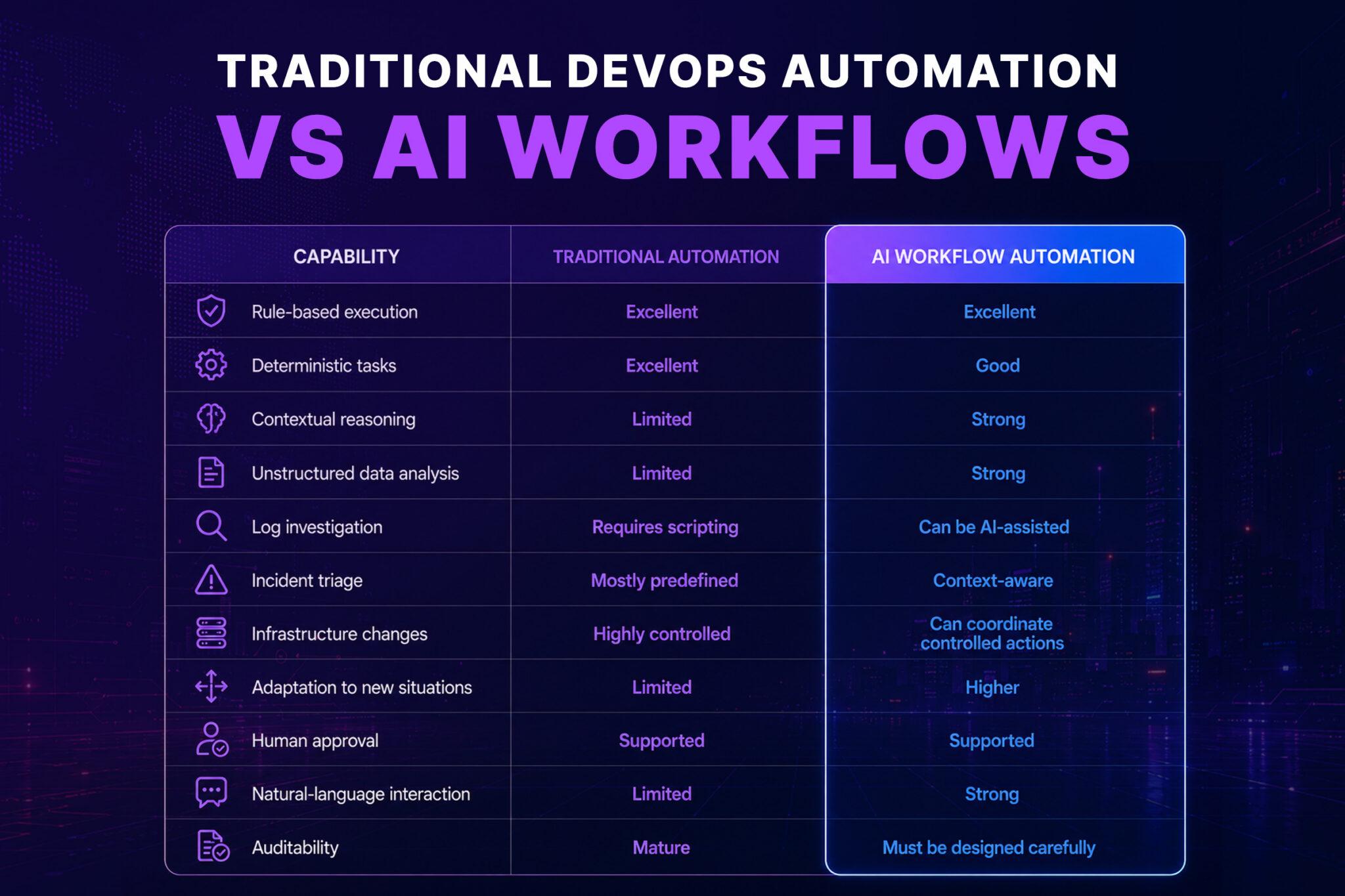
The best architecture combines both approaches.
Use traditional automation for actions that should behave predictably every time. Use AI agents for investigation, classification, contextual analysis, and decisions that depend on multiple signals.
AI workflow automation is therefore not a replacement for traditional DevOps automation. It is an orchestration layer that can make existing automation more adaptive and useful.
Where AI Workflow Automation Fits in DevOps
AI workflow automation isn’t limited to incident management.
It can span the entire engineering operations lifecycle.
Common areas include:
- Incident response
- Infrastructure provisioning
- Kubernetes operations
- Cloud cost management
- Security operations
- Deployment verification
- CI/CD troubleshooting
- Certificate monitoring
- Database operations
- Backup verification
- Compliance checks
- Resource cleanup
- Developer support
- Operational reporting
A useful way to think about it is:
Detect → Understand → Decide → Act → Verify → Report
Traditional monitoring is very good at detection.
Automation is very good at action.
AI can help bridge the understanding and decision-making stages.
AI Workflow Automation for Incident Response
Incident response is one of the strongest use cases for AI workflows.
Consider a production API returning elevated 5xx errors.
A traditional alert might send:
API error rate exceeded threshold.
An engineer then begins the investigation.
An AI-powered workflow can start that investigation automatically.
Example workflow
Consider a production API returning elevated 5xx errors. A traditional alert might simply report:
API error rate exceeded threshold.
An engineer then begins the investigation manually.
An AI-powered workflow can start that investigation automatically:
Datadog Alert
↓
Create Incident
↓
AI Agent Investigates
↓
Query Recent Deployment
↓
Inspect Kubernetes Pods
↓
Read Application Logs
↓
Check Infrastructure Metrics
↓
Compare Recent Changes
↓
Generate Diagnosis
↓
Recommend Remediation
↓
Human Approval
↓
Execute Rollback
↓
Verify Service Health
↓
Post-Incident Summary
The engineer receives a much more useful starting point. Instead of simply seeing that something is wrong, the workflow can provide evidence such as:
Error rates increased 14 minutes after deployment v2.8.4. The affected pods are running the new version. Database and infrastructure metrics remain within normal ranges. Rolling back to v2.8.3 is recommended.
AI Agents and Incident Investigation
An AI agent can perform several investigation tasks.
For example:
- Retrieve the alert details.
- Identify the affected service.
- Query monitoring data.
- Inspect recent deployments.
- Retrieve relevant logs.
- Check Kubernetes events.
- Compare current and historical behavior.
- Identify possible causes.
- Recommend the next action.
- Execute the action if policy allows it.
The workflow defines what information the agent can access and which actions it can perform. This allows the AI to focus on investigation and reasoning while execution remains governed by predefined workflow rules and policies.
Why AI Agent Access Needs Guardrails
Giving an AI agent unrestricted access to production systems creates unnecessary security and reliability risks. AI systems can misunderstand context, misinterpret operational signals, or execute an inappropriate command. An agent could modify infrastructure when the correct response should have been investigation or escalation.
Enterprise AI workflows therefore need multiple layers of control around the agent, including permissions, policies, approval gates, auditability, and isolated execution environments.
A safer architecture places the workflow at the center of the automation process. Monitoring events trigger the workflow, which provides relevant context to the AI agent for analysis. Policy and approval controls determine which actions are permitted, while approved commands are executed through an isolated environment before interacting with production systems.
This separation keeps AI reasoning, decision-making, and execution within defined boundaries. The workflow effectively becomes the control plane that governs what the AI can access, what it can do, and how its actions interact with production systems.
AI Workflows for Kubernetes Operations
Kubernetes creates another large opportunity.
Platform teams frequently perform repetitive tasks such as:
- Checking pod health
- Inspecting failed deployments
- Reviewing events
- Restarting workloads
- Checking resource pressure
- Comparing replicas
- Investigating CrashLoopBackOff
- Reviewing recent configuration changes
- Collecting diagnostic information
These tasks are often performed manually during incidents.
An AI workflow can automate the investigation.
Example: CrashLoopBackOff workflow
When a Kubernetes alert is triggered, the workflow can identify the affected namespace and deployment, collect pod status, read container logs, inspect Kubernetes events, and check recent deployments. The AI agent then analyzes this evidence to identify patterns and determine the likely cause before recommending an appropriate remediation.
For a low-risk environment, the workflow might automatically restart the deployment.
For production, it may instead require approval.
The same workflow can therefore support different environments through policy.
AI Workflow Automation for Infrastructure
Infrastructure automation traditionally relies heavily on Infrastructure as Code. Terraform, for example, provides a controlled and repeatable way to define infrastructure.
AI doesn’t need to replace Terraform. Instead, it can coordinate the steps around Terraform.
Consider a request:
Create a temporary staging environment for the new API release.
An AI workflow could:
- Parse the request.
- Identify the appropriate environment.
- Retrieve the required configuration.
- Generate or modify Terraform variables.
- Run validation.
- Create a plan.
- Evaluate policy requirements.
- Request approval.
- Apply the change.
- Verify the infrastructure.
- Notify the requester.
The actual infrastructure change can still be performed through Terraform.
The AI agent handles coordination and reasoning.
From Runbooks to Intelligent Workflows
Traditional runbooks are usually written as documents.
For example:
If service X fails, check logs, restart pods, verify database connectivity, and contact the platform team.
The problem is that a document depends on someone reading it and executing every step.
An automated workflow converts the runbook into an executable process.
AI can make that workflow more flexible.
Traditional runbook
Step 1 → Check logs
Step 2 → Check pods
Step 3 → Restart pods
Step 4 → Verify service
AI-assisted workflow
An AI-powered workflow can follow a structured investigation process while dynamically adapting based on what it discovers. The process begins with a trigger that initiates evidence collection, after which the AI determines the appropriate investigation path and runs the relevant diagnostics. Based on the findings, it recommends a remediation, requests approval when required, executes the approved action, verifies the outcome, and documents the results. Unlike a purely linear workflow, the process can branch dynamically based on the evidence and findings discovered during the investigation.
That makes automation more useful for situations where every incident doesn’t follow exactly the same path.
AI Workflow Automation and Cloud Operations
Modern engineering teams rarely operate a single system.
A typical environment may contain:
- AWS or Azure
- Kubernetes
- Terraform
- GitHub or GitLab
- Datadog
- Slack
- Jira
- PostgreSQL
- Redis
- Security platforms
- Internal APIs
The operational problem isn’t usually the absence of tools.
It’s the fragmentation between them.
AI workflows can connect these systems into one operational process.
Example
A deployment fails.
The workflow can:
GitHub → Kubernetes → Datadog → Jira → Slack
The workflow retrieves the commit, checks deployment status, analyzes monitoring data, creates an incident ticket, and posts the result to the engineering channel.
Instead of engineers manually switching between systems, the workflow coordinates the process.
AI Workflows for Deployment Verification
A deployment being marked “successful” doesn’t necessarily mean the application is healthy.
A CI/CD pipeline might complete successfully while the application experiences:
- Higher latency
- Increased error rates
- Memory pressure
- Failed background jobs
- Database connection problems
AI workflow automation can perform post-deployment analysis.
After a deployment is completed, the workflow waits for the system to stabilize, collects metrics, checks application logs, and compares the results against an established baseline. The AI agent then evaluates the collected signals for anomalies and determines whether the deployment appears healthy.
If the system is healthy, the workflow continues normally. If issues are detected, it can trigger an alert or initiate a rollback process.
The AI is not replacing automated health checks. It adds contextual analysis around them, helping the workflow interpret multiple signals and determine the appropriate next step.
Security Should Be Part of the Workflow
Security should be built into the workflow rather than added after automation is deployed.
Every AI workflow should operate with clearly defined permissions and boundaries. The agent should have only the access required for its specific task, while sensitive production actions should be protected by policy and approval controls.
Important controls include:
- RBAC
- Least-privilege permissions
- Short-lived credentials
- Secrets management
- Network restrictions
- Approval gates
- Audit logs
- Action allowlists
- Environment separation
- Rate limits
- Resource limits
For example, an incident investigation agent may need read access to Kubernetes and monitoring systems but should not have permission to delete workloads. A separate execution step can perform approved remediation actions using tightly scoped permissions.
This separation reduces the potential blast radius if an AI agent makes an incorrect recommendation or encounters unexpected conditions.
Why Sandboxed Execution Matters
AI agents often need to execute commands.
They may need to run:
kubectl get pods
terraform plan
python diagnose.py
git diff
Running these commands directly on an engineer’s laptop creates unnecessary risk.
The environment may contain:
- SSH keys
- Cloud credentials
- Source code
- .env files
- Browser sessions
- Local configuration
- Terraform state
- Personal files
A sandbox provides an isolated execution environment.
A useful distinction is that governance controls define what an AI agent is allowed to do, while sandboxing controls where and under what constraints its commands are executed.
Instead of giving the agent access to the engineer’s workstation, commands can run in a controlled environment with defined permissions, resources, networking, and credentials.
This is particularly important when using AI coding agents or DevOps agents that need to execute real commands.
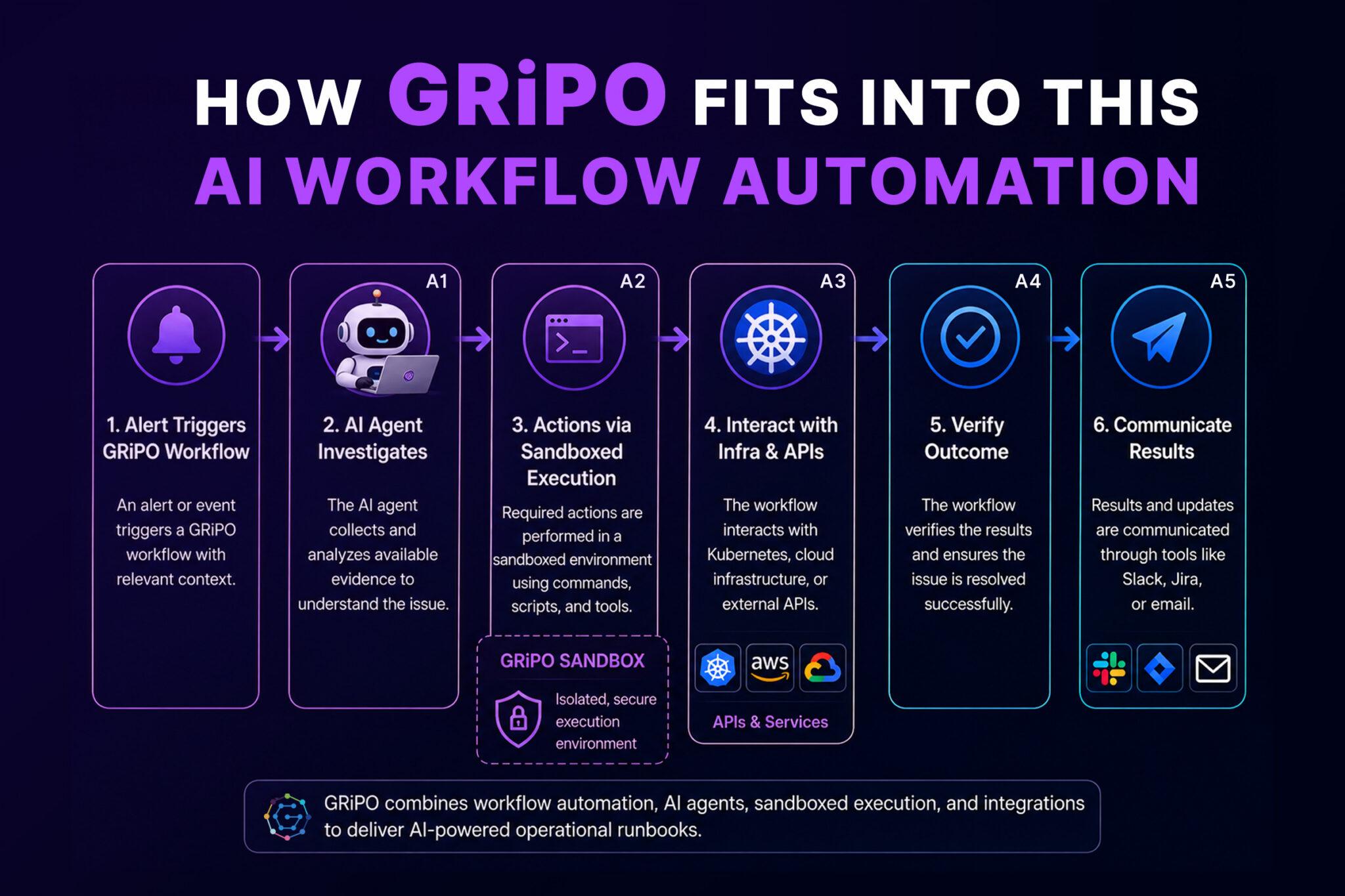
How GRiPO Fits Into AI Workflow Automation
GRiPO is designed around this model: AI agents don’t operate as isolated chat interfaces. They become components inside automated engineering workflows.
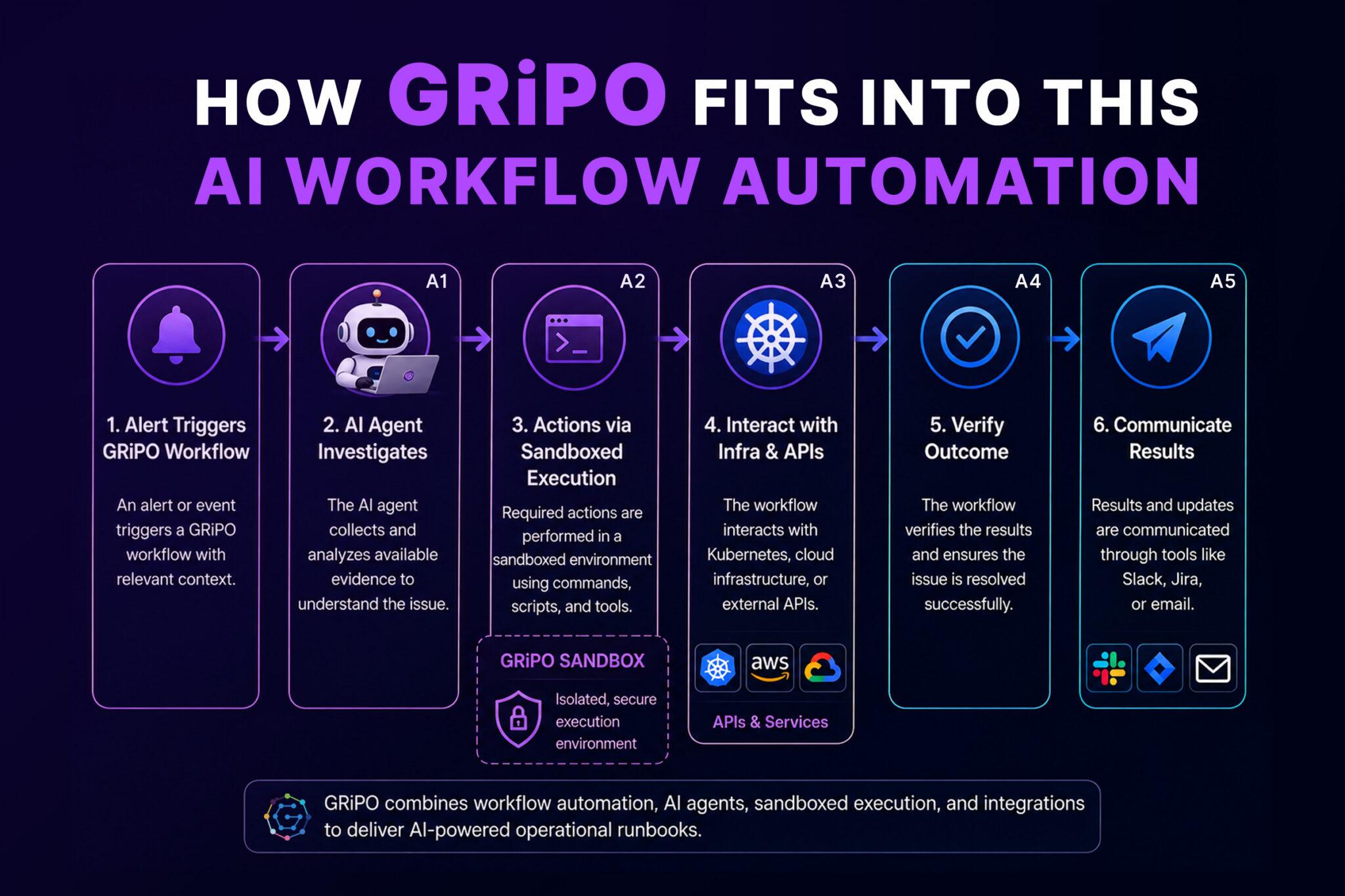
GRiPO provides a visual workflow environment where teams can combine workflow automation, AI agents, sandboxed code execution, and integrations.
A typical AI-powered automation flow can begin with an alert that triggers a GRiPO workflow. The workflow passes the relevant context to an AI agent, which investigates the issue by collecting and analyzing available evidence. Any required actions can then be performed through a sandboxed execution environment before interacting with Kubernetes, cloud infrastructure, or external APIs. After execution, the workflow verifies the outcome and communicates the results through tools such as Slack, Jira, or email.
This approach is useful because the workflow controls the sequence of operations while the AI agent handles tasks that require contextual reasoning.
GRiPO’s sandboxed execution can also provide a controlled place for running commands, scripts, and DevOps tooling without depending on an engineer’s local machine.
The platform’s plugin model can connect services such as Slack, Jira, AWS, PagerDuty, or other APIs into workflow activities.
The result is closer to an executable operational runbook than a conventional AI assistant.
A Practical AI Workflow Architecture
A mature implementation can be divided into several layers.
1. Event Layer
Events enter the system from:
- Monitoring tools
- CI/CD pipelines
- Webhooks
- Schedulers
- Cloud events
- Security alerts
2. Workflow Layer
The workflow decides:
- What should happen next?
- Which agent should run?
- What information is required?
- Is approval needed?
3. Intelligence Layer
The AI agent can:
- Analyze logs
- Classify incidents
- Summarize findings
- Identify likely causes
- Generate recommendations
- Decide which diagnostic workflow to execute
4. Execution Layer
Commands execute through controlled environments.
Examples include:
- Kubernetes CLI
- Terraform
- Python
- Cloud CLI tools
- Internal APIs
5. Integration Layer
Results can be delivered to:
- Slack
- Jira
- Incident management systems
- Dashboards
6. Governance Layer
Every important action should be governed by:
- Identity
- RBAC
- Approval policies
- Audit logs
- Credential controls
- Execution limits
Where You Should Not Use AI
Not every automation needs an AI agent.
If the task is deterministic, traditional automation is often better.
For example:
Every night at 2 AM, delete temporary resources older than seven days.
You probably don’t need an AI agent.
A scheduled job with explicit rules is easier to test and audit.
Similarly:
If CPU exceeds 90%, scale the deployment from 3 to 5 replicas.
A Kubernetes autoscaling mechanism may be more appropriate.
AI becomes more valuable when the workflow requires context.
For example:
Determine why the API’s error rate increased and identify the safest remediation.
That’s a reasoning problem.
A useful rule is:
Use deterministic automation for deterministic decisions. Use AI where contextual reasoning adds value.
Measuring the Value of AI Workflow Automation
Adding AI to a workflow isn’t automatically an improvement.
Engineering teams should measure outcomes.
Useful metrics include:
Mean Time to Detect MTTD
Measures how quickly the organization identifies an operational problem.
Mean Time to Resolve MTTR
Measures how long it takes to restore service.
Manual Intervention Rate
Measures how many workflow executions still require engineers.
Automation Success Rate
Measures how often the workflow completes successfully.
False Positive Rate
How often does the AI incorrectly classify an event or incident?
Cost per Automation
How much infrastructure and AI processing does each workflow execution consume?
Change Failure Rate
Do automated changes introduce additional incidents?
These metrics provide a much better evaluation than simply counting how many AI workflows have been created.
A Safe Path to Adopting AI Workflows
Organizations don’t need to automate production remediation on day one.
A staged approach works better.
Stage 1: Observe
Start with read-only workflows.
Let AI:
- Collect information
- Analyze logs
- Summarize incidents
- Generate recommendations
Don’t let it change infrastructure.
Stage 2: Recommend
Add proposed actions.
For example:
Recommended action: roll back deployment v2.8.4.
An engineer approves or rejects the recommendation.
Stage 3: Execute With Approval
Allow approved actions to execute automatically.
Stage 4: Automate Low-Risk Actions
Automate predictable remediation such as:
- Restarting a failed non-production workload
- Cleaning temporary resources
- Refreshing test environments
Stage 5: Expand Carefully
Only after collecting sufficient operational evidence should teams consider automating higher-impact production actions.
This progression creates trust while keeping the blast radius manageable.
AI Workflow Automation Checklist
Before deploying an AI-powered DevOps workflow, ask:
- Is the task actually suitable for AI?
- Could deterministic automation solve it better?
- What systems does the workflow need to access?
- Does the AI agent have least-privilege permissions?
- Are credentials isolated?
- Is execution sandboxed?
- Are production actions protected by approval gates?
- Can every action be audited?
- Are resource and execution limits configured?
- Is there a rollback strategy?
- Can the workflow fail safely?
- Are AI recommendations evaluated before execution?
- Are workflow outcomes measurable?
- Can an engineer take control at any point?
If several answers are unclear, the workflow isn’t ready for production.
The Future of DevOps Is More Orchestrated, Not Just More Automated
The interesting shift isn’t that AI can write shell commands or Terraform.
DevOps tools have been generating and executing code for years.
The larger opportunity is orchestration.
An AI agent can interpret a problem.
A workflow can determine what should happen next.
A sandbox can provide controlled execution.
Plugins can connect external systems.
Policy can determine what the agent is allowed to do.
Observability can verify the result.
Human approval can remain in the loop for high-risk actions.
Together, these components create a much more capable automation system.
The result isn’t an AI replacing the DevOps engineer.
It’s an engineering environment where the repetitive coordination work is increasingly handled by software.
Key Takeaways
- AI workflow automation combines reasoning with automation. AI agents add contextual analysis to workflows that already contain deterministic steps.
- Use AI where context matters. Incident investigation, troubleshooting, classification, and operational analysis are strong use cases.
- Security must be built into the architecture. Least privilege, RBAC, credential isolation, sandboxing, approval gates, and auditability help control risk.
- Traditional automation remains essential. Deterministic tasks should generally remain deterministic rather than being unnecessarily delegated to AI.
- The biggest opportunity is orchestration. AI workflows can connect monitoring, infrastructure, CI/CD, incident management, and communication systems into a coordinated operational process.
Practical Next Steps
If you’re evaluating AI workflows for your DevOps organization, start with one repetitive process.
Incident triage is often a strong starting point because it combines repetitive investigation with contextual decision-making.
Document the current manual workflow.
Then identify:
- Which steps are deterministic
- Which steps require human judgment
- Which systems must be accessed
- Which actions are read-only
- Which actions require approval
- What can safely execute in a sandbox
- How success will be measured
Build the workflow around those boundaries.
Don’t start by giving an AI agent unrestricted access to production.
Start by making the workflow useful, observable, and safe.
FAQ Section
What is AI workflow automation?
AI workflow automation combines AI agents with automated workflows, integrations, and execution environments to perform tasks that require both automation and contextual reasoning.
How is AI workflow automation different from traditional automation?
Traditional automation primarily follows predefined rules. AI workflow automation can introduce contextual reasoning, allowing workflows to analyze information and determine appropriate next steps.
How can AI workflows help DevOps teams?
AI workflows can help with incident investigation, deployment analysis, infrastructure operations, Kubernetes troubleshooting, cloud cost management, security operations, and repetitive operational tasks.
Can AI agents automatically fix production incidents?
They can, but unrestricted autonomous production access is risky. A safer approach is to begin with read-only investigation, then introduce recommendations, approval gates, and controlled low-risk remediation.
Why do AI agents need sandboxed execution?
Sandboxed execution provides an isolated environment where agents can run commands and tools without directly exposing an engineer’s workstation or unrestricted production environment.
Can AI workflows work with Kubernetes?
Yes. AI workflows can collect Kubernetes pod status, events, logs, deployment information, and resource metrics, then use that information to assist with troubleshooting and remediation.
Can AI workflows work with Terraform?
Yes. AI can help coordinate Terraform-based infrastructure workflows by preparing configuration, validating changes, generating plans, analyzing results, and routing changes through approval processes.
Should every DevOps automation use AI?
No. Deterministic tasks are often better handled by traditional automation. AI is most useful when a task requires contextual analysis, classification, investigation, or reasoning.
How can organizations safely introduce AI agents into DevOps?
Start with read-only workflows. Move to recommendations, then approval-based execution, and finally automate carefully selected low-risk operations.
What security controls should AI workflows have?
Important controls include least-privilege access, RBAC, credential isolation, sandboxed execution, approval gates, audit logs, network restrictions, resource limits, and clearly defined action policies.
What DevOps tools can AI workflows integrate with?
Depending on the platform, AI workflows can integrate with monitoring systems, Kubernetes, cloud providers, CI/CD systems, Git repositories, Terraform, Slack, Jira, incident management platforms, and internal APIs.
How should teams measure AI workflow automation?
Useful metrics include MTTR, manual intervention rate, automation success rate, false-positive rate, cost per execution, and change failure rate.
Final Recommendation
The strongest DevOps AI strategy isn’t to replace every existing automation system with an AI agent.
Keep deterministic automation where it works well.
Add AI where contextual reasoning is valuable.
Put execution behind appropriate security controls.
Use workflows to define the boundaries.
And measure whether the automation actually reduces operational effort and improves reliability.
That combination AI reasoning + deterministic automation + secure execution + human governance is where AI workflow automation becomes practical for enterprise DevOps.