
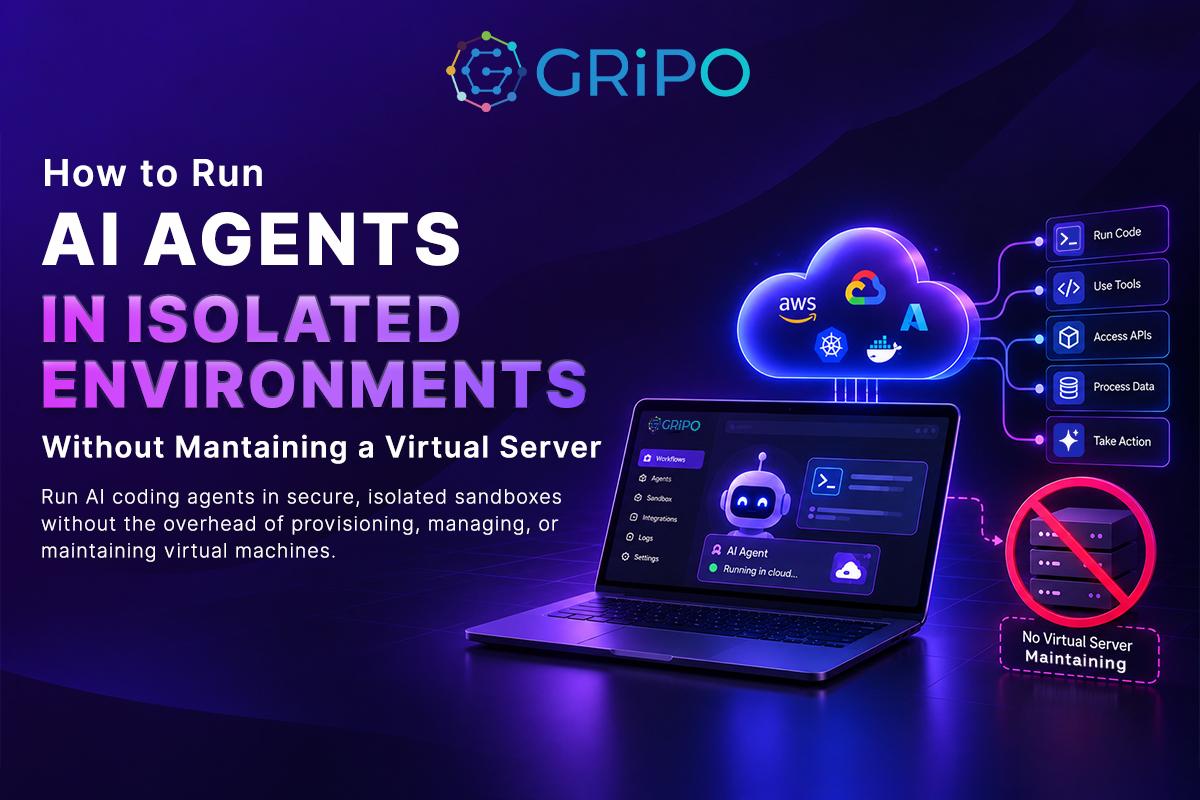
An AI agents needs somewhere to run.
That sounds obvious, but it creates an infrastructure problem that teams often underestimate.
Give an agent access to a cloud VM and you now have another server to manage. Someone has to configure the operating system, install dependencies, patch packages, manage SSH access, rotate credentials, control network access, monitor resources, handle failures, and eventually clean the machine up.
For a traditional long-running application, that operational work may be justified.
For an AI agent that runs a script for three minutes, investigates a Kubernetes alert, executes Terraform, analyzes logs, or modifies files in a temporary workspace, maintaining a dedicated virtual server can be unnecessary overhead.
This is where the idea of a virtual server agent becomes interesting. The key idea is simple: an AI agent needs an execution environment, but that environment does not necessarily need to be a dedicated virtual server.
Instead of treating an AI agent as a process that permanently lives on a server, you can treat it as a workload that receives compute when it needs it, executes inside an isolated environment, and disappears when the job is finished.
That shift changes the architecture.
Instead of:
AI agent → permanent VM → operating system → dependencies → workload
you can build:
AI agent → workflow → isolated execution environment → task → cleanup
The difference isn’t just about convenience. It affects security, scalability, cost, reliability, and how much infrastructure your engineering team has to operate.
What Is a Virtual Server Agent?
A virtual server agent is an AI-powered agent that operates using compute resources hosted on a virtual server or cloud infrastructure. A virtual server is only one way to provide this execution environment; for short-lived AI workloads, containers or isolated sandboxes may be more appropriate.
The server provides the environment where the agent can:
- Execute commands
- Run scripts
- Install packages
- Access APIs
- Inspect files
- Query infrastructure
- Run tests
- Interact with cloud services
- Perform automation tasks
A simple architecture might look like this:
User / Event
↓
AI Agent
↓
Virtual Server
↓
Operating System
↓
Tools + Dependencies
↓
Task Execution
This model works.
In fact, virtual machines remain useful for many workloads.
The problem appears when the workload is temporary, unpredictable, or highly dynamic.
Imagine an incident-response agent that runs only when an alert fires.
The agent might:
- Receive a Prometheus alert.
- Inspect Kubernetes resources.
- Query application logs.
- Identify a failing deployment.
- Run diagnostic commands.
- Produce a report.
- Stop.
Keeping an entire VM available just for that workflow can create unnecessary operational work.
The question becomes:
Why should the execution environment have the same lifecycle as the infrastructure underneath it?
Why AI Agents Create a Different Infrastructure Problem
Traditional applications are generally predictable. A web server may run continuously, a database may operate 24/7, and a Kubernetes cluster may support workloads around the clock. AI agents, however, can behave very differently. One agent might execute only once every few hours, while another could suddenly receive hundreds of tasks. The tools required can also vary from one task to another: some tasks may need Python, while others may require Terraform, kubectl, Git, cloud CLIs, or custom binaries. Execution times can vary just as widely, with some workflows completing in seconds and others running for several minutes. This variability creates four key infrastructure requirements: isolation, scalability, flexible tooling, and efficient resource usage.
1. Dynamic compute
The environment should appear when the workload needs it.
2. Isolation
An agent should not automatically receive unrestricted access to the host system.
3. Reproducibility
The same workflow should execute in a predictable environment.
4. Cleanup
Temporary resources should not remain running indefinitely.
A manually managed VM doesn’t naturally solve these problems.
It can support them, but your team has to build the surrounding automation.
The Traditional Approach: Give the Agent a Virtual Server
Suppose your company wants an AI agent that investigates production incidents. A straightforward approach is to deploy the agent inside a virtual machine running in the cloud. The VM provides a complete operating system where the AI agent can use tools such as Python, kubectl, Terraform, and cloud CLI commands to investigate issues and interact with cloud or Kubernetes environments. While this architecture gives the agent access to a real machine and a real operating system, it also introduces a broader security boundary that needs to be carefully managed.
But now you have to answer questions such as:
- Who patches the VM?
- Who updates the agent?
- Where are API credentials stored?
- What happens if the agent installs a malicious dependency?
- Can the agent access the VM metadata service?
- Can it reach internal services?
- What prevents it from reading unrelated files?
- How are resource limits enforced?
- How is the VM destroyed after execution?
- How do you handle 100 simultaneous agents?
At this point, you aren’t just building an AI agent.
You’re operating infrastructure for an AI agent.
Why a Dedicated VM Isn’t Always the Best Execution Environment
A virtual machine provides strong isolation compared with running arbitrary agent code directly on a developer laptop or shared host.
But isolation isn’t the only consideration.
Operational overhead
VMs require operating-system maintenance, image management, patching, monitoring, and lifecycle management.
Slow provisioning
Depending on the architecture, starting a VM can introduce more latency than creating a lightweight execution environment.
Resource waste
A VM may remain idle while waiting for the next agent task.
Scaling complexity
Running one agent is easy.
Running hundreds of isolated agents simultaneously becomes an infrastructure orchestration problem.
Credential exposure
Giving an agent access to a VM doesn’t automatically mean the agent has safe access to credentials.
In fact, the opposite can happen if secrets are placed in environment variables, configuration files, SSH keys, or instance metadata.
Cleanup
Temporary workloads require temporary infrastructure.
If cleanup isn’t automatic, unused servers accumulate.
That’s not only an operational problem.
It’s a cost problem.
What Is an AI Agent Sandbox?
An AI agent sandbox is an isolated environment where an AI agent can perform actions without receiving unrestricted access to the underlying host system.
For example:
AI Agent
│
▼
Sandbox
├── Temporary filesystem
├── Python
├── Git
├── kubectl
├── Terraform
├── Cloud CLI
└── Network policy
The sandbox does not eliminate infrastructure. Instead, it creates a controlled execution boundary around the infrastructure the agent uses. The agent can perform useful work.
But the environment can impose boundaries around:
- Filesystem access
- Network access
- CPU
- Memory
- Execution time
- Credentials
- Installed tools
- External services
This becomes particularly useful for AI coding and DevOps agents.
An agent might need to execute code, inspect a repository, install dependencies, or run infrastructure commands.
Those capabilities are useful.
They’re also potentially dangerous when the execution environment is trusted too much.
The Security Problem: Agents Need Permissions
This is one of the most important architectural considerations.
An AI agent doesn’t become safe simply because it runs in the cloud.
Consider an agent that receives this task:
Investigate why the production deployment failed.
It may need access to:
- Kubernetes
- Cloud APIs
- Git repositories
- Monitoring systems
- Logs
- Incident-management tools
That is a lot of capability.
If all of those credentials are permanently available inside a VM, a compromised prompt, malicious repository, vulnerable dependency, or agent mistake could potentially turn a diagnostic workflow into a much larger security incident.
A better architecture separates execution from authorization.
For example, an AI agent can run inside an isolated sandbox with scoped access to the specific services required by its current workflow, such as GitHub, Kubernetes, python,or bash. Instead of giving the agent unrestricted access to the entire environment, each integration can be limited to only the permissions and resources it actually needs. This reduces the potential impact of mistakes, compromised credentials, or unintended actions. The agent can still perform its assigned tasks effectively while operating within clearly defined boundaries. This approach follows the principle of least privilege, where an AI agent receives only the minimum permissions required to complete its current workflow.
Why Temporary Credentials Matter for AI Agents
Suppose an infrastructure agent needs AWS access.
One approach is to place long-lived credentials inside the server.
That creates unnecessary risk.
A stronger design is to issue short-lived credentials for a specific task, restrict their permissions, and revoke or expire them when the workflow ends.
The same principle applies to:
- Cloud credentials
- Git tokens
- API keys
- Database credentials
- Kubernetes credentials
- Internal service tokens
The execution environment should ideally know:
What does this task need?
rather than:
What credentials does this server happen to contain?
That’s a major architectural difference.
Running AI Agents Without Managing the Server
The alternative is to move from server management to execution management.
Instead of creating a VM and manually installing everything, the platform creates an isolated environment when a workflow requires it.
The lifecycle can look like this:
Event
↓
Workflow Trigger
↓
AI Agent Starts
↓
Sandbox Created
↓
Tools + Credentials Attached
↓
Agent Executes Task
↓
Results Collected
↓
Sandbox Destroyed
The goal is not to eliminate servers, but to make server provisioning and lifecycle management an implementation detail of the execution platform.
The important part is the final step.
The environment doesn’t need to become permanent infrastructure.
It can be disposable.
This pattern is particularly useful for AI workloads because agents frequently perform bounded tasks rather than hosting continuously running services.
Example: Automated Kubernetes Incident Investigation
Consider a production Kubernetes deployment that starts returning errors.
A monitoring system detects the problem.
The workflow could be:
Prometheus Alert
↓
AI Incident Agent
↓
Create Sandbox
↓
Run kubectl diagnostics
↓
Inspect logs
↓
Check recent deployment
↓
Identify likely cause
↓
Generate incident report
↓
Send to Slack
↓
Destroy Sandbox
Notice what isn’t required:
- A dedicated incident VM running continuously
- SSH access to a permanent server
- Manually installed diagnostic tools
- A permanent workspace for every incident
The infrastructure becomes part of the workflow rather than something engineers have to maintain separately.
Where GRiPO Fits
This is the type of architecture where GRiPO becomes useful.
GRiPO provides an environment for building AI-powered DevOps workflows around isolated execution, AI agents, plugins, and visual workflow orchestration.
Instead of thinking about an AI agent as an application that needs its own permanent server, you can treat the agent as one component inside an automated workflow.
For example:
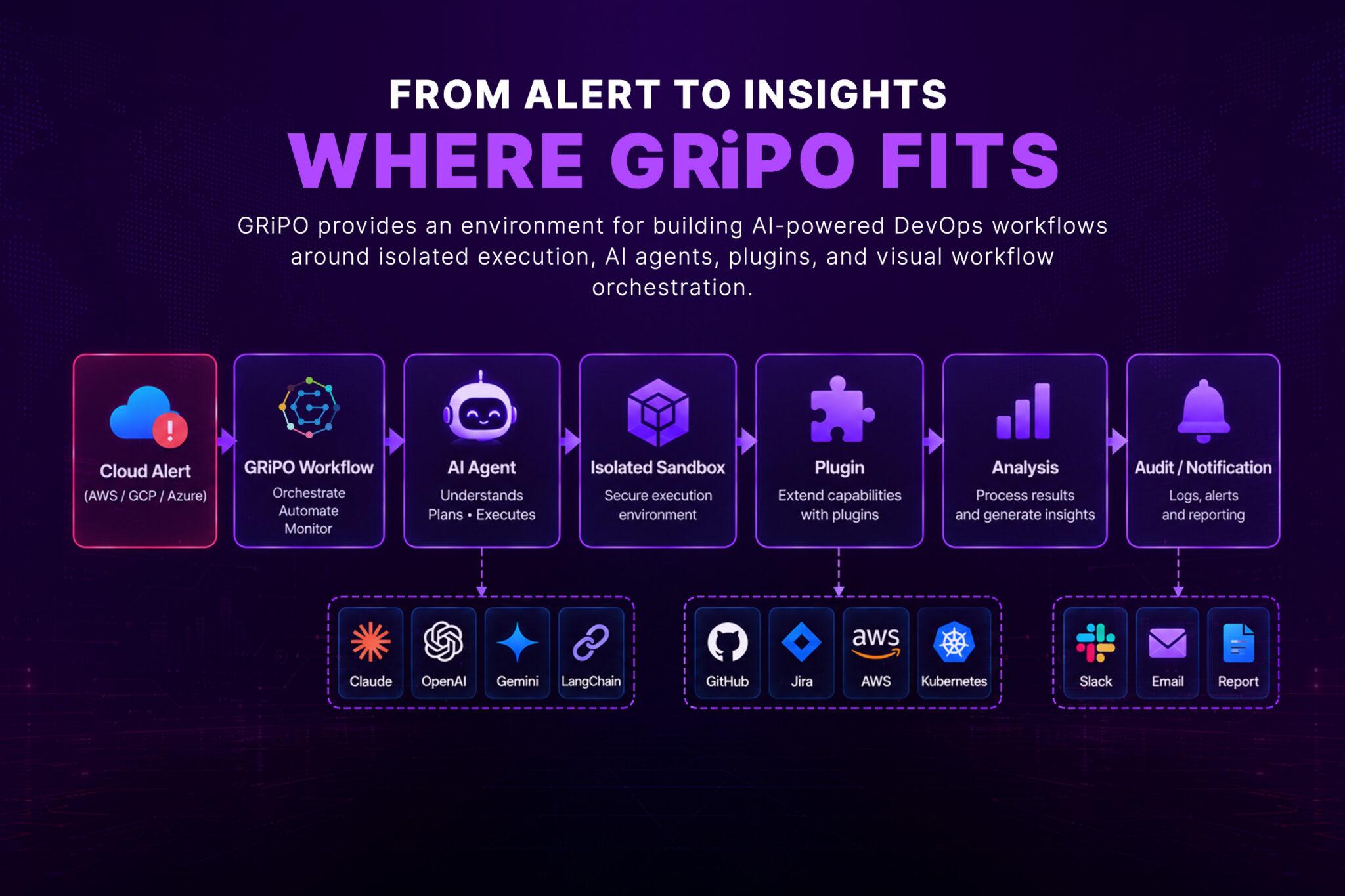
The sandbox can provide the execution boundary while the workflow controls what happens before and after the agent runs.
That distinction matters for enterprise automation.
The goal isn’t to give an agent a powerful machine.
The goal is to give it exactly the environment and permissions required to complete a specific task.
GRiPO’s workflow approach can also connect execution with external services through plugins, allowing automation to interact with the tools engineering teams already use.
When Should You Use a Virtual Server Agent?
Virtual servers still have legitimate use cases.
A VM can make sense when the workload requires:
Long-running processes
If the agent needs to maintain a persistent process or service, a VM may be appropriate.
Custom operating-system requirements
Some workloads require kernel-level capabilities or specialized OS configurations.
Stateful environments
If the agent needs persistent state that shouldn’t disappear after execution, a disposable sandbox may not be sufficient by itself.
Specialized hardware
Certain workloads may require GPUs or other dedicated resources.
Legacy software
Some enterprise applications are designed around traditional servers and aren’t easy to move into ephemeral execution environments.
The goal isn’t to eliminate virtual servers.
It’s to stop using them by default for every AI workload.
When an AI Agent Sandbox Is a Better Fit
A sandbox is often more appropriate when the agent performs short-lived, bounded tasks.
Examples include:
- Running code generated by an AI agent
- Testing pull requests
- Investigating incidents
- Executing Terraform plans
- Running Kubernetes diagnostics
- Processing files
- Analyzing logs
- Generating reports
- Running security checks
- Performing FinOps analysis
- Executing scheduled automation
- Installing temporary CLI tools
- FOUCS Cost analysis in Finops
The common characteristic is simple:
The workload has a clear beginning and end.
That makes ephemeral execution particularly attractive.
Cost Considerations
Cloud cost isn’t just the hourly price of a server.
There are at least three different costs:
Compute cost + infrastructure operations + idle capacity
A VM may appear inexpensive on paper, but maintaining dozens of machines to support unpredictable AI workloads can quickly increase the real cost. For example, if a company maintains 10 dedicated VMs, periods of low utilization can leave significant amounts of compute sitting idle while the organization continues paying for it, in addition to the maintenance overhead of managing those machines. With ephemeral execution, compute resources can instead be allocated when an AI workload arrives, used while the task is running, and released when the task is complete. This does not automatically guarantee lower cloud spending, because sandbox infrastructure has its own costs and poorly designed workflows can still consume excessive resources. However, ephemeral execution provides another important lever for controlling resource utilization and aligning compute consumption more closely with actual AI workload demand:
Pay for execution rather than keeping infrastructure available indefinitely.
For FinOps teams, that distinction is worth measuring.
Observability Still Matters
Removing server management doesn’t mean removing observability.
In fact, AI workflows can require more visibility because their behavior isn’t always deterministic.
You should be able to answer:
- Which agent ran?
- What triggered it?
- Which workflow executed?
- Which tools were available?
- Which credentials were issued?
- How long did execution take?
- How much CPU and memory were consumed?
- What commands were executed?
- What external systems were contacted?
- What result did the agent produce?
- Did a human approve the final action?
For enterprise environments, these records become important for troubleshooting, security investigations, compliance, and operational review.
Human Approval Still Has a Place
Not every AI action should be autonomous.
There is a meaningful difference between:
“Analyze this incident.”
and:
“Delete the production database.”
The execution architecture should support different levels of autonomy.
A practical model is:
Observe
↓
Analyze
↓
Recommend
↓
Request Approval
↓
Execute
↓
Verify
For low-risk tasks, approval may not be necessary.
For high-impact infrastructure changes, an approval gate can provide an important safety boundary.
This is especially relevant when AI agents interact with Terraform, Kubernetes, cloud resources, databases, or production systems.
A Practical Architecture for Enterprise AI Agents
A mature cloud AI-agent architecture might look like this:
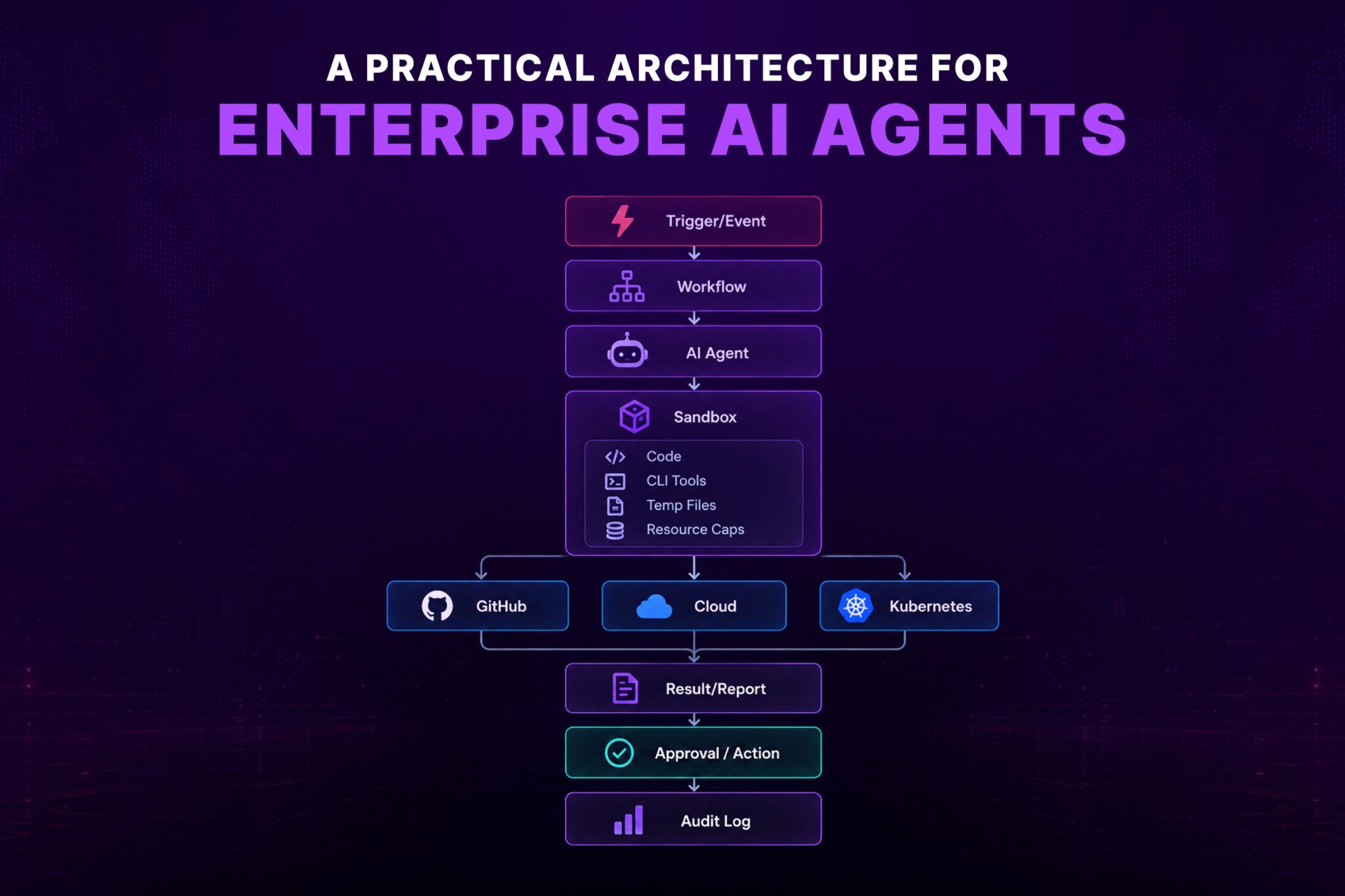
This architecture separates responsibilities.
The workflow handles orchestration.
The AI agent handles reasoning.
The sandbox handles execution.
The integration layer handles external systems.
The approval layer handles risk.
The audit layer provides accountability.
That separation is much easier to reason about than giving an AI agent a permanent server with broad access to everything.
How to Choose the Right Execution Model
Before deploying an AI agent, ask these questions.
Step 1: Does the agent need persistent infrastructure?
If yes, a VM or long-running container may be appropriate.
If no, consider ephemeral execution.
Step 2: Does the agent execute untrusted code?
If yes, strong isolation becomes a priority.
Step 3: What tools does it need?
List them explicitly.
For example:
- Python
- Git
- Terraform
- kubectl
- AWS CLI
- Azure CLI
- Google Cloud CLI
Don’t install everything by default.
Step 4: What credentials are required?
Map every credential to a specific task.
Step 5: What network access is necessary?
Define allowed destinations rather than giving unrestricted outbound access.
Step 6: What happens when execution finishes?
Temporary resources should have an automatic cleanup path.
Step 7: What actions require approval?
Separate analysis from destructive operations.
Step 8: What needs to be logged?
Capture enough information to reconstruct what happened.
This process usually reveals whether you actually need a permanent virtual server.
What About Claude Code and Other Coding Agents?
Coding agents make the execution problem even more obvious.
A coding agent may need to:
- Clone a repository
- Read source code
- Modify files
- Install dependencies
- Run tests
- Execute shell commands
- Inspect build output
- Use Git
- Access APIs
Running that agent directly on a developer workstation can expose far more than the project requires.
A dedicated Claude Code sandbox, for example, can provide a controlled environment where the coding agent gets the tools and filesystem it needs without automatically inheriting the entire workstation’s access.
The same architectural principle applies to other AI coding agents.
The key question isn’t which agent you’re using.
It’s:
What can the agent access while it is running?
That should be designed deliberately.
The Future of AI Infrastructure Is More About Workloads Than Servers
The cloud industry has spent years moving from physical servers to virtual machines, containers, and managed services.
AI agents push that evolution another step.
The infrastructure increasingly becomes an execution layer behind the workflow.
Engineers don’t necessarily need to think:
“Which server should this agent run on?”
They can think:
“What environment does this task require?”
That’s a much better abstraction for automation.
The platform can decide how to provide the required compute while engineers define:
- Tools
- Permissions
- Policies
- Resource limits
- Network boundaries
- Workflow logic
- Approval requirements
- Observability
This is especially valuable as organizations move from experimenting with individual AI agents toward fleets of specialized agents working across DevOps, security, cloud operations, and FinOps.
FAQ Section
What is a virtual server agent?
A virtual server agent is an AI agent that runs on cloud infrastructure provided by a virtual server. The VM supplies the operating environment and compute resources required for the agent to execute tasks.
Can AI agents run in the cloud without a virtual machine?
Yes. AI agents can run using containers, serverless infrastructure, managed execution platforms, or isolated AI agent sandboxes. The best option depends on the workload, isolation requirements, persistence, and available tools.
What is an AI agent sandbox?
An AI agent sandbox is an isolated execution environment designed to restrict what an AI agent can access while allowing it to perform tasks such as running code, executing CLI commands, analyzing files, or interacting with external services.
Is a sandbox safer than a virtual machine?
Not automatically. Security depends on the implementation and configuration. A well-designed sandbox can provide strong isolation for short-lived agent workloads, while VMs can provide strong infrastructure isolation. The important factors include permissions, network controls, filesystem isolation, credential management, and resource limits.
Why shouldn’t AI agents always run on dedicated VMs?
Dedicated VMs can introduce unnecessary operational overhead for short-lived workloads. Teams may need to manage patching, scaling, dependencies, credentials, monitoring, and cleanup even though the AI agent only runs occasionally.
Are virtual servers still useful for AI agents?
Yes. VMs remain useful for persistent workloads, specialized operating-system requirements, stateful applications, legacy software, and workloads requiring dedicated resources.
What tools can an AI agent run inside a sandbox?
Depending on the environment, an AI agent can run Python, Git, Terraform, kubectl, cloud CLIs, testing tools, scripts, and other approved command-line utilities.
How do you protect cloud credentials used by AI agents?
Use least-privilege permissions, short-lived credentials where possible, scoped access, network restrictions, and strong secret-management practices. Avoid giving an agent unrestricted access to long-lived credentials.
Can AI agents execute Terraform safely?
They can execute Terraform in a controlled environment, but infrastructure changes should be protected with appropriate permissions, plan/review stages, policy checks, and approval gates before production changes are applied.
How do AI agent sandboxes help Platform and engineering teams?
They provide controlled environments where agents can execute diagnostic commands, scripts, infrastructure tools, and automation workflows without requiring every task to run directly on a developer workstation or permanent server.
Can AI agents work with Kubernetes?
Yes. An AI agent can use tools such as kubectl to inspect workloads, analyze events and logs, diagnose incidents, and potentially perform approved changes. Kubernetes credentials should be scoped according to the agent’s actual responsibilities.
Does running AI agents without VMs eliminate cloud infrastructure?
No. The infrastructure still exists underneath the execution platform. The difference is that engineers don’t necessarily need to provision and maintain an individual server for every AI agent or workflow.
Key Takeaways
- A virtual server agent can execute powerful cloud automation, but a dedicated VM isn’t always necessary.
- AI agents often perform short-lived, unpredictable workloads that fit well with ephemeral execution.
- Containers and AI agent sandboxes can reduce infrastructure management for these workloads.
- Isolation is critical when agents execute code or access production systems.
- Least-privilege credentials should be designed around individual workflows rather than permanent server access.
- Network restrictions, resource limits, temporary workspaces, and automatic cleanup improve security and operational control.
- High-impact infrastructure actions should use approval and verification stages.
- Observability remains essential even when server management is abstracted away.
- GRiPO can combine AI agents, isolated sandbox execution, plugins, and workflow automation into a controlled DevOps execution model.
- The goal isn’t to eliminate servers. It’s to make server management an implementation detail rather than the center of every AI workflow.