
AI agents have moved beyond generating text.
A modern AI agent can inspect a repository, write code, install dependencies, run tests, execute shell commands, query APIs, troubleshoot infrastructure, and modify files. Coding agents such as Claude Code and Codex make this workflow increasingly practical.
But there is a fundamental infrastructure problem behind all of this:
Where should an AI agent actually execute the code it generates?
Giving an agent access to a developer’s laptop is convenient, but it creates a large trust boundary. The machine may contain SSH keys, cloud credentials, .env files, Kubernetes configurations, source code, Terraform state, browser sessions, and personal documents.
That is where an AI agent sandbox becomes useful.
A sandbox gives the agent a controlled execution environment with defined compute, filesystem, networking, permissions, and lifecycle. Instead of giving an agent access to an entire workstation or production environment, you give it a constrained environment designed for the task.
Several platforms now target this problem, but they aren’t interchangeable.
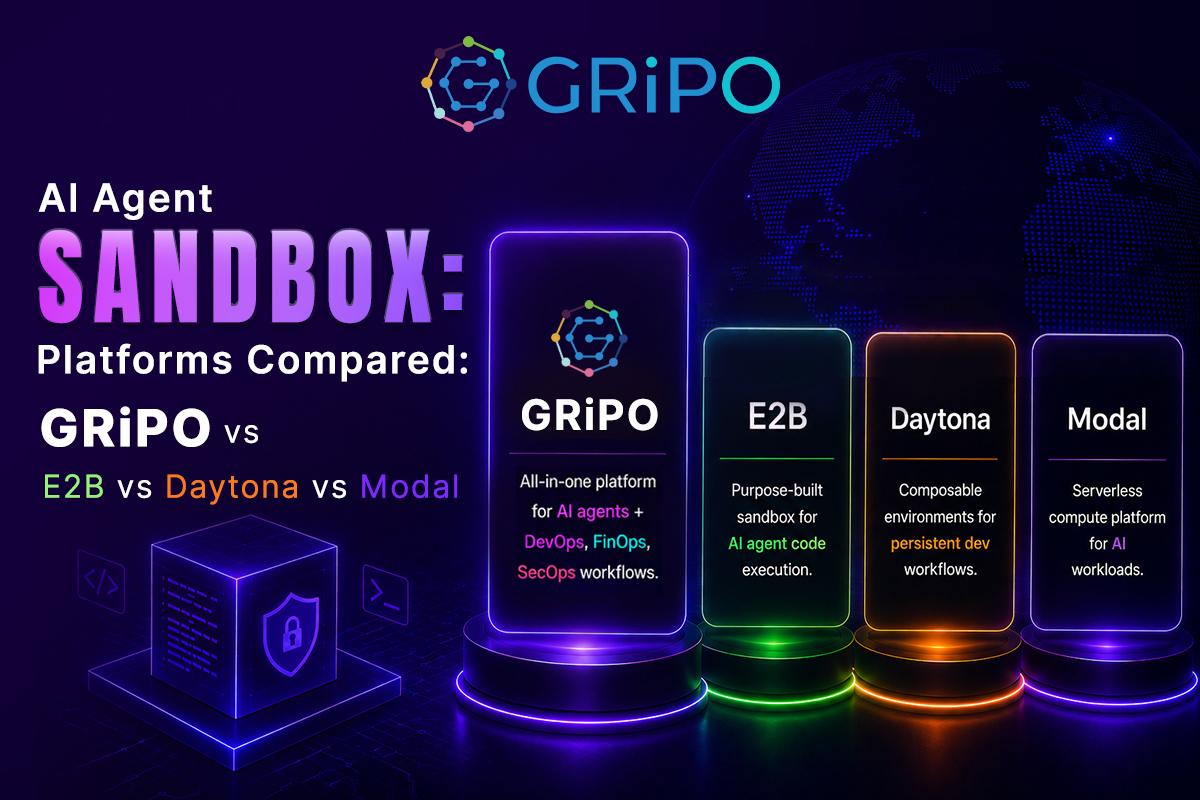
E2B focuses heavily on AI-agent code execution and isolated cloud sandboxes. Daytona takes a broader “composable computer” approach with persistent environments and multiple runtime options. Modal treats sandboxes as part of a larger serverless compute platform, including GPU workloads. GRiPO approaches the problem from the DevOps automation side, combining isolated code execution, AI agents, integrations, and visual workflows.
The right choice depends less on which platform has the longest feature list and more on what you expect your AI agents to do.
What Is an AI Agent Sandbox?
An AI agent sandbox is an isolated execution environment where an AI agent can safely perform actions such as running code, executing commands, modifying files, installing dependencies, and interacting with approved services.
A typical architecture looks like this:
AI Agent → Sandbox → Tools / APIs / Repository → Results → Workflow
The agent does not need unrestricted access to the host machine.
Instead, the sandbox establishes an execution boundary.
A useful sandbox can provide:
- Isolated filesystem
- CPU and memory limits
- Controlled network access
- Temporary or scoped credentials
- Package installation
- Shell access
- Code execution
- Process management
- Persistent or ephemeral sessions
- Logs and execution history
- Lifecycle controls
- Reproducible environments
The goal isn’t merely to “put code in a container.”
The real objective is to control the blast radius of autonomous software.
Why AI Agents Need Sandboxes
Traditional software follows instructions written and reviewed by developers.
AI agents are different.
An agent may dynamically decide which commands to run based on the task, repository state, tool output, or information returned by external systems.
That makes the execution environment part of the security architecture.
Consider an agent asked to:
“Investigate why our Kubernetes deployment is failing and fix the configuration.”
The agent might need to:
- Inspect the repository.
- Read Kubernetes manifests.
- Run kubectl.
- Inspect deployment events.
- Modify YAML.
- Run validation.
- Execute tests.
- Commit a change.
- Open a pull request.
That’s useful automation.
It is also a significant amount of authority.
If that same agent runs directly on a developer workstation, the available environment may contain unrelated credentials and files.
A sandbox lets the engineering team define a narrower boundary:
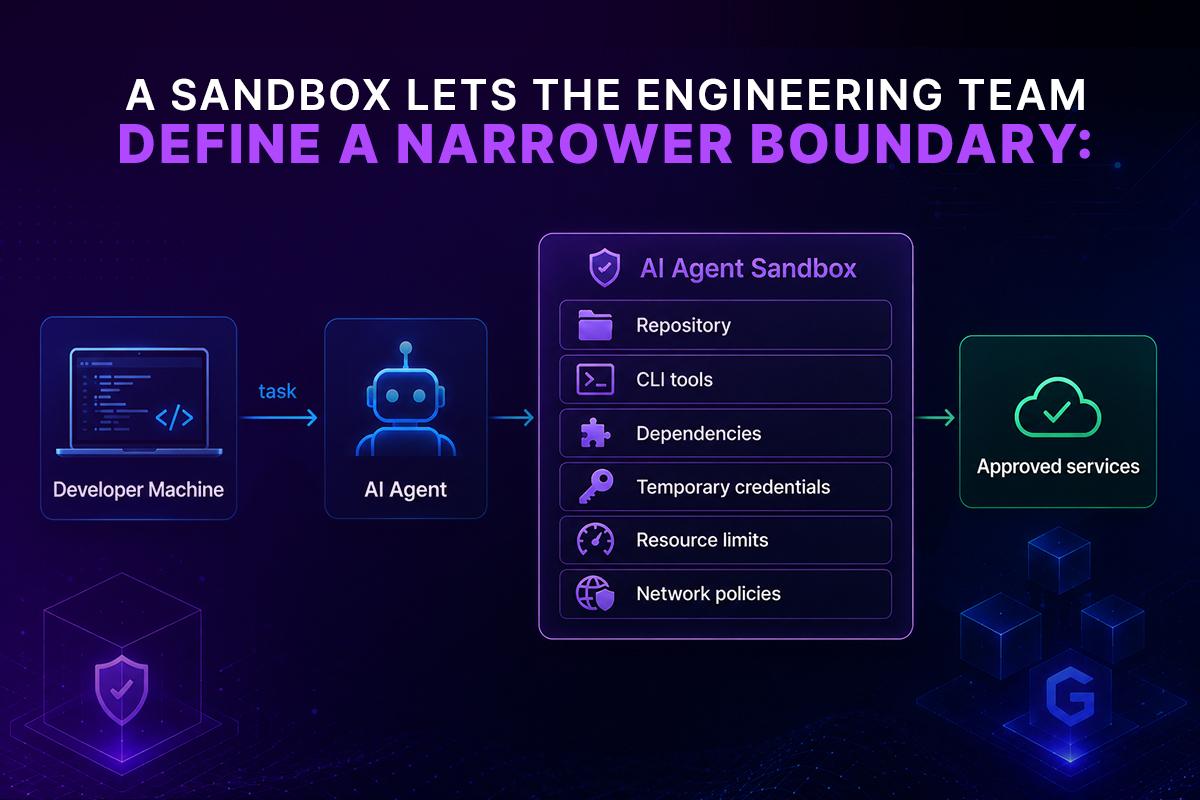
This architecture doesn’t make an agent automatically safe.
It gives you a place to enforce security controls.
That distinction matters.
What Should You Look for in an AI Agent Sandbox?
Before comparing platforms, define the capabilities that actually matter.
1. Isolation
The first question is how strongly the workload is isolated from the underlying infrastructure.
Different platforms use different approaches, including containers, microVMs, and sandboxing technologies.
E2B, for example, says its sandboxes are powered by Firecracker microVMs and designed for running untrusted workflows.
Modal describes its Sandboxes as secure containers for executing untrusted user or agent code.
Daytona provides isolated sandboxes with dedicated filesystem, network stack, CPU, RAM, and disk resources, with container, VM, Windows, and GPU sandbox options.
For security-sensitive workloads, don’t evaluate “sandbox” as a marketing label. Understand the actual isolation model.
2. Execution speed
AI agents often operate in loops:
Think
↓
Execute
↓
Observe
↓
Think again
↓
Execute
If creating a sandbox takes several seconds on every iteration, the latency compounds quickly.
Cold-start time therefore matters for:
- Coding agents
- Automated testing
- Data analysis
- Browser agents
- Incident response
- CI/CD automation
- Parallel agent workloads
E2B currently advertises same-region sandbox startup below 200 ms, while its website also highlights an 80 ms secure quick-start figure.
Daytona documents sandbox startup of under 90 ms for its default container runtime.
Modal has also been working on higher-throughput sandbox infrastructure for workloads requiring very high concurrency. Its V2 sandbox backend is aimed at workloads above 20 sandbox creations per second and more than 10,000 concurrent sandboxes.
These numbers are useful, but don’t compare them without considering workload, region, image size, initialization steps, and network dependencies.
3. Persistence
Not every AI agent needs a persistent environment.
A simple code-generation task may look like:
Create sandbox
→ Run code
→ Return result
→ Destroy sandbox
A coding agent working on a large repository may need something different:
Create environment
→ Clone repository
→ Install dependencies
→ Modify files
→ Run tests
→ Pause
→ Continue later
→ Submit changes
Persistence can therefore become a major architectural decision.
Daytona emphasizes persistent environments and stateful operations, including snapshot-based workflows.
E2B also supports long-running sandbox sessions and currently advertises sessions of up to 24 hours.
Modal provides sandbox lifecycle and storage primitives within its broader compute platform.
4. Networking and credentials
A sandbox that can execute code but has uncontrolled network access can still create serious security problems.
For enterprise workloads, ask:
- Can outbound traffic be restricted?
- Can credentials be scoped?
- Can secrets be injected only for specific tasks?
- Can credentials expire automatically?
- Can access to internal services be controlled?
- Can network activity be audited?
The principle should be:
Give the agent the minimum access required to complete the task.
For example, an agent fixing a Kubernetes deployment probably doesn’t need access to every AWS account, every internal API, and every production database.
5. Developer experience
Security controls are only useful if engineers actually use them.
The SDK, CLI, filesystem interface, terminal access, image management, Git integration, logs, and debugging experience all matter.
E2B provides SDK-based access to files, commands, isolated code execution, terminals, and sandbox lifecycle operations.
Daytona exposes sandbox lifecycle management, filesystem operations, process execution, runtime configuration, SDKs, API access, and CLI tooling.
Modal provides programmatic sandbox creation and runtime configuration through its platform APIs and SDKs.
The right platform is often the one your engineering team can integrate without building a second infrastructure platform around it.
GRiPO vs E2B vs Daytona vs Modal
The four platforms solve overlapping problems, but their center of gravity is different.
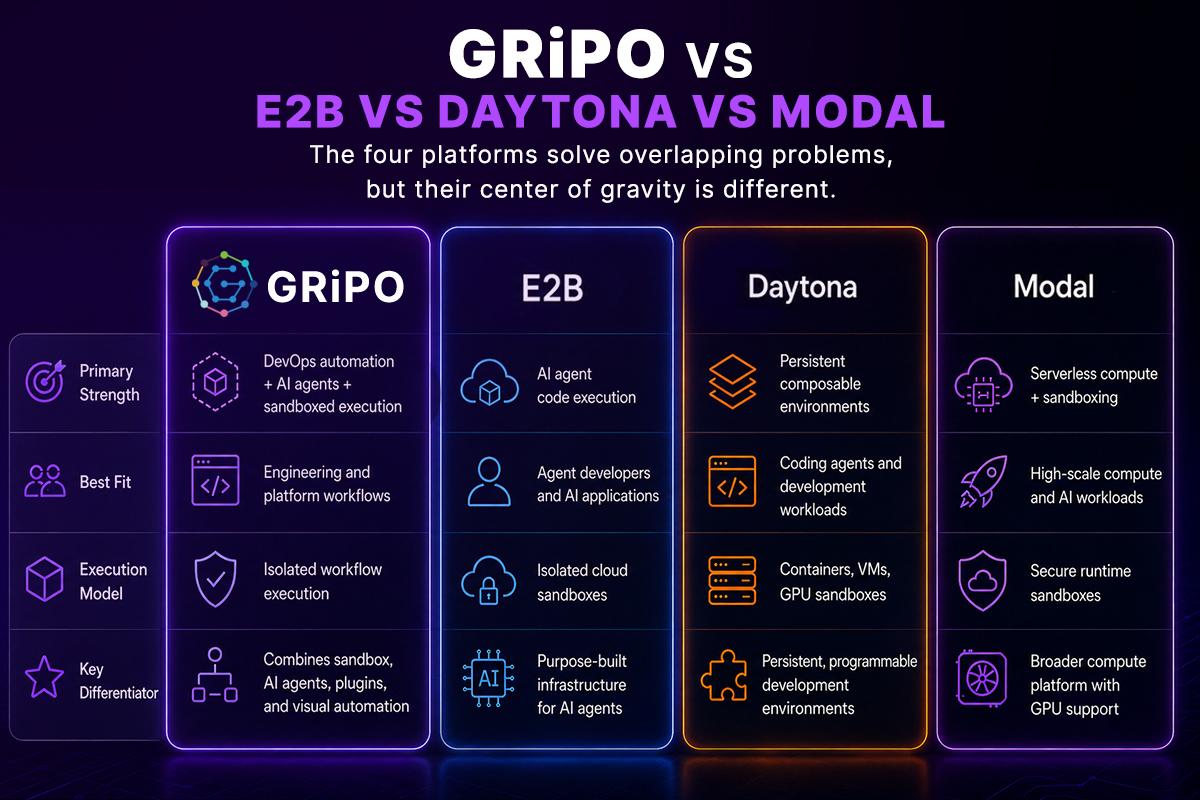
The important point is that GRiPO isn’t simply another sandbox runtime.
Its focus is the layer above execution: connecting sandboxed code execution with AI agents, integrations, credentials, triggers, and repeatable DevOps workflows.
GRiPO: Sandbox Execution Inside DevOps Workflows
GRiPO approaches the problem from an engineering automation perspective.
Its platform combines:
- Isolated code execution
- AI agents
- Visual workflow automation
- Plugin integrations
- Secrets management
- Execution logs
- Reusable workflows
GRiPO’s code sandbox supports Python, Bash, kubectl, Terraform, and CLI agents such as Claude Code, Codex, and OpenCode inside isolated containers.
The important architectural difference is what happens after the code executes.
Imagine an incident-response workflow:
Alert
↓
Collect Datadog data
↓
AI Agent analyzes incident
↓
Sandbox runs diagnostic commands
↓
kubectl collects cluster state
↓
AI Agent determines likely cause
↓
Create Jira issue
↓
Send Slack notification
You aren’t only provisioning a sandbox.
You’re building an operational workflow around it.
GRiPO provides a visual workflow builder where sandbox steps, AI agents, and plugin integrations can be connected into automated workflows.
That makes GRiPO particularly interesting for DevOps teams that need to move from “AI can execute code” to “AI can safely participate in operational processes.”
E2B: Purpose-Built Infrastructure for AI Agents
E2B is strongly focused on providing execution environments for AI-powered applications and agents.
Its sandboxes provide Linux environments where agents can create files, execute commands, run code, use terminals, and interact with the internet.
E2B also emphasizes security isolation through Firecracker microVMs.
This makes E2B a strong fit when your architecture looks like:
Your AI Application
↓
Agent Framework
↓
E2B Sandbox
↓
Generated Code
↓
Result
It is particularly attractive to teams building their own AI-agent product and looking for a dedicated execution layer.
E2B also integrates with modern agent ecosystems. For example, E2B became a sandbox provider in the OpenAI Agents SDK, allowing agents to edit files, run shell commands, maintain workspace state, and run multiple sandboxes in parallel.
E2B is a strong choice when:
- Your product is primarily an AI-agent application.
- You need dedicated sandbox infrastructure.
- MicroVM isolation is important to your architecture.
- You want SDK-level control over execution.
- You are building your own orchestration layer.
The trade-off is that you’ll generally own more of the workflow orchestration and DevOps automation around the sandbox.
Daytona: Persistent Computers for AI Agents
Daytona takes a slightly different approach.
Rather than treating the sandbox purely as a disposable code-execution box, Daytona describes sandboxes as full composable computers for AI agents.
An agent can install packages, run servers, compile code, manage processes, and work inside a persistent environment.
Daytona supports several runtime options, including Linux containers, Linux VMs, Windows VMs, and GPU-enabled sandboxes.
This is useful for coding agents that need an environment that behaves more like a complete development machine.
For example:
Agent
↓
Persistent Sandbox
├── Git repository
├── Node.js
├── Python
├── Database
├── Test server
├── Build tools
└── Background processes
Daytona also supports stateful execution and persistent interpreter contexts, which can be useful for longer-running agent sessions.
Daytona is a strong choice when:
- Agents need persistent workspaces.
- Development environments are complex.
- You need multiple runtime options.
- Long-running processes matter.
- You want the agent to interact with a complete development environment.
The trade-off is that persistent environments introduce lifecycle, storage, cleanup, and security considerations that don’t exist to the same degree with short-lived execution.
Modal: Sandbox as Part of a Larger Compute Platform
Modal approaches the problem from serverless infrastructure.
Its Sandbox primitive allows teams to dynamically create secure containers for arbitrary or untrusted code, including code generated by language models.
That becomes especially interesting when the AI workload also needs significant compute.
Modal’s platform extends beyond sandboxing into functions, batch workloads, GPUs, inference, and other compute primitives.
This creates an architecture such as:
AI Agent
│
├── Sandbox
│
├── GPU Compute
│
├── Serverless Functions
│
└── Batch Jobs
Modal has also introduced integrations around Claude Managed Agents and Modal Sandboxes, separating the hosted agent loop from code execution.
Modal is particularly compelling when sandboxed agent execution is part of a larger compute-heavy AI platform.
Modal is a strong choice when:
- AI workloads require GPUs.
- You already use Modal infrastructure.
- You need large-scale compute.
- You want sandboxing alongside serverless workloads.
- Your architecture includes inference or batch processing.
Modal’s broader infrastructure focus is also its distinction. If your primary problem is DevOps workflow automation rather than AI compute, you may need additional orchestration around the sandbox.
GRiPO vs E2B vs Daytona vs Modal: Which One Should You Choose?
There isn’t one universal winner.
The better question is:
What are you trying to build?
Choose GRiPO if you need DevOps automation around AI agents
GRiPO is a strong fit when your goal is to build operational workflows that combine:
- AI agents
- Code execution
- Kubernetes
- Terraform
- Cloud services
- Incident management
- Slack
- Jira
- PagerDuty
- APIs
- Scheduled automation
- Webhooks
Instead of building the orchestration layer yourself, you can assemble the workflow visually.
This is particularly relevant for platform engineering and SRE teams.
Choose E2B if execution infrastructure is the main requirement
E2B makes sense when you’re building an AI product and need a dedicated sandbox execution layer.
For example:
- Coding agents
- AI code interpreters
- AI data analysis
- Browser-enabled agents
- Autonomous software development
- Agent evaluation environments
You can keep your own application and orchestration stack while using E2B for isolated execution.
Choose Daytona for persistent agent workspaces
Daytona is compelling when an AI agent needs a longer-lived development environment.
Think:
“Give the agent a complete computer and let it work.”
This is useful for:
- Software development agents
- Repository modification
- Long-running tasks
- Stateful development
- Complex build environments
- Agents that need background processes
Choose Modal for compute-intensive AI workloads
Modal becomes particularly attractive when the sandbox isn’t the only infrastructure primitive you need.
If your AI system needs:
- GPU workloads
- Inference
- Batch processing
- Serverless functions
- High-scale execution
- Dynamic sandboxes
then Modal’s broader platform can reduce the number of infrastructure systems you need to operate.
The Most Important Difference: Sandbox vs Automation Platform
This is where many comparisons become misleading.
A sandbox answers:
“Where can my AI agent safely execute code?”
An automation platform answers:
“How do I connect that execution to the rest of my engineering environment?”
Those are related problems, but they aren’t identical.
Consider a production incident.
You might need:
PagerDuty
↓
AI Agent
↓
Sandbox
↓
kubectl
↓
Prometheus
↓
AI diagnosis
↓
Terraform
↓
Approval
↓
Deployment
↓
Slack
↓
Jira
The sandbox is one component.
The workflow is the system.
This distinction matters when evaluating platforms for enterprise DevOps.
If you’re building an AI coding product, a dedicated sandbox may be exactly what you need.
If you’re trying to automate infrastructure operations across an organization, you’ll need more than code execution.
A Practical AI Agent Sandbox Architecture for Enterprise Teams
A production architecture should separate the AI agent’s reasoning from its execution environment. The AI agent is responsible for reasoning and deciding which actions to take, while tool invocations pass those actions to a dedicated sandbox layer. The sandbox provides controlled access to code, shell commands, the filesystem, and dependencies. From there, the workflow can provide controlled access to enterprise systems such as Kubernetes, cloud services, and SaaS APIs. This separation makes the security boundary explicit and limits the agent’s direct access to enterprise resources.
Recommended controls
1. Least privilege
Don’t give an agent administrator credentials when read-only access is sufficient.
2. Short-lived credentials
Use temporary credentials where possible.
3. Network restrictions
Allow access only to services required by the task.
4. Resource limits
Set CPU, memory, storage, and execution time limits.
5. Disposable environments
Destroy environments when sensitive or temporary workloads finish.
6. Auditability
Record important actions, commands, workflow runs, and authentication events.
7. Human approval
High-impact actions such as production deployments or infrastructure deletion should have an explicit approval boundary where appropriate.
Example: Running a DevOps AI Agent Safely
Suppose an engineering team wants an AI agent to investigate failed Kubernetes deployments.
A weak architecture looks like:
Developer Laptop
↓
AI Agent
↓
Production Kubernetes
A stronger architecture is:
Alert
↓
AI Agent
↓
Isolated Sandbox
↓
Read-only Kubernetes credentials
↓
Collect logs/events
↓
Analyze results
↓
Generate recommended fix
↓
Human approval
↓
Controlled deployment workflow
The second architecture limits the agent’s authority.
The agent can investigate without automatically receiving unrestricted production access.
This is the type of design platform teams should aim for as AI becomes part of operational tooling.
What About Docker?
Docker is still extremely useful.
A sandbox platform isn’t necessarily a replacement for Docker.
Docker provides a container runtime and a powerful packaging model. But an enterprise AI agent platform may need more than the container itself:
- Sandbox lifecycle
- Multi-tenant isolation
- Agent orchestration
- Credential management
- Network policies
- Execution logging
- Persistence
- Autoscaling
- Workflow integration
- Approval controls
- API and SDK abstractions
For some workloads, a Docker container is enough.
For autonomous AI agents operating on untrusted or dynamically generated code, you should evaluate the entire security and execution architecture rather than assuming that “containerized” automatically means “safe.”
How Claude Code Fits Into the Sandbox Model
Claude Code is a useful example of why this category exists.
Claude Code can work directly with a repository, inspect files, execute commands, modify code, and interact with development tooling.
The more capable the agent becomes, the more important the execution boundary becomes.
A Claude Code sandbox lets you preserve the useful development workflow while moving execution away from a developer’s unrestricted workstation.
GRiPO supports installing Claude Code, Codex, and OpenCode inside isolated containers as part of DevOps workflows.
That means a team can use an AI coding agent as one step inside a larger workflow rather than treating the agent as an isolated developer tool.
AI Agent Sandbox Comparison: The Decision Matrix
Use this simplified decision framework:
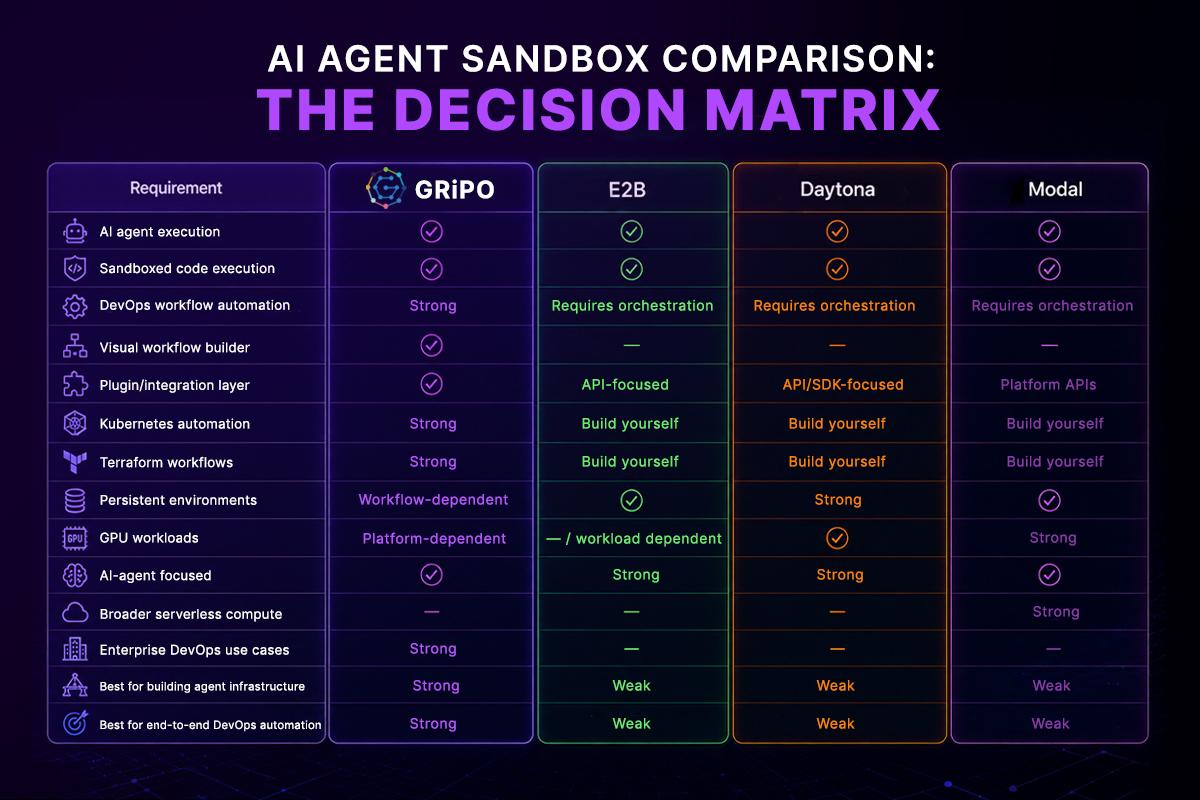
This isn’t a benchmark.
It’s an architectural comparison.
Performance, cost, security, and availability depend heavily on workload characteristics, region, runtime configuration, concurrency, image size, and network behavior.
How to Evaluate an AI Agent Sandbox Before Production
Don’t choose a platform from a feature page alone.
Run a representative workload.
Test 1: Repository task
Give the agent a real repository and ask it to:
- Inspect the code
- Install dependencies
- Modify a file
- Run tests
- Produce a patch
Measure startup time and total task completion time.
Test 2: Network access
Test:
- Allowed endpoints
- Blocked endpoints
- DNS behavior
- Internal service access
- Credential exposure
Test 3: Persistence
Stop and restart the environment.
Check whether:
- Files survive
- Processes survive
- Environment state survives
- Credentials remain available
- Snapshots behave as expected
Test 4: Failure behavior
Force:
- Out-of-memory conditions
- Process crashes
- Network failures
- Timeout conditions
- Invalid commands
Then evaluate cleanup and recovery.
Test 5: Concurrency
Run dozens or hundreds of agent tasks.
Measure:
- Startup latency
- Queueing
- Resource contention
- Failure rates
- API limits
- Cost
This is far more useful than comparing isolated benchmark numbers.
Enterprise Security Checklist for AI Agent Sandboxes
Before production deployment, verify:
- Sandbox isolation model is documented.
- Agent permissions follow least privilege.
- Secrets are not baked into images.
- Credentials can be scoped or rotated.
- Network egress is controlled.
- Resource limits are enforced.
- Execution timeouts are available.
- Sandbox lifecycle is controllable.
- Logs are available for investigation.
- Sensitive files aren’t mounted unnecessarily.
- Production access requires appropriate authorization.
- Human approval exists for high-risk operations.
- Dependencies can be controlled.
- Images or environments can be reproduced.
- The platform can scale with expected concurrency.
- Data retention requirements are understood.
- Compliance requirements are documented.
For organizations with formal security programs, also map the architecture to relevant internal controls and frameworks such as SOC 2, ISO 27001, and OWASP guidance.
The Future of AI Agent Infrastructure Is More Than Sandboxing
The sandbox is becoming an important infrastructure primitive for AI agents.
But it isn’t the whole architecture.
As agents become more autonomous, engineering teams will need systems that combine:
Reasoning + Execution + Permissions + Integrations + Governance
That’s why the distinction between an AI sandbox and an AI automation platform matters.
A sandbox gives an agent a safe place to operate.
An automation platform connects that agent to the systems and processes where work actually happens.
For a developer building an AI coding application, E2B, Daytona, or Modal may be the right foundation.
For a platform team automating Kubernetes, cloud operations, incident response, CI/CD, and internal engineering workflows, the requirements can be broader.
That’s where GRiPO’s approach is different.
Instead of making the sandbox the entire product, GRiPO treats isolated code execution as one component of a larger automation system that combines AI agents, workflow orchestration, and integrations.
How GRiPO Fits Into the AI Agent Sandbox Stack
GRiPO is designed for engineering teams that want AI agents to do real operational work while keeping execution controlled.
A workflow can combine:
Trigger
↓
Plugin
↓
AI Agent
↓
Sandbox
↓
Python / Bash / kubectl / Terraform
↓
AI Analysis
↓
Approval
↓
Cloud / Kubernetes / SaaS
↓
Slack / Jira / PagerDuty
That architecture is useful for workflows such as:
- Kubernetes incident investigation
- Automated cloud-cost analysis
- SSL certificate monitoring
- Infrastructure validation
- CI/CD automation
- Security checks
- Log analysis
- Automated remediation
- FinOps reporting
- AI-assisted DevOps runbooks
The important part is that the agent doesn’t have to operate as an uncontrolled process on someone’s workstation.
The workflow defines what it can access, what it can execute, and what happens with the result.
Final Verdict: Which AI Agent Sandbox Platform Is Right for You?
There is no single platform that wins every AI agent workload.
E2B is a strong option when you primarily need purpose-built sandbox infrastructure for AI agents and want a dedicated execution layer with strong isolation.
Daytona stands out when agents need persistent, programmable environments that behave more like complete development computers.
Modal is compelling for teams that need sandboxed execution as part of a broader compute platform, particularly when GPU and high-scale workloads are involved.
GRiPO is different in scope. It is most compelling when sandboxed execution is only one part of the problem and the real objective is to automate DevOps and engineering workflows using AI agents, code execution, and integrations.
The decision should therefore start with one question:
Do you need a sandbox, or do you need an automation system built around AI agents and sandboxes?
That answer will usually narrow the field quickly.
FAQ Section
What is an AI agent sandbox?
An AI agent sandbox is an isolated execution environment where an AI agent can run code, execute commands, modify files, and use approved resources without unrestricted access to the host system.
Why do AI agents need a sandbox?
AI agents can execute dynamically generated code and commands. A sandbox limits their filesystem, network, credentials, and compute access, reducing the potential impact of mistakes or malicious instructions.
What is the best AI agent sandbox?
There is no universal best option. E2B is focused on AI-agent execution, Daytona emphasizes persistent composable environments, Modal combines sandboxing with broader compute infrastructure, while GRiPO focuses on AI-powered DevOps workflows combining agents, sandboxes, and integrations.
Is E2B better than Daytona?
It depends on the workload. E2B is particularly focused on AI-agent sandbox execution, while Daytona emphasizes persistent and composable environments for agents and developers. Evaluate isolation, persistence, startup time, workload requirements, and operational model before choosing.
Is Modal an AI agent sandbox?
Modal provides Sandboxes for running untrusted user or AI-generated code. Sandboxes are part of Modal’s broader serverless and compute platform rather than its entire product.
What is the difference between a sandbox and a Docker container?
A Docker container is a packaging and process-isolation technology. An AI agent sandbox is a broader execution concept that can include isolation, lifecycle management, resource controls, networking, credentials, persistence, and agent-specific tooling.
Can Claude Code run inside a sandbox?
Yes. Claude Code can be installed and executed inside controlled environments. GRiPO supports installing Claude Code inside isolated containers as part of DevOps workflows.
Is a sandbox enough to secure an AI agent?
No. Sandboxing is one security layer. Production systems should also use least-privilege credentials, network controls, secret management, resource limits, logging, authorization, and appropriate human approval.
Should AI agent sandboxes be persistent or ephemeral?
It depends on the workload. Short-lived tasks often benefit from ephemeral environments, while coding agents and long-running workflows may need persistence. Persistence should be balanced against storage, lifecycle, and security requirements.
Can AI agents run Kubernetes commands inside a sandbox?
Yes, provided the sandbox has the appropriate CLI tools and credentials. The safer architecture is to provide narrowly scoped Kubernetes permissions instead of unrestricted cluster access.
Can AI agents execute Terraform inside a sandbox?
Yes. Terraform can run inside an isolated execution environment, allowing teams to validate infrastructure changes before they reach production. Credentials and state access should be tightly controlled.
Is GRiPO an AI agent sandbox platform?
GRiPO includes isolated sandboxed code execution, but its scope is broader than sandbox infrastructure alone. It combines code execution, AI agents, plugins, and visual workflow automation for DevOps and engineering workflows.
Key Takeaways
- An AI agent needs a controlled execution environment when it can run code or commands.
- A sandbox reduces the blast radius of autonomous AI workloads.
- Isolation, networking, credentials, persistence, lifecycle, and observability matter more than a simple “sandbox” label.
- E2B is strongly focused on AI-agent execution infrastructure.
- Daytona emphasizes persistent, composable environments for AI agents.
- Modal combines sandbox execution with broader serverless and GPU infrastructure.
- GRiPO focuses on combining sandboxed execution with AI agents, plugins, and DevOps workflow automation.
- Docker can be part of a sandbox architecture, but containerization alone doesn’t solve every enterprise AI security problem.
- The best platform depends on the workload, not the feature count.
- Enterprise teams should test real workloads before committing to a sandbox platform.
- Sandboxing should be combined with least privilege, network controls, secret management, logging, and approval policies.
- The next step for AI infrastructure isn’t just safer code execution. It’s controlled, auditable automation.